

 thewca
Incidents log cannot be filtered by tag anymore
Here. I noticed that while working on #5259. I thought I broke it, but it turns out it's already broken on the website! It's probably due to an update of bootstrap-table, but I haven't had the time to git-bissect it yet.


If you type in the tag it woks fine, but if you click on one of the tag, then click "search incidents with this tag" then nothing happened (the url gets updated but without the appropriate data in it).
Looked into this a bit, turns out its a problem with Bootstrap's Javascript sanitization, where the onclick function trying to be passed to the popover is being simply removed. To fix it, you'd have to do something along the lines of $.fn.tooltip.Constructor.DEFAULTS.whiteList.a.push('onclick'), removing anything set for onclick from being sanitized and lost. I am not sure where this line could be added, though.

Thanks for investigating! I haven't looked at how the filter feature is implemented specifically, but while I appreciate the thoroughness of your investigation into the whiteList approach it looks like a huge hack. Just from gut feeling there should be a simpler solution.
Apart from this general remark, I just tried the overview at https://www.worldcubeassociation.org/incidents and filtering for tags seems to work?! I am happy to provide a screencast as proof. But I can actually use the "Filter by tags" box to my heart's content...

The issue is not actually with that filtering, but if you click on an actual incident tag in an individual incident and then click "Search incidents with this tag", it will not work. I've attached a screenshot that hopefully clarifies this. 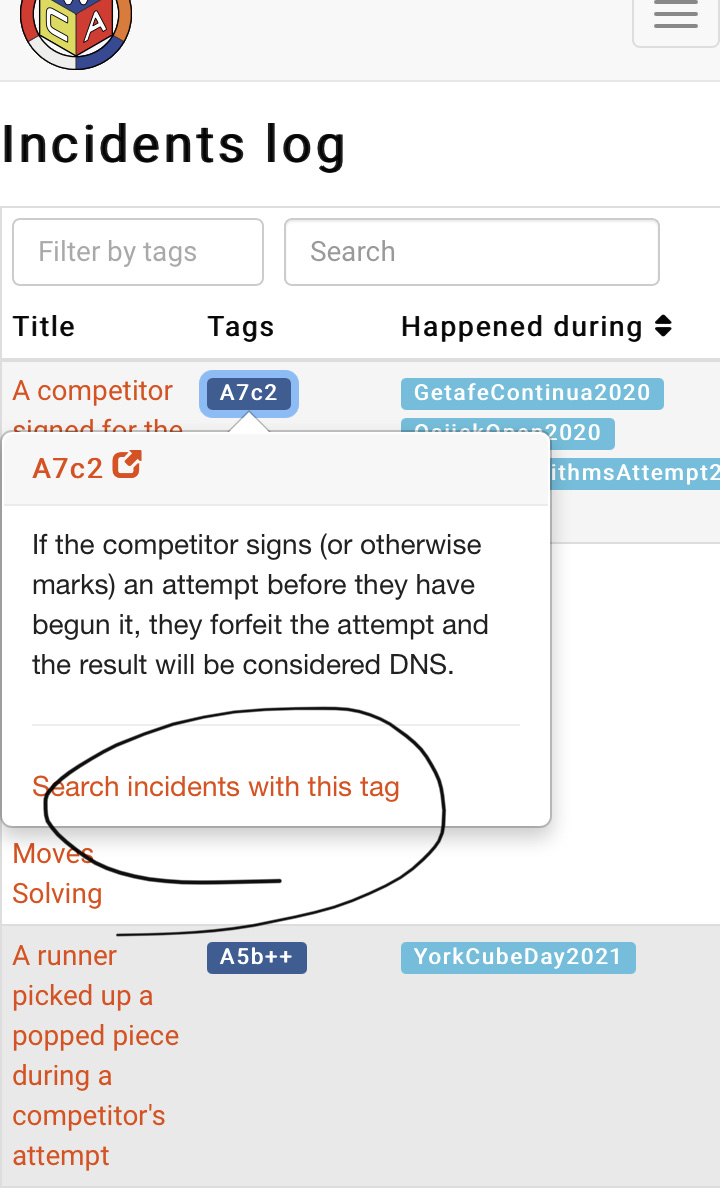
Ah, thanks for the clarification! The context wasn't clear to me based on the orginal post, but your screenshot helped a lot.
The documentation that you linked specifies that href is whitelisted for a tags. Maybe it would already suffice to set js_search to false around here?
Otherwise I'd like to "solve" this issue by waiting until we can migrate the Incidents log to React, because investing time into the solution you described sounds like "hacking" our way 'round a problem that will eventually be gone anyways because our long-term goal is to use React.
That works, though isn't necessarily the original intention of the feature. I can agree that it is probably better than a hacky solution for the time being.
Just to add: what is stopping us from being able to migrate the incidents log (and other pages) to React right now?
Now that we have https://github.com/thewca/worldcubeassociation.org/pull/6359: Nothing :smile:
Now that we have #6359: Nothing 😄
great! i'd like to work on this, if that's alright
By all means, go ahead! I'll assign you to this issue, feel free to reach out on Slack if you want to discuss the implementation in detail.
I think this has been resolved now that the incidents log has been transitioned to React? I can't reproduce the issue.

Thanks for picking this up Kevin!
I think this works when there is no filtering already in place, but if one already has one item in the filtered incidents section, then selecting a new tag to filter by adds it to the filtered items - which I don't think would be the desired behaviour? I'd probably rather see it clear the previous one.
So, technically we could probably close this issue, but I think it would be great if we could make that fix to the filter behaviour before closing.

The current behaviour makes sense to me, and I think it matches the prior behaviour. It adds more incidents to the results to expand your current search. Plus it's easier to remove the other tag manually than to figure out which one it was that just disappeared.
Ah ok sorry I misunderstood the "Filter" option as being an "and" filter, instead of an "or" filter, if that makes sense.
Generally when I've seen "Filter" used it described "and" behaviour (eg, in Excel). Is it worth updating the text to something else - perhaps "Search by tags"?