thequilo
Cannot load extension on Mac
I tried to install the extension on mac and managed to build the module, after the fix in #1. Nonetheless, the extension cannot be loaded to obsidian.
Unfortunately I do not know typescript, and cannot debug on my side. Still, I could help if it is needed.
Update: It does load by downloading the release files. Also works as expected!

Hi @WilliamCappelletti! Thanks for reporting this. I don't own a Mac, so I can't test things on Mac. I can only test it on Ubuntu and Windows.
The release files are the first "proof-of-concept". Since then I added a few improvements to the Settings. You can now add a custom preamble to load tikz libraries and define custom tikz styles globally.
You could try to open the console window in Obsidian (Ctrl + Shift + I and select the "Console" tab) and see if any errors related to the tikz render plugin are logged.

Hi @WilliamCappelletti. I see that you were successful in loading this plugin in your mac. I am having trouble with loading this package and I am no computer expert. Can you help me (and probably others) by telling steps to do so?
PS: I did copy all the files to the .../.obsidian/plugins/obsidian-tikz-renderer folder but the plugin doesn't show up in obsidian.
I tried to install the extension on mac and managed to build the module, after the fix in #1. Nonetheless, the extension cannot be loaded to obsidian.
Unfortunately I do not know typescript, and cannot debug on my side. Still, I could help if it is needed.
Update: It does load by downloading the release files. Also works as expected!

@sherlock0601, to manually install a plugin follow these steps:
- Copy the files in the subfolder
- Deactivate the safe mode for Community plugins
- Refreshing the installed plugins (button by Installed plugins)
- Enable the plugin it by toggling the switch in the installed list
Still, as thequilo said, the release was a preliminary version. Unfortunately I did not have time to look into the building errors on mac yet.
Hi @WilliamCappelletti. I see that you were successful in loading this plugin in your mac. I am having trouble with loading this package and I am no computer expert. Can you help me (and probably others) by telling steps to do so?
PS: I did copy all the files to the .../.obsidian/plugins/obsidian-tikz-renderer folder but the plugin doesn't show up in obsidian.
I tried to install the extension on mac and managed to build the module, after the fix in #1. Nonetheless, the extension cannot be loaded to obsidian. Unfortunately I do not know typescript, and cannot debug on my side. Still, I could help if it is needed. Update: It does load by downloading the release files. Also works as expected!
in esbuild.config.mjs

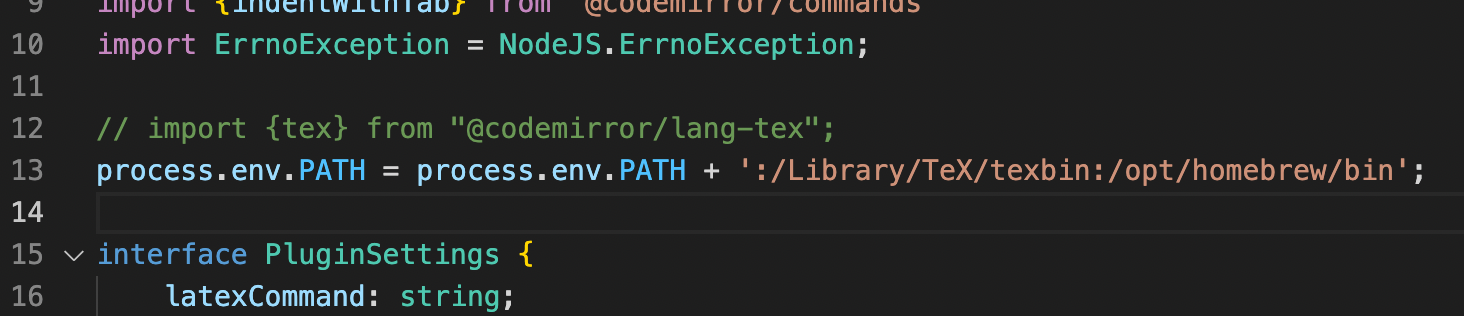
in main.ts, add this line and replace pdflatex and pdf2svg command path of yours.