

 the-paperless-project
Make an option for date format (creation date)
First of all, thank you for this great project! I am using it every day and it makes my life so much easier :)
One thing that is very confusing however is the date format for the creation date (see below)
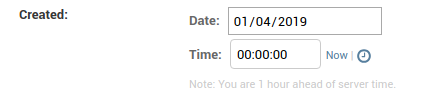
It defaults to mm/dd/YYYY, however as this format is only used in the American region, most people from other countries would expect a dd/mm/YYYY format - which can cause some problems, if the wrong date is entered.
It would be great if the format was either changed to YYYY-mm-dd or have an option in the .conf file to set the format.
I tried creating a PR, unfortunately I do not have a lot of experience with Django, which is why could not even find the code that affects the format.
Thank you!

It's funny, when I go to /admin/documents/document/335/change/, the date format used is dd/mm/yyyy. Are you doing anything creative in your settings.py and/or your paperless.conf? Localisation in Django is a funny beast, so this might be tough to nail down, but it should be possible to be configurable.

No, I haven't changed any settings.py or did anything special in the paperless.conf.
Interestingly enough, when I open the page with Firefox, it is shown as dd/mm/yyyy. On Chrome it uses mm/dd/yyyy though.
I am using Ubuntu 16.04, but just saw that my computer has the LANG environment variable set to en_US.UTF-8, even though all other related variables are en_GB.UTF-8. Might be a problem related to my computer configuration, on my other devices it is showing up as dd/mm/yyyy.
Modifying the settings.py doesn't do anything in regards to changing this behaviour though. Would there maybe be a way to manually enforce the format?
Have the same issue, but in my case all browsers show it the same. I cannot find a way to change the behavior in settings.py. How can I just change the date format?

Here's an additional wrinkle to this year-old issue. My Firefox install also displays mm/dd/yyyy, but when paperless auto guesses the date, it always uses dd/mm/yyyy. Since I live in the US, that means date auto guess doesn't work for me. I'll see something like "Detected document date 2013-05-08T00:00:00+00:00 based on string 08/05/13," but the UI will display it as 05/08/2013. I'd love to be able to set detection to mm/dd/yyyy since most of my documents are labeled that way. For now, I'm manually adding yyyymmddZ to the front of everything (when I remember) before consuming it.
