
texstudio
 texstudio copied to clipboard
 texstudio-org
Main document not recognized after automatically creating new included/inputted .tex file from main document
Environment
- TeXstudio: 4.5.2
- Qt: 6.5.0
- OS: Windows 10 Professional 22H2
- TeX distribution: MikTeX
Expected behavior
At the moment, when using a main document, if user includes or inputs a file that does not exist in the directory, TeXstudio asks if user would like to create that file. The file is created and opened in a new tab, where user can edit it.
Actual behavior
When going directly to the new tab, syntax highlighting which depends on the main file does not work: see screenshot below. Commands which require the main file to be parsed are marked as errors. TeXstudio must be restarted for them to be parsed properly.

How to reproduce
- Create main.tex or other master file with a minimal preamble (document type).
- Type
\input{test-file}or\input{test-file} - Navigate to test-file using the sidebar : TeXstudio asks whether to create the file.
- Try to use commands like \section in new file.


I,m having the same Problem
Environment: TeXstudio: 4.5.2 Qt: 6.5.0 OS: Windows 10 TeX distribution: MikTeX
Added Information to the behavior The hole file will compile correctly when compiling the main file
How to reproduce
Create main.tex or other master file with a minimal preamble (document type).
Include a packet like amsmath and type \input{test-file}
Navigate to test-file using the sidebar : TeXstudio asks whether to create the file.
Try to use commands that get introduced in the main file like \begin{align*} form the packet amsmath

there were some changes in dev to cwls regarding chapter and the like. from then on the completer will recognize \chapter, \section... even in a single new document without any other text. So the question is what about commands from packages? And it seems to me that this isn't working. as said above:
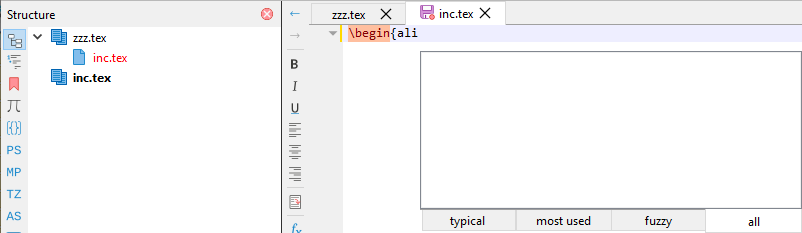
A first hint that something may be wrong is the red color of the include name in the structure pane.
Contents of file zzz.tex is:
\documentclass{article}
\usepackage{amsmath}
\begin{document}
\input{inc.tex}
\end{document}

@sunderme You still can't reproduce? Ensure you closed all tabs before ending txs. Start txt, open new editor, paste Latex code given above (with the \input), click on inc in structure pane, confirm creation of that file, and enter in the file's editor \begin{ali or ali. Use ctrl+alt+space to complete command. But completer won't find align envs. win10, current dev txs.
@sunderme As a first note: I see a crash. I try If I can reproduce.
crashed with signal Assert failure: fileName.isEmpty() || pairedFileInfo.isAbsolute() at something in C:/msys64/home/WDAG/texstudio-org/texstudio/src/latexdocument.cpp:112
in my build (git 4.6.0alpha1-14-g20b1b8dda) folder a file named file.tex exists (it is from the last test and contains the align* env created with completer). start empty txs and enter in an empty editor (or use wizard):
Now click on the label file in the structure pane and txs crashes immediately.
crash fixed, but the file doesn't open on click or on context menu (Open Document) in structure and Toc pane:
that is because an untitled/unsaved file does not have a root path to load an included file.
but the file existes as file.tex (sorry, this may not be immediately obvious from the comments): in my build folder a file named file.tex exists