

 terrychou
Wrong color for `fg` in colorscheme loaded at startup
Minimal example to reproduce:
    set background=dark

    hi clear
    if exists('syntax_on')
      syntax reset
    endif

    let g:colors_name = 'test'

    hi Normal guifg=#ffffff guibg=#292c36 guisp=NONE gui=NONE
    hi StatusLine guifg=#64878f guibg=fg guisp=NONE gui=NONE,reverse
Save this in ~/.vim/colors/test.vim and add colorscheme test to your vimrc. You should see that, after starting iVim, the foreground color of the status line is dark instead of white. If you reload the colorscheme the status line gets the right foreground color (white).
I could not reproduce this in other versions of Vim (MacVim, terminal Vim in iTerm2), v7.4 or v8. May it be a bug in iVim?
Btw, there are three workarounds for this:
- Use an explicit color instead of
fg; - Do not set
background; - Set
backgroundafterhi Normal(but before the other highlight group definitions);
so this is not terribly serious. But I would like to know whether I should update my colorschemes or it's something that should be fixed in iVim.

I have also noticed some color discrepancies with the ios theme I am working on. The above workaround of explicitly setting the colors does not appear to work. I’ll report more as I dig in.

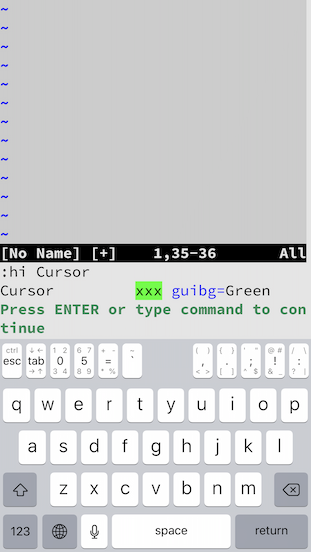
I'm seeing something similar. On both iOS 13.3 and 12.4.4, my .vimrc includes "colo zellner2" (I had problems with an invisible cursor with zellner so I tweaked it). With the current iVim, on both machines, the cursor is invisible at first, though ":colo" shows that it's correctly set to zellner2. I have to reenter the command ":colo zellner2" to get the cursor to appear as specified in the zellner2 file.


:hi Cursor
Cursor xxx ctermbg=10 guifg=bg guibg=fg
:colo
zellner2
The "xxx" is inverted. I guess that's an illustration of what the cursor should look like; but it doesn't, it's the same background as the text bg, and the foreground color blinks, between the text fg color and black. Not quite invisible, if you're editing text that isn't black, but very nearly. After I give the ":colo zellner2" command, then ":hi Cursor" output agrees with what I have in zellner2.vim.
It's the same on both iOS 13.3 and iOS 12.4.4.
zellner2.vim contains:
hi Cursor ctermbg=Green guibg=Green guifg=Black
and is otherwise the same as zellner.vim.
iVim sets its default foreground color to "white" and background color "black". And to ensure the visibility of the cursor, it also sets the highlight group Cursor as guifg=bg guibg=fg. All these are hardcoded in the code.
As a result, if the color scheme you are using doesn't have its own setting to Cursor and it happens to have a white background, the cursor would not be visible.
As to your "zellner2.vim" problem, I still don't quite understand. Because the Cursor group should be changed by your scripts, otherwise, the ctermbg=10 should not be there. However, it does not match exactly your Cursor group settings. This is weird.
For the record, I also have the problem where
- My cursor is invisible:
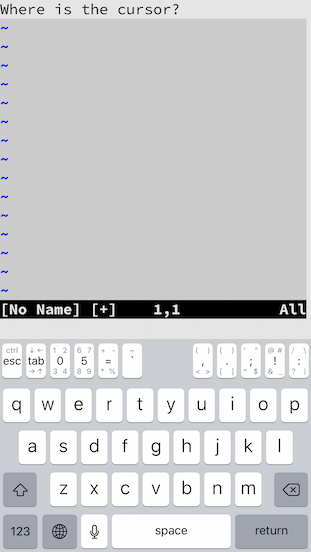
- The output of
:hi Cursordoes not match the colours set by the colorscheme in my vimrc (morning)
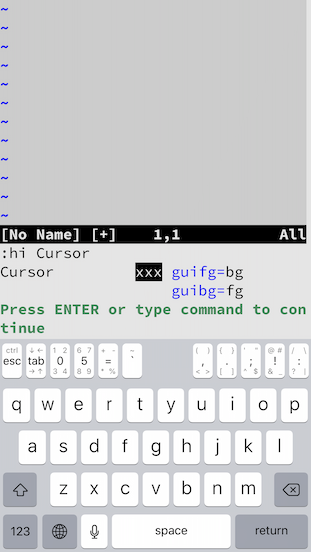
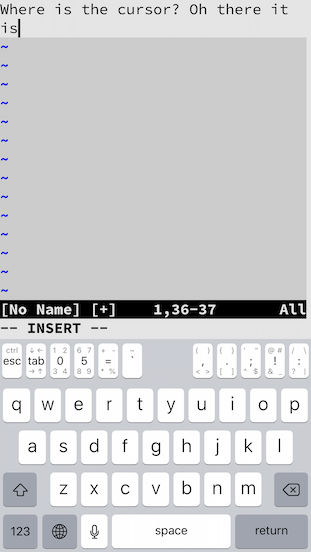
N.B. The first problem does not seem to affect insert mode: the cursor is visible, but the wrong colour: it matches the (incorrect) output of :hi Cursor:
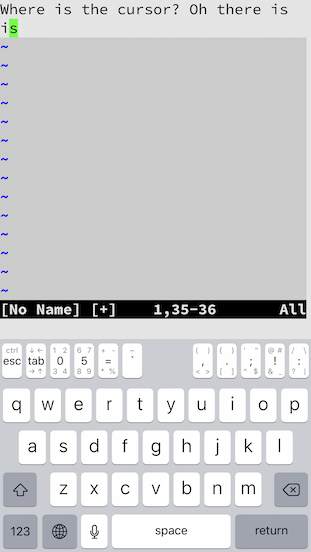
Resetting the colorscheme by invoking :colo morning again seems to solve both problems. I think it's a fairly recent issue.

Not until you mentioned it. I tried activating it and it seemed to work once or twice but I have in-app purchases disabled so it must have deactivated after the first time.
have you guys enabled the auto-restore for these testing?
I have auto-restore switched off in the settings.
the 'fg' problem and the cursor problem both have been fixed, and the fixes will be available in the next update.