

 telegramdesktop
Issues after deleting group avatar
Steps to reproduce
- Go to group settings and upload pic1, pic2 and pic3

- Delete pic3
Expected behaviour
After deleting pic3, the group picture should be set to pic2
Actual behaviour
After deleting pic3 there is no group picture at all:

But if we click on the image above service message
 the list of all group avatars will appear
Now set pic4 as the group avatar
 All previous group avatars will appear (including removed pic3)
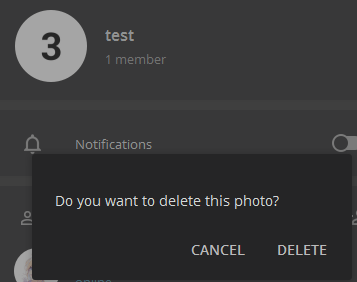
One more thing. If we try to remove latest pic (now it's pic4), we get this message:

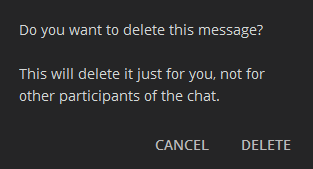
But if we try to remove old pics, we get another message
#5279 may be related to this, but it's different issue
Configuration
Operating system: Windows 7
Version of Telegram Desktop: 1.6.5 beta
Used theme: Any

Hey there!
This issue was inactive for a long time and will be automatically closed in 30 days if there isn't any further activity. We therefore assume that the user has lost interest or resolved the problem on their own.
Don't worry though; if this is an error, let us know with a comment and we'll be happy to reopen the issue.
Thanks!
![stale[bot] avatar](https://avatars.githubusercontent.com/in/1724?v=4 "Published by a pub.dev verified publisher")
@aNNiMON About the "One more thing. If we try to remove latest pic (now it's pic4), we get this message:"
The list of group profile photos is really a list of messages about changing the group photo. So deleting the old ones is about deleting the corresponding messages. The last one is deleted from the group, clearing the group photo.

Hey there!
This issue was inactive for a long time and will be automatically closed in 30 days if there isn't any further activity. We therefore assume that the user has lost interest or resolved the problem on their own.
Don't worry though; if this is an error, let us know with a comment and we'll be happy to reopen the issue.
Thanks!
Hey there!
This issue was inactive for a long time and will be automatically closed in 30 days if there isn't any further activity. We therefore assume that the user has lost interest or resolved the problem on their own.
Don't worry though; if this is an error, let us know with a comment and we'll be happy to reopen the issue.
Thanks!
Issue still exist in 3.6.1. I'm waiting for 3.6.2+ to check if 1bd4595bba8f73ee78e31670f2f42a747d620f7a fixes this.
Hey there!
This issue was inactive for a long time and will be automatically closed in 30 days if there isn't any further activity. We therefore assume that the user has lost interest or resolved the problem on their own.
Don't worry though; if this is an error, let us know with a comment and we'll be happy to reopen the issue.
Thanks!
![github-actions[bot] avatar](https://avatars.githubusercontent.com/in/15368?v=4 "Published by a pub.dev verified publisher")
Hey there!
This issue was inactive for a long time and will be automatically closed in 30 days if there isn't any further activity. We therefore assume that the user has lost interest or resolved the problem on their own.
Don't worry though; if this is an error, let us know with a comment and we'll be happy to reopen the issue.
Thanks!
Hey there!
This issue was inactive for a long time and will be automatically closed in 30 days if there isn't any further activity. We therefore assume that the user has lost interest or resolved the problem on their own.
Don't worry though; if this is an error, let us know with a comment and we'll be happy to reopen the issue.
Thanks!
Hey there!
This issue was inactive for a long time and will be automatically closed in 30 days if there isn't any further activity. We therefore assume that the user has lost interest or resolved the problem on their own.
Don't worry though; if this is an error, let us know with a comment and we'll be happy to reopen the issue.
Thanks!
Hey there!
This issue was inactive for a long time and will be automatically closed in 30 days if there isn't any further activity. We therefore assume that the user has lost interest or resolved the problem on their own.
Don't worry though; if this is an error, let us know with a comment and we'll be happy to reopen the issue.
Thanks!
Hey there!
This issue was inactive for a long time and will be automatically closed in 30 days if there isn't any further activity. We therefore assume that the user has lost interest or resolved the problem on their own.
Don't worry though; if this is an error, let us know with a comment and we'll be happy to reopen the issue.
Thanks!

Hey there!
This issue was inactive for a long time and will be automatically closed in 30 days if there isn't any further activity. We therefore assume that the user has lost interest or resolved the problem on their own.
Don't worry though; if this is an error, let us know with a comment and we'll be happy to reopen the issue.
Thanks!
Expected behaviour
After deleting pic3, the group picture should be set to pic2
@aNNiMON @soredake Hi guys. Can you tell me where I can find similar behavior? I checked both iOS and Android apps, and after deleting the current group photo, the group photo is completely reset and becomes empty, just like on the desktop.

@23rd, correct. However, please also take into account that the Edit Group/Channel screen on Telegram Android only displays a single group photo, so it's expected that removing this photo will clear the group photo entirely. Telegram X Android is even better; it shows a "Remove group photo" or "Remove channel photo" button when the user tries to update the photo.
tdesktop has a different approach. The user needs to open the current photo and delete it. The problem is that previous photos are displayed here as well, so the user thinks that removing the current photo will automatically switch to the next one, if there's one.
What would be great, at least for me, is to have a separate option in the context menu to remove the group/channel photo. Here:
And here: