
ulauncher-albert-calculate-anything
 ulauncher-albert-calculate-anything copied to clipboard
 tchar
tchar
Currency conversion showing only 1 icon
When using the currency conversion function it will only show a single icon.


Hello,
Looks like the links are not preserved when you clone the repo. The USD currency flag is a symbolic link to US flag. Looks like git converted USD.svg to a file containting US.svg. On my computer I am developing locally so it works.
Probably you can confirm this if you copy the US flag to USD currency and restart the launcher. Also the flags with "time" command should work because they are not symlinks.
cp ~/.local/share/ulauncher/extensions/com.github.tchar.ulauncher-albert-calculate-anything/images/flags/US.svg \
~/.local/share/ulauncher/extensions/com.github.tchar.ulauncher-albert-calculate-anything/images/flags/USD.svg
Now for this to be solved there are 2 ways I guess:
- create copies of all currency flags instead of symlink
- resolve the symlink problem with git
Give me an hour or two shouldn't be that hard to fix

Hello again @Laar3
So I found the issue. If you clone the repo directly to ulauncher extensions through git clone, it works perfectly. For some reason when you install the extension through ulauncher it doesn't do normal git clone and just copies the contents of the file (in case of symlinks it is the name of the linked file), so you end up with normal text files.
#3 fixes this, please confirm that after you update the extension currency flags are showing.
Hello again @Laar3
So I found the issue. If you clone the repo directly to ulauncher extensions through git clone, it works perfectly. For some reason when you install the extension through ulauncher it doesn't do normal git clone and just copies the contents of the file (in case of symlinks it is the name of the linked file), so you end up with normal text files.
#3 fixes this, please confirm that after you update the extension currency flags are showing.
ive updated but now the currency conversion doesnt do anything at all (all other functions work though) after this i tried removing the extension and manually git cloneing to the .local/share/ulauncher/extensions and the currency conversion still wouldnt work
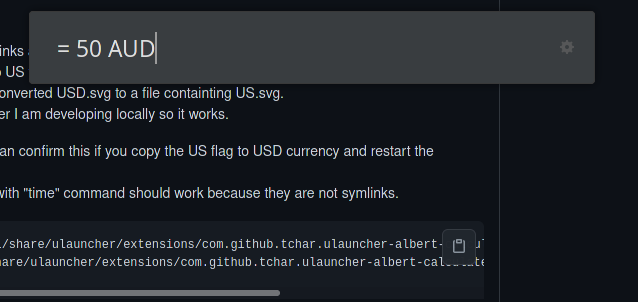 forgot to upload an image
@Laar3
I should create a logger indipendently from ulauncher because it is not enough as the project grew in size.
All right that's a different issue. Normally if you go to extension preferences disable cache (set to None) hit save and then reenable it (hit Save again) it will fix but if you have the time to give me some logs to fix this generally I would really appreciate it.
If you want to provide the logs read below. In any case please tell me if the issue was fixed after this.
First you can check the cache of the extension.
It should be in ~/.cache/extension_calculate_anything/ and normally you can find 2 files there. One of them should be called currency_data.json. Can you open that file and confirm the contents with me?
I suspect that the last update timestamp is relatively new and the exchange rates are empty.
If the file is too big you can use this snippet to get the info from currency_data.json
python -c "import os,json;f=open(os.path.expanduser('~/.cache/extension_calculate_anything/currency_data.json'));d=json.loads(f.read());f.close();p=d.get('provider');t=d.get('last_update_timestamp');c=d.get('exchange_rates');print('provider={},timestamp={},currencies={}'.format(p, t, len(c) if c is not None else None))"
Normally by deleting the file and restarting ulauncher it should work.
However to get the proper logs so that I can find out what went wrong before deleting the file close ulauncher and open it in dev mode with no extensions
ulauncher --no-extensions --dev -v |& grep calculate-anything
Open a new terminal and type the VERBOSE command you see above. Alternatively you can find this command under the extension's preferences when you open ulauncher in dev mode. Should look like this
VERBOSE=1 ULAUNCHER_WS_API=ws://127.0.0.1:5054/com.github.tchar.ulauncher-albert-calculate-anything PYTHONPATH=/usr/lib/python3/dist-packages /usr/bin/python3 ~/.local/share/ulauncher/extensions/com.github.tchar.ulauncher-albert-calculate-anything/main.py
Redirect the log to a file by adding 2>&1 | tee ~/ulauncher-calculate-anything.log. So the final command should look like this.
VERBOSE=1 ULAUNCHER_WS_API=ws://127.0.0.1:5054/com.github.tchar.ulauncher-albert-calculate-anything PYTHONPATH=/usr/lib/python3/dist-packages /usr/bin/python3 ~/.local/share/ulauncher/extensions/com.github.tchar.ulauncher-albert-calculate-anything/main.py 2>&1 | tee ~/ulauncher-calculate-anything.log
You should see some logs in your terminal.
Type the currency conversion that fails in ulauncher and then close the terminal and post the logs at ~/ulauncher-calculate-anything.log over here.
Thanks for taking the time to help me resolve this.
![github-actions[bot] avatar](https://avatars.githubusercontent.com/in/15368?v=4 "Published by a pub.dev verified publisher")