

 tauri-apps
Exe file not running well when using command.new(), missing dependencies.
Describe the bug
Hi,
I have a folder that contains EXE file with dependencies (dlls), I should run the EXE file by tauri. Because the EXE file is not self-contained I cannot use the SideCar feature but command.new().
The folder with the files are located in src-tauri/target/debug/playerLogic. I declared a command in tauri.conf.json: { "name": "PlayerLogic", "cmd": "$RESOURCE/playerLogic/Player.exe" },
and finally, run the command via the angular code:
let command = new Command( 'PlayerLogic'); let output = await command.execute(); console.log(output);
the Player.exe is starting to run but I get an exception that the DLLs are not found although they are located in the same folder.
If I run the EXE file manually from the folder - it runs successfully.
what could be the issue?
thanks!
Reproduction
No response
Expected behavior
No response
Platform and versions
Environment › OS: Windows 10.0.19045 X64 › Webview2: 108.0.1462.76 › MSVC: - Visual Studio Build Tools 2022 › Node.js: 14.18.3 › npm: 8.3.0 › pnpm: Not installed! › yarn: Not installed! › rustup: 1.25.1 › rustc: 1.65.0 › cargo: 1.65.0 › Rust toolchain: stable-x86_64-pc-windows-msvc
Packages WARNING: no lock files found, defaulting to npm › @tauri-apps/cli [NPM]: 1.0.5 (outdated, latest: 1.2.2) › @tauri-apps/api [NPM]: 1.0.2 (outdated, latest: 1.2.0) › tauri [RUST]: 1.2.3, › tauri-build [RUST]: 1.2.1, › tao [RUST]: 0.15.8, › wry [RUST]: 0.23.4,
App › build-type: bundle › CSP: unset › distDir: ../dist › devPath: http://localhost:4200/ › framework: Angular › bundler: Webpack
App directory structure ├─ .angular ├─ node_modules ├─ src └─ src-tauri
Stack trace
No response
Additional context
No response

Can you share a full reproduction example? It works fine on my system using pyinstaller (in multi-fine mode). Maybe also try upgrading your tauri dependencies (on the JS side) 🤔

what is pyinstaller ? my EXE code is C#. may pyinstaller help? or it only for python programs?
it's only for python and pretty much irrelevant for the problem, i just used it because it's a simple way to create an app with .exe + .dll files. And I justed wanted to mention it so that we're on the same page.
The steps to reproduce the issue:
-
create tauri + angular project.
-
have a folder containing EXE file + dll , locate it under /src-tauri folder. lets call the folder "playerLogic", the exe file is Player.exe
-
in tauri.conf.json , add to resource section:
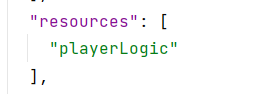
and :

- now in the angular code , call the Command API:

although the EXE file and its DLL are located in the same folder under target\debug\playerLogic , when it is running I get an exception of :
System.IO.FileNotFoundException: Could not load file or assembly 'GalaSoft.MvvmLight, Version=5.4.1.0, Culture=neutral, PublicKeyToken=bb738e8c4ab8c76c' or one of its dependencies. The system cannot find the file specified. at Player.main.Main(String[] args)
Yeah so that's the same you showed in the issue description and it works fine on my end when i replicated it. Can you share your c# project by any chance?
Oh, I create a very simple C# project to send you , and check it again inside tauri, and now I see it's working well. so maybe there was an error with specific DLL...
thanks you for your help!
@FabianLars , After a second checking I see the issue is still reproduced,
I attach an example of a C# console application project. basic.zip
thanks for your help.
@FabianLars just to update that I upgrade the tauri dependencies in JS side to the latest version and the issue is still reproduced. If I run the attached basic example I get this error:
"\nUnhandled Exception: System.IO.FileNotFoundException: Could not load file or assembly 'websocket-sharp.clone, Version=1.0.2.39869, Culture=neutral, PublicKeyToken=null' or one of its dependencies. The system cannot find the file specified.\r\n at backend.Program.Main(String[] args)"
When I run your zip, I get an error in the response of the basic execution:

does it reproduce for you?
another update - if I run in my project the player.exe from your zip - it is working fine. the issue is in the zip of C# project I sent you..
@FabianLars Hi,
Any update? this issue blocks me in my project..
thanks in advanced
Can you translate the error from your screenshot? I do have that too but if i put that into a translator it doesn't sound like an error at all.
Can you also share the source code of your basic.zip c# project?
Attached the source code of C# project. this is a simple console application project, .net framework 4.8.1 backend.zip
I also tried to translate the sentence without success. Do you have any idea why the error comes in Chinese?
@FabianLars Hi,
in order to see the error in English in the zip you sent me - please change the command row to:
let cmd_basic = new Command('Basic');
(remove the encoding)
now I get the error as in my project:

@AyalaGol i have similar issue as you , and resolved like this , so you may try
let command = new Command('PlayerLogic', [], { cwd: (await resolveResource("playerLogic/Player.exe")).replace("/Player.exe", "").replace("\\Player.exe", "") })
generally speaking set the working directory to the directory the Player.exe file is actually in
