

 tauri-apps
[bug] Mouse back/forward doesnt work on linux
Describe the bug
Mouse navigation buttons (back and forward) does nothing on linux and are registered as mouse left click.
Reproduction
- Create new vanilla js app with npx create-tauri-app, select vanilla js
- Replace index.html with this:
<!DOCTYPE html>
<html>
  <style>
    html,
    body {
      margin: 0;
      padding: 0;
      width: 100%;
      height: 100%;
    }

    body {
      display: flex;
      align-items: center;
      justify-content: center;
    }
  </style>
    <script>
      window.addEventListener('mousedown', event => {
        document.getElementById('button-id').innerHTML = 'Button id: ' + event.button.toString()
      })
    </script>
  <body>
    <h1>history-api</h1>
    <a href="https://tauri.studio">Tauri webpage</a>
    <button onclick="window.history.back()">Back</button>
    <button onclick="window.history.forward()">Forward</button>

    <p id="button-id"></p>
  </body>
</html>
- Press different mouse button to see the id
- Click the link and use mouse buttons to navigate back/forward
- You can also test with the buttons on page how history should work
Expected behavior
Page should navigate between the external website and our index.html and mouse back/forward buttons should not be detected as mouse left (id 0).
Platform and versions
Environment
  › OS: Arch Linux Rolling Release X64
  › Node.js: 17.9.0
  › npm: 8.5.5
  › pnpm: 7.0.0
  › yarn: 1.22.18
  › rustup: 1.24.3
  › rustc: 1.60.0
  › cargo: 1.60.0
  › Rust toolchain: stable-x86_64-unknown-linux-gnu

Packages
  › @tauri-apps/cli [NPM]: 1.0.0-rc.9
  › @tauri-apps/api [NPM]: 1.0.0-rc.4
  › tauri [RUST]: 1.0.0-rc.8,
  › tauri-build [RUST]: 1.0.0-rc.7,
  › tao [RUST]: 0.8.3,
  › wry [RUST]: 0.15.1,

App
  › build-type: bundle
  › CSP: unset
  › distDir: ../dist
  › devPath: ../dist

App directory structure
  ├─ dist
  ├─ node_modules
  └─ src-tauri
Stack trace
No response
Additional context
No response

Could someone provide some pointers on how to solve this potentially? Would be very nice to have in place and breaks some use cases I have in my Tauri applications.

you could try running the same code in epiphany borwser if it doesn't work in epiphany then it is a bug in upstream webkit2gtk

Could someone provide some pointers on how to solve this potentially? Would be very nice to have in place and breaks some use cases I have in my Tauri applications.
My workaround was to use rdev, spawn listener in another thread and use channels to trigger events on Button::Unknown(8) and Button::Unknown(9).
Hey @aalhitennf
I'm also struggling with this issue. It seems like mouse buttons 8 and 9 are not dispatched to the web view on all platforms.
Are you using rdev for Mac windows and Linux?
Also, could you share a snippet of how the code looks?

you could try running the same code in epiphany borwser if it doesn't work in epiphany then it is a bug in upstream webkit2gtk
I tested this in an up-to-date epiphany and my forwards/back buttons on my mouse work just fine, and are not detected as a left mouse button click. @amrbashir It looks like this is not an upstream issue.

While back/forward works in epiphany, the event is still not triggered. I can make mouse back/forward buttons navigate back and forward but the event won't be emitted, eg window.addEventListener('mousedown') won't work. I am still exploring options but I think I am very close to fixing this.
@amrbashir that'd be awesome! Will that work on Mac and Windows too? (Please say yes 🤞)
I think Windows should be working, I will confirm later today after I am done with Linux, as for macOS, idk if it is working or not and I don't have one to test, if it is not working, let me know and I will see what I can do
I'm not sure if the event listener is supposed to fire with the forward/back buttons, since even Firefox (running on Linux/X11) does not seem to trigger it with these buttons. Mouse1/2/3 work fine, and navigation using mouse4/5 works too, but window.addEventListener('mousedown') only fires with mouse1/2/3.
It does fire on chromium based browsers so I think I can synthesize the events, will let you know if it goes well. The good news is that I can make the back/forward navigation work anyways.
Alright, here is the new synthesized event
{
    altKey: false,
    bubbles: true,
    button: 4,
    buttons: 16,
    cancelBubble: false,
    cancelable: true,
    clientX: 304,
    clientY: 202,
    composed: true,
    ctrlKey: false,
    currentTarget: null,
    defaultPrevented: false,
    detail: 1,
    eventPhase: 0,
    fromElement: null,
    isTrusted: false,
    layerX: 304,
    layerY: 202,
    metaKey: false,
    movementX: 0,
    movementY: 0,
    offsetX: 304,
    offsetY: 202,
    pageX: 304,
    pageY: 202,
    relatedTarget: null,
    returnValue: true,
    screenX: 304,
    screenY: 242,
    shiftKey: false,
    timeStamp: 11448,
    type: "mousedown",
    webkitForce: 0,
    which: 5,
    x: 304,
    y: 202
}
and the original event
{
    altKey: false,
    bubbles: true,
    button: 0,
    buttons: 0,
    cancelBubble: false,
    cancelable: true,
    clientX: 304,
    clientY: 202,
    composed: true,
    ctrlKey: false,
    currentTarget: null,
    defaultPrevented: false,
    detail: 1,
    eventPhase: 0,
    fromElement: null,
    isTrusted: true,
    layerX: 304,
    layerY: 202,
    metaKey: false,
    movementX: 0,
    movementY: 0,
    offsetX: 304,
    offsetY: 202,
    pageX: 304,
    pageY: 202,
    relatedTarget: null,
    returnValue: true,
    screenX: 304,
    screenY: 279,
    shiftKey: false,
    timeStamp: 11440,
    type: "mousedown",
    webkitForce: 1,
    which: 1,
    x: 304,
    y: 202
}
There is a couple of fields that are different, mainly because they can't be changed like webkitForce and isTrusted and others because they are deprecated or not a standard like which but I think this is pretty damn good so far. Also the backward/forward navigation could be cancelled by listening to mouseup and calling event.preventDefault()
You're right, it works on windows! So it's just mac and linux missing.
@goenning are you sure macOS also has this issue? if you have access to a macOS, could you please post the console.log of mousedown and mouseup events inside a tauri app and inside safari
@amrbashir Yes, i'm sure. This is the code I used on a Tauri app.
window.addEventListener("mousedown", (e) => console.log("mousedown", e));
window.addEventListener("mouseup", (e) => console.log("mouseup", e));
- left and right click logs something as usual
- wheel click logs the events below.
- back/forward ( which AFAIK is button 4 and 5? ) doesn't log anything.
The same behavior on Safari
I'm using a MX Master 3S if that matters
mousedown (wheel click)
mousedown

MouseEvent
altKey: false
bubbles: true
button: 1
buttons: 4
cancelBubble: false
cancelable: true
clientX: 416
clientY: 704
composed: true
ctrlKey: false
currentTarget:
defaultPrevented: false
detail: 1
eventPhase: 0
fromElement: null
isTrusted: true
layerX: 416
layerY: 704
metaKey: false
movementX: 0
movementY: 0
offsetX: 270
offsetY: 704
pageX: 416
pageY: 704
relatedTarget: null
returnValue: true
screenX: 630
screenY: 787
shiftKey: false
srcElement: <div class="min-h-full flex flex-col justify-center max-w-4xl md:max-w-5xl lg:max-w-6xl xl:max-w-7xl mx-auto py-10 px-4">
target: <div class="min-h-full flex flex-col justify-center max-w-4xl md:max-w-5xl lg:max-w-6xl xl:max-w-7xl mx-auto py-10 px-4">
timeStamp: 2367
toElement: <div class="min-h-full flex flex-col justify-center max-w-4xl md:max-w-5xl lg:max-w-6xl xl:max-w-7xl mx-auto py-10 px-4">
type: "mousedown"
view: Window {listeners: Object, Infinity: Infinity, document: #document, window: Window, NaN: NaN, …}
webkitForce: 1
which: 2
x: 416
y: 704
mouseup (wheel click)
mouseup
MouseEvent
altKey: false
bubbles: true
button: 1
buttons: 0
cancelBubble: false
cancelable: true
clientX: 416
clientY: 704
composed: true
ctrlKey: false
currentTarget: null
defaultPrevented: false
detail: 1
eventPhase: 0
fromElement: null
isTrusted: true
layerX: 416
layerY: 704
metaKey: false
movementX: 0
movementY: 0
offsetX: 270
offsetY: 704
pageX: 416
pageY: 704
relatedTarget: null
returnValue: true
screenX: 630
screenY: 787
shiftKey: false
srcElement: <div class="min-h-full flex flex-col justify-center max-w-4xl md:max-w-5xl lg:max-w-6xl xl:max-w-7xl mx-auto py-10 px-4">
target: <div class="min-h-full flex flex-col justify-center max-w-4xl md:max-w-5xl lg:max-w-6xl xl:max-w-7xl mx-auto py-10 px-4">
timeStamp: 2501
toElement: <div class="min-h-full flex flex-col justify-center max-w-4xl md:max-w-5xl lg:max-w-6xl xl:max-w-7xl mx-auto py-10 px-4">
type: "mouseup"
view: Window {listeners: Object, Infinity: Infinity, document: #document, window: Window, NaN: NaN, …}
webkitForce: 1
which: 2
x: 416
y: 704
I will see what I can do but it is weird to see that mouseup and mousedown is not triggered for back/forward buttons, at least on linux, the events were fired but got the wrong buttons. could you check again with
window.addEventListener("mousedown", (e) => {
	e.preventDefault();
	e.stopImmediatePropagation();
	e.stopPropagation();
	console.log("mousedown", e)
});
window.addEventListener("mouseup", (e) => {
	e.preventDefault();
	e.stopImmediatePropagation();
	e.stopPropagation();
	console.log("mouseup", e)
});
@amrbashir nope, same behaviour.
And that preventDefault / stopImmediatePropagation / stopPropagation has no impact on Safari, it still goes back and forward as usual. I'm using preserve logs and it doesn't show any logs after navigation.
On a Tauri app (freshly created), it doesn't navigate and doesn't log anything.
On my machine (Linux/X11), the behavior is different.
Adding the event listeners and clicking mouse buttons result in the following output:
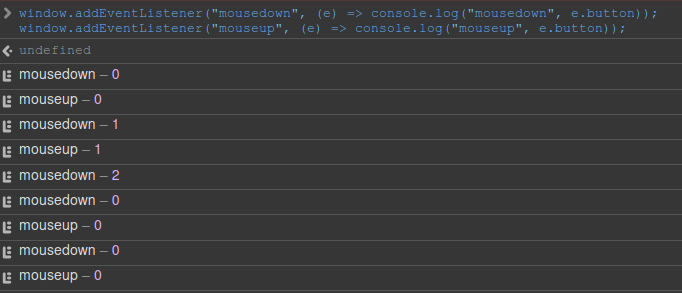 I pressed LMB, MMB, RMB, and then mouse4 and mouse5, in that order.
That means the issues on MacOS and Linux are not quite the same.
This is now fixed in v2-alpha for linux and macos, unfortunately it won't be in v1 as it is considered breaking change. We are now blocking the native webview events for these buttons and replaced them with a synthesized event of our own, so it might not match 1:1 but at least the important fields of the event are set correctly. If a field is not set correctly or the behavior is not what you expected, please open and issue and ping me.
I should also note that the fix only applies if mouse back/froward is the last pressed key, for example:
-
LeftButton (down) then BackButton (down)will result in our synthesizedmousedownevent which will trigger navigation and haveevent.buttonandevent.buttonsset correctly -
BackButton (down) then LeftButton (down)will result in the native webview event which will havee.buttonsthat won't include correct bits for mouse back/forward buttons. Feel free to open a new issue to discuss this limitation and whether we should synthesize these as well.