

 taskforcesh
Connection not using Redis.Cluster - ReplyError: MOVED
Hey,
Our connection config (nestjs, latest):
BullModule.forRootAsync({
  inject: [
    ConfigService,
  ],
  useFactory: (configService: ConfigService) => {
    const redisQueueConfig =
      configService.get<RedisQueueConfig>('redisQueue');
    return {
      prefix: '{sms-queue}',
      defaultJobOptions: {
        removeOnComplete: true,
        removeOnFail: false,
      },
      connection: {
        host: redisQueueConfig.host,
        port: redisQueueConfig.port,
        enableReadyCheck: true,
        retryDelayOnClusterDown: 300,
        retryDelayOnFailover: 1000,
        retryDelayOnTryAgain: 3000,
        slotsRefreshTimeout: 1000,
      },
    };
  },
}),
host = Redis cluster endpoint
Redis Cluster spec:
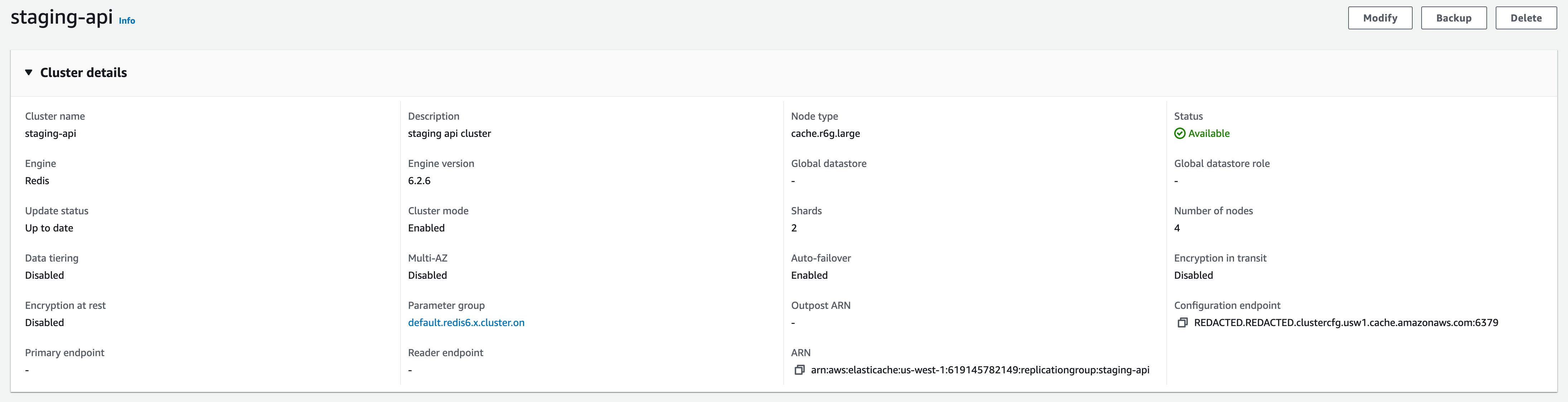
Errors:
ReplyError: MOVED 2104 10.0.3.199:6379
    at parseError (/node_modules/redis-parser/lib/parser.js:179:12)
    at parseType (/node_modules/redis-parser/lib/parser.js:302:14) {
  command: {
    name: 'evalsha',
    args: [
      'b3d5a3db874c950fed58b92c5aa9d9fac5711831',
      '9',
      '{sms-queue}:sms-queue:wait',
      '{sms-queue}:sms-queue:active',
      '{sms-queue}:sms-queue:priority',
      '{sms-queue}:sms-queue:events',
      '{sms-queue}:sms-queue:stalled',
      '{sms-queue}:sms-queue:limiter',
      '{sms-queue}:sms-queue:delayed',
      '{sms-queue}:sms-queue:paused',
      '{sms-queue}:sms-queue:meta',
      '{sms-queue}:sms-queue:',
      '1673954075028',
      '',
      <Buffer de 00 03 a5 74 6f 6b 65 6e d9 26 30 65 34 65 33 39 64 61 2d 33 39 63 37 2d 34 61 31 63 2d 39 38 36 65 2d 65 65 61 31 38 38 61 61 39 32 63 30 3a 30 ac ... 24 more bytes>
    ]
  }
}
Redis cluster works fine when we can connect manually to Redis.Cluster(), going over the code I can see isRedisCluster but not sure how we can force ioredis to use the cluster call with our connection method (above).

Hi @n10000k , try configuring
{ enableReadyCheck: false, maxRetriesPerRequest: null }
on your redis configurations, it should do the trick.

Hey @n10000k we're facing a similar issue, any chance you found the cause in the end?

Same here, I just tried to move from bull to bullmq in hopes of fixing the cluster issue, but no luck. 😢

I think you need to instantiate the connection first with Redis.Cluster and pass that to the Queue and Worker constructors. Also, you must use {} on the queue prefix, something like this:
import { Redis } from "ioredis"

const connection = new Redis.Cluster(...);

const queue = new Queue("myQueue", { prefix: "{bull}", connection })
Since the queue has a different prefix it will be a new queue, so older queues will not be compatible with this new one.
https://stackoverflow.com/questions/64374113/replyerror-moved-error-after-connecting-to-redis-cluster-aws https://redis.io/docs/reference/cluster-spec/

@manast Thanks for the reply, Is there a way to define the cluster connection in nestjs for BullMQ? We have this working for Bull currently already. However for BullMQ I can't find a way to define Redis.Cluster() as the connection client. Is it possible to get the docs to provide an example on how to connect via Redis Cluster mode? Thanks in advance!
test code:
    BullModule.forRootAsync({
      inject: [
        ConfigService,
      ],
      useFactory: (configService: ConfigService) => {
        const redisQueueConfig =
          configService.get<RedisQueueConfig>('redisQueue');
        return {
          prefix: '{sms-queue}',
          defaultJobOptions: {
            removeOnComplete: true,
            removeOnFail: false,
          },
          settings: {
            lockDuration: 300000,
          },
          createClient: (): Redis.Cluster | Redis.Redis => {
            return new Redis.Cluster([
              redisQueueConfig.host,
            ], {
              enableReadyCheck: false,
              retryDelayOnClusterDown: 300,
              retryDelayOnFailover: 1000,
              retryDelayOnTryAgain: 3000,
              slotsRefreshTimeout: 10000,
              redisOptions: {
                keyPrefix: '{sms-queue}',
              },
            });
          },
        };
      },
    }),
For ref: https://docs.bullmq.io/guide/nestjs
The best would be to request such feature if not available already in the nestjs/bull repo: https://github.com/nestjs/bull
Just as some feedback, creating the Queue this way works for me now (this is for the old bull still, but I think it's pretty much the same for bullmq in this case?)
new Bull('jobs', {
	'{someprefix}',
	createClient: (type, clientConfig) =>
		new Redis.Cluster(
			clusterNodes.map((node) => ({ host: node.host, port: node.port })),
			{...clientConfig },
	),
});
@flipswitchingmonkey yes, the same in BullMQ except you pass a IORedis instance as a connection property instead of a "createClient" callback.
It seems like this could be improved by checking here if the passed in options are RedisOptions or ClusterOptions, and constructing the appropriate client type. I had this issue because I was passing in a configuration, but BullMQ always seems to create the standalone client. Passing in an already created client as suggested above is working, though.
