
tailwindui-issues
 tailwindui-issues copied to clipboard
 tailwindlabs
Bad z-index for button with dropdown
What component (if applicable)
- URL for category: https://tailwindui.com/components/application-ui/elements/button-groups
- Component name: "With dropdown"
Describe the bug
Dropdown menu appears behind other buttons. Strangly, I tried to add e.g. z-50 to menu elements of the "Button with dropdown" and could not get behavior to change.
To Reproduce
Copy component code directly from TailwindUI; I made SFC ComboButton which used in a very simple loop with minimal styling:
      <ol role="list" class="divide-y divide-gray-200">
        <li v-for="item in (activeTab == 'Approved' ? approved : pending)" :key="item.id" class="flex py-4">
          <div>
            {{ item.cached_render }}
          </div>
          <div class="flex flex-wrap content-start">
            <ComboButton />
          </div>
        </li>
      </ol>
Expected behavior I expect the dropdown menu to have the highest Z-index
Screenshots
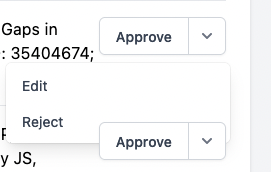
Browser/Device (if applicable)
- Mac oS X
- Safari, FF, and Chrome (all latest)

Hey thanks for raising this! We're going to add a sensible default z-* utility to these panels so it works a bit better out of the box, even if you may have to change it to a different value in your project depending on what other UI exists at other z-index levels 👍
The reason adding it isn't working in this case is because of the z-0 on the parent:
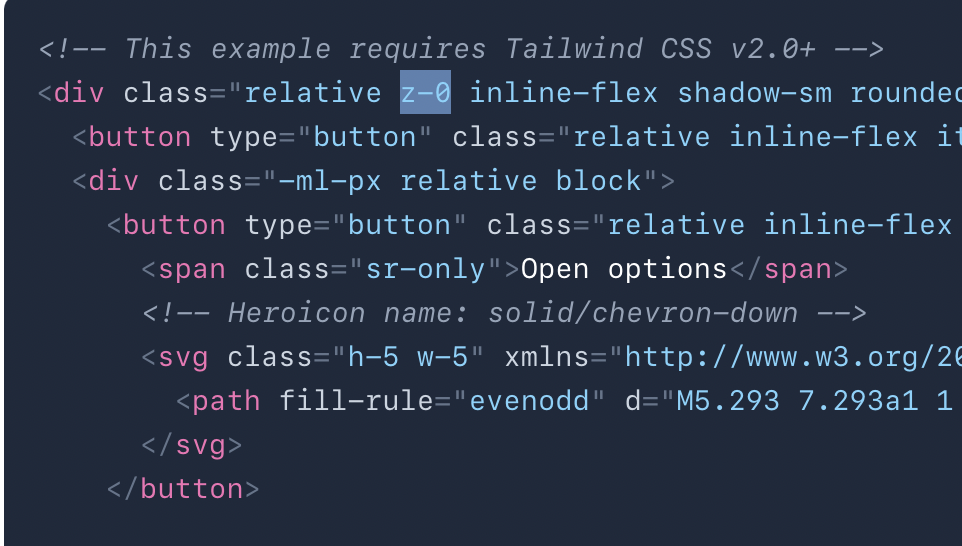
Going to remove that too, that's a bug. Will update you when the changes are live!

Hey @jblachly. We have now reviewed all of the dropdown panels across Tailwind UI. We have added z-10 to the panels as a sensible default, but you may still need to adjust this depending on your use case. We have also removed the root z-0 class from the component you referenced, so that any changes to the panel's z-index will behave as expected. Thanks again for bringing this to our attention! 🤝
