

 tailscale
backend error: invalid key: API key <KEY> not valid
What is the issue?
I get the error: backend error: invalid key: API key <KEY> not valid
when I try to use a pre-approved key to add my Mac book as follows:
tailscale up --authkey tskey-auth-xxxxx
Steps to reproduce
- Generate auth key from https://login.tailscale.com/admin/settings/keys
- Go to mac book and run
tailscale up --authkey tskey-auth-xxxxx - It did work once, but then I removed the device from the admin console and tried 5 more times, and it failed each time.
Are there any recent changes that introduced the issue?
No response
OS
macOS
OS version
Monterey version 12.0.1
Tailscale version
1.50.1
Other software
No response
Bug report
No response

That sounds like a one-time use authkey. To use the authkey multiple times, it needs to be created as a reusable key which is not the default.

That sounds like a one-time use authkey. To use the authkey multiple times, it needs to be created as a reusable key which is not the default.
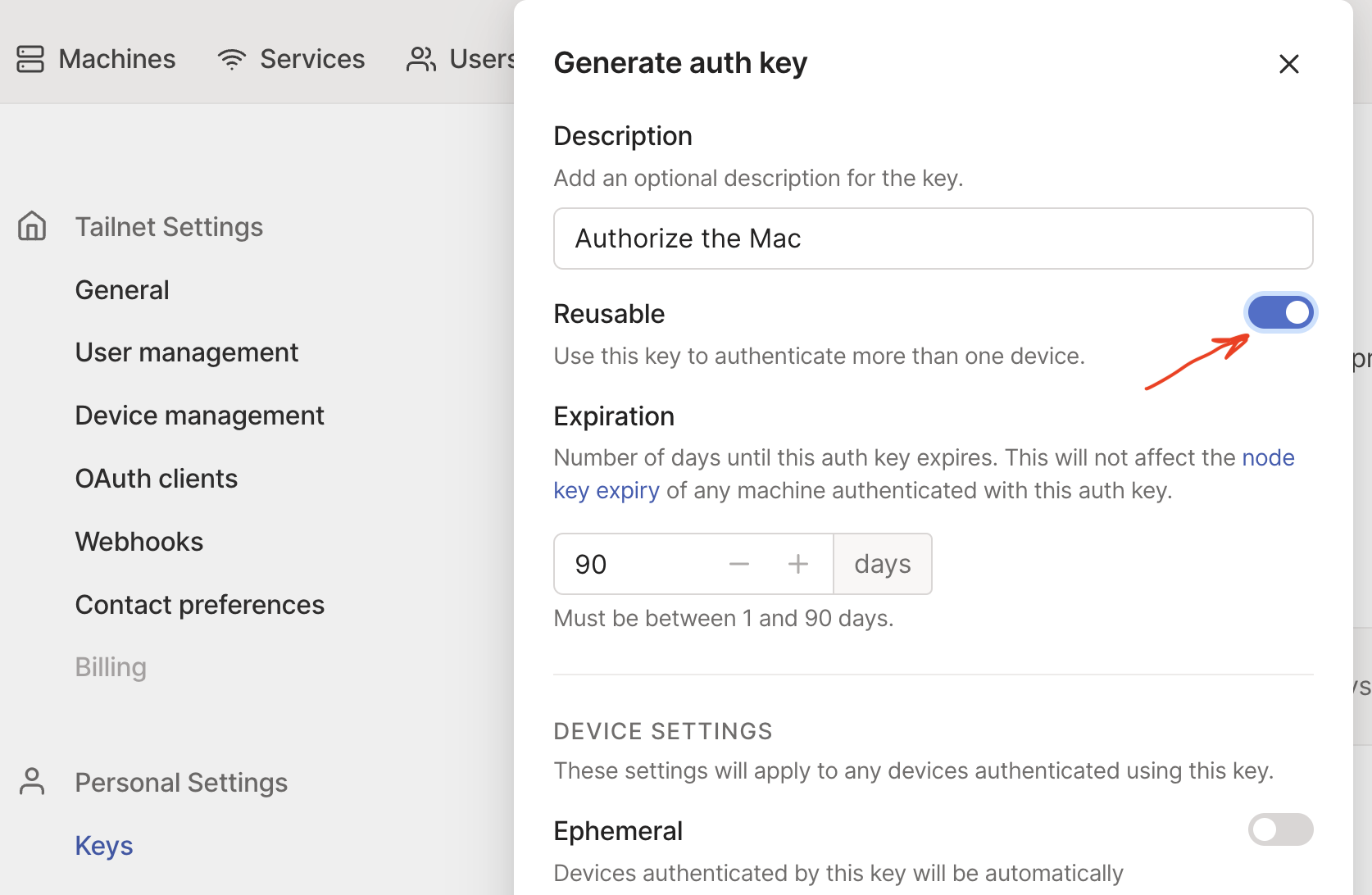
I generated a new key each time. However, if I generate a new key with "Reusable" enabled then I don't see this error. But given I was generating a new key each time, why do you think I was seeing this error?
I've come here also experiencing this, or something similar, I think, when I was trying to re-auth a macOS Sonoma machine through the command line.
On this machine, Tailscale was installed through Homebrew ("brew install tailscale", "sudo brew services start tailscale").
Tailscale was, some time ago, authenticated with a tag, using a non-reusable auth key: "tailscale up --auth-key xxx".
Today I updated to 1.50.1 and wanted to re-authenticate with my user account.
- I removed the machine through the admin console and generated a new non-reusable key with no tags.
- "tailscale up --auth-key xxx" produced the mentioned error "backend error: invalid key: API key xxx not valid".
- The auth key was invalidated in the Tailscale admin console.
- Tried this a few more times, same result every time.
- Created a new auth key that was reusable. "tailscale up --auth-key xxx" then succeeded.
- I invalidated the auth key to wrap everything up. The Mac stayed online, as expected.

Same issue here.
Wanted to test the auth-key functionality:
- non-reusable key test
- tailscale client is stopped, removed from the admin console (previously it was authenticated via web)
- non-reusable key generated
- tailscale client with auth-key can't start with this error
- reusable key test
- generated a reusable key
- tailscale client with auth-key can start, fine
- non-reusable test again
- tailscale client is stopped, removed from the admin console
- non-reusable key generated
- tailscale client can't start with this error
- web auth
- tailscale client with web auth can start, fine
Conclusion: non-reusable keys are totally broken.

I'm experiencing the same issue. The failure happens for both one-time keys and OAUTH keys but it appears to work for reusable keys.
The other observation is that there appears to be another factor involved.
- I attempted to connect from a linux machine that had been previous authorized. This failed for both version 1.46 and 1.50.1.
- I connected from a clean install on a windows 10 VM was able to successfully use a one-time key.
- I tried bringing the windows machine on and off the tailnet multiple times using new keys and that did not have any problems.
- Access for a different windows machine running 1.40 worked fine with a one-time key.

More information. It seems like this may be related to switching the associated user. I tried to reconnect the windows 10 VM using a key generated by a different user. In this case, the failure occurs.
More information. It seems like this may be related to switching the associated user. I tried to reconnect the windows 10 VM using a key generated by a different user. In this case, the failure occurs.
In my case I didn't change the user.
The same problem is still happening today on 14th December 2023. Selecting the reusable key fixes it

Same as @aki-k here. I experienced this today. Was unable to re-authenticate my truenas scale machine after removing it from the admin panel. I was able to work around it by manually revoking the key after generating a reusable one.

This happens with fresh install of 1.60.0 and 1.58.2 (now confirmed) but not 1.56.1
more so, it doesnt specify auth key, it specifies API key even though re-usable auth key is used:

Based on the test procedures folks of mentioned here, I think this may have been the same issue as #9025, which we just fixed late last week. Could you all retry and see if the problems you were experience still persist?
In particular, there was a bug in our control server that specifically impacted re-registering devices using a single-use auth key that had previously been registered with an auth key. In certain cases, we were marking the single-use key as having been used, while simultaneously returning an error instructing the client to perform some additional steps and retry the auth. When the client retries the auth, the auth key is now marked as having been used, so the registration fails. This particular bug didn't impact devices registered by going to the auth link to the admin panel. It also doesn't impact reusable auth keys, since they could of course still be reused on the second registration request.
@PowershellScripter the "unable to validate API key" error is something different. That's saying that the structure of the key itself isn't valid. Could you double check that you copied and pasted the full key from the admin console, and that you don't have any extra whitespace or anything?

I can reproduce:
1.60.0
  tailscale commit: b36943c9b3cfc9f917b202025bfde002b076fc87
  other commit: 99e84774ba7d892c022e79a304b5a365a106ff69
  go version: go1.22.0
Brand new reusable key generated.

@peterbraden are you saying you can reproduce success or an error case? If an error, could provide some more details on your reproduction case? Is this a brand new device or one that has been registered before? You mention using a reusable key, but I believe all of the reports here are about receiving errors when using a non-reusable key. What error are you receiving?