

 tailscale
Unable to access port 80 service
What is the issue?
Unable to access port 80 service and port 5700 , but port 8123 is working . The 8123 is Home Assistant. The 80 service is my docker adguard home.

Steps to reproduce
install a docker adguard home
Are there any recent changes that introduced the issue?
No response
OS
Linux, macOS
OS version
debian , macos
Tailscale version
macos is 1.31.71, debian is 1.30.2
Bug report
BUG-be3fb71baa21c4e2d7857b474282378e8b44834d36090148cbab0b92e36f8d03-20220921040527Z-23285c90904ec976


We need something to be able to help diagnose what is happening. If you attempt to connect to port 80 and immediately run tailscale bugreport, it gives us something to go on.
We need something to be able to help diagnose what is happening. If you attempt to connect to port 80 and immediately run
tailscale bugreport, it gives us something to go on.
BUG-be3fb71baa21c4e2d7857b474282378e8b44834d36090148cbab0b92e36f8d03-20220921053120Z-7e29f352adcd0e03
Shortly before the bugreport, we see:
2022-09-21 13:31:15.641614678 +0800 +0800: Accept: TCP{100.95.116.34:52471 > 100.72.15.37:80} 64 tcp ok
So the connection to port 80 did arrive and was not blocked by ACLs. What behavior did you see: it returned an error, the connection just hung, or something else?
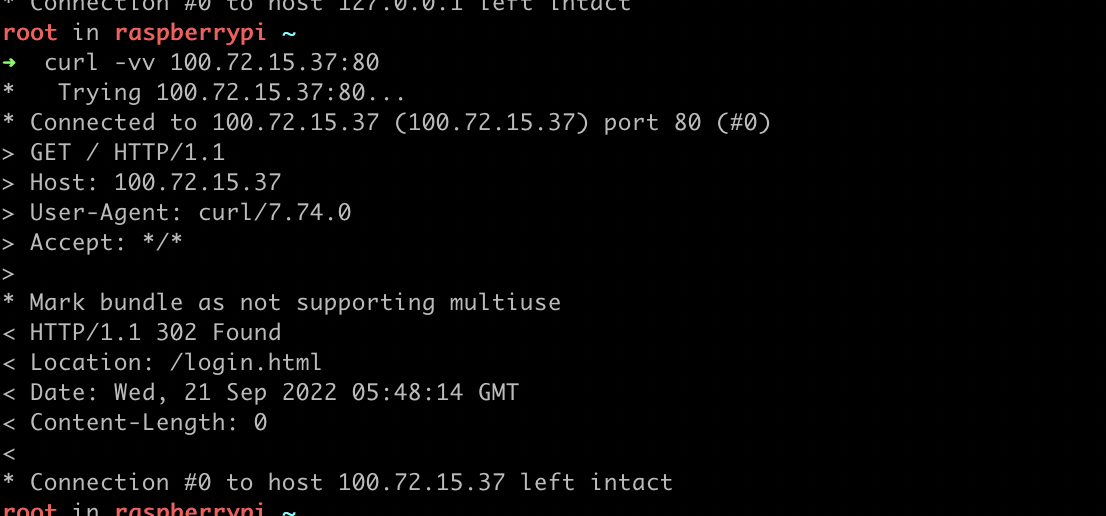
 The port 8231 is working . I don't know why port 80 doesn't work.
The first screenshot says: Connected to 100.72.15.37 (100.72.15.37) port 80 (80)
It was able to connect. The problem is that the web server did not return the data you were expecting?
The first screenshot says:
Connected to 100.72.15.37 (100.72.15.37) port 80 (80)It was able to connect. The problem is that the web server did not return the data you were expecting?
The return data is correct. 302 to /login.html. But the first screenshot is executed on the web server local. The second screenshot is the tailscale log of the remote request. So the web server is right.But it is not accessible through tailscale.Is there any other method I can use to troubleshoot the cause?
Repeatedly showing me log messages is not useful.
When you run curl from a remote host to connect to 100.72.15.37:80, what actually happens? What does it print? What error does it give?
Repeatedly showing me log messages is not useful.
When you run curl from a remote host to connect to 100.72.15.37:80, what actually happens? What does it print? What error does it give? Timeout.

My client logs: BUG-44db875b6e2628f4daf42670ea1dba15f0566b5bad05fedc4eef3cb90c325f7f-20220921142340Z-ccdd403c51898d49
As far as I can see, Tailscale delivers the packets to both port 80 and port 8123. Port 80 doesn't send anything back.
2022-09-21 22:22:51.675268 +0800 +0800: Accept: TCP{100.95.116.34:54921 > 100.72.15.37:8123} 58 ok out
2022-09-21 22:22:55.70446 +0800 +0800: user bugreport: BUG-44db875b6e2628f4daf42670ea1dba15f0566b5bad05fedc4eef3cb90c325f7f-20220921142255Z-e0f67a7fc39e7199
2022-09-21 22:23:03.14699 +0800 +0800: Accept: TCP{100.95.116.34:57333 > 100.72.15.37:80} 48 ok out
2022-09-21 22:23:08.148481 +0800 +0800: open-conn-track: timeout opening (TCP 100.95.116.34:57333 => 100.72.15.37:80) to node [hpsCZ]; online=yes, last Recv=18s
This appears to be something local, the service listening on port 80 may be bound to a particular interface or otherwise not sending a response.
no tailscaled uses port 80 when no other services are using that port. I stopped nginx and, whoop, tailscaled started on port 80. How can I stop tailscaled from claiming port 80 everytime I stop a service that is using port 80?
