

 tagspaces
Ideas
Hi, I bought version 3.0.0
- checkbox in file list
- drag and drop for group tag sorting
- textarea for file list to exclude (eg .ds_store, .thumbnails, desktop.ini)
- setting for unique tags and unique groups tags
- settings to insert the labels near the icons
- rename / change the color of the tag and modify all the tags already associated
- add icon in the menu above the file list to reload the files in the current folder
- after selecting the file, show the tags already associated in the modal association tag
- expandable left side menu
- tags ordered by the A-Z in the select components
- list of tag groups that can be ordered from a-z
- setting to hide the extension from the file name when renaming
Thanks also for reading


Ditto to most of the above feature ideas. I have a few more - a couple might already be suggested in other Issues, but this seems like a good place for a consolidated/succinct list:
- Multi-select for both files and tags using "shift" and/or "command" would help when tagging several files simultaneously
- Dynamic tag group containing everything used in the current folder?
- Dynamic "Collected Tags" group for everything?
- "Parent" tags whose use would also assign "child" tags?
- Option to prevent redundant tags and groups when importing libraries/groups
Thanks!!

- add "(create new tag)" in the select element when the tag does not exist (see example in gmail)
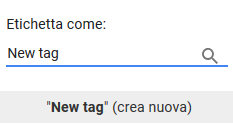
- add third levels to tags or a setting to enable / disable sharing of Tag for different location
- add "(create new tag)" in the select element when the tag does not exist (see example in gmail)
A similar functionality is already implemented in version 3. When you activate "Collect new tags in the tag library" in the Settings, all unique tags you assign to files will be added to a extra tag group automatically.
- add "(create new tag)" in the select element when the tag does not exist (see example in gmail)
A similar functionality is already implemented in version 3. When you activate "Collect new tags in the tag library" in the Settings, all unique tags you assign to files will be added to a extra tag group automatically.
I know this functionality, I wanted to add the label (create new tag) after the tag, so the user understands that the one in the list is a new tag