

 tagspaces
Color of tag on file does not get updated when the group color is updated
Describe the bug When you add a new tag to a file, add it to a tag group and then edit the tag group to make all tags in the group the same color, the tag in the list gets updated but not the tag on the file. This worked in 4.2.1. The only way to get the tag in the right color onto the file is to remove the "old" tag from the file and add the updated one from the list.
To Reproduce Steps to reproduce the behavior:
- Add a new tag to a file.
- Move the tag from Collected tags to a category which has a different tag color.
- Edit the tag group so that all tags in the group have the same color.
- Look at the file. its tag has not changed color
Expected behavior When the tag color in the group has changed all instances on files should also change.
Desktop Application:
- Operating System: Windows 10
- TagSpaces Version: 4.3.1

@Quixus in TagSpaces if you add tag from some tagGroup this will copy tag color in .ts/file_name.json and there is not dependency from which tagGroup is this color (you can move tag in another TagGroup too). Maybe the right fix for this issue will be additinal functionallity in TagSpaces - batch update of tags color by Tag name (but this operation will take time and system resources to list all .ts folders and search for the selected tags array). After change the TagGroup color you can get the message like: "Do you want to update the colors of the used tags from this TagGroup?" @uggrock

@sytolk Why was that changed? It worked in 4.2.1 (and probably in versions before that).
3. Edit the tag group so that all tags in the group have the same color.
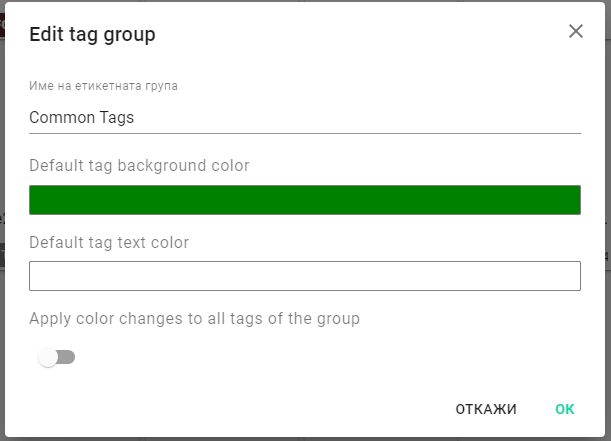 You cant change the whole tag group color. This settings will change the default taggroup color only - for the new created tags.
Can I have screenshot of the same TagGroup edit dialog from 4.2.1 version ?
You cant change the whole tag group color. This settings will change the default taggroup color only - for the new created tags.
Can I have screenshot of the same TagGroup edit dialog from 4.2.1 version ?
my bad.. I see now "Apply color changes for the all tags in the Taggroup"
It's strange for me how this can work in v4.2.1 -> try to reload the current dir? maybe in v4.2.1 the tag color is changed from the current opened directory only but this is not correct the same tag can be set in files from an other disk storage S3 or Minio
The "apply color changes to all tags on the groups" checkbox works as expected and changes the color of all tags in the group -> closing

@uggrock still having this issue. I'm using the deb package version of 5.7.4 lite on popOS 22.04.
Steps to reproduce: Go to tag library > click 3 dots on tag group > edit tag group > change default tag background > apply color changes to all tags in tag group > hit "OK".
Below is a screenshot showing the game_ost tag color wasn't updated even after restarting the program.

@PaperOrb look at my comment: https://github.com/tagspaces/tagspaces/issues/1617#issuecomment-1144443930 if you want batch update of tags color on the filesystem this is an other issue. Default tag group color is the color of the tag group only but this not change color of already placed tags on the filesystem.
@PaperOrb look at my comment: #1617 (comment) if you want batch update of tags color on the filesystem this is an other issue. Default tag group color is the color of the tag group only but this not change color of already placed tags on the filesystem.
Thanks, I'll reopen #2049 as a feature request. This behavior is so bizarre though that I genuinely thought it was a bug.