

 tagspaces
Tag operation on multiple files window - Show existing tags
In this window it would be nice to show the tags at the top that are currently applicable to the selection. Each one would have an 'X' button that would allow you to remove/delete that tag. This would be better than having to manually type a name for a tag just to click a button to remove it.

the files tagging dialog is for tag operation of many files at once, it difficult to show all tags on all selected files ... what will happen if the user click add tag? Add all tags to all files ?

Why would you ask a follow up question nearly 4 months later and then immediately close the issue?
the closing was a mistake, I will open the issue so we can continue the conversion, if you are still interested.
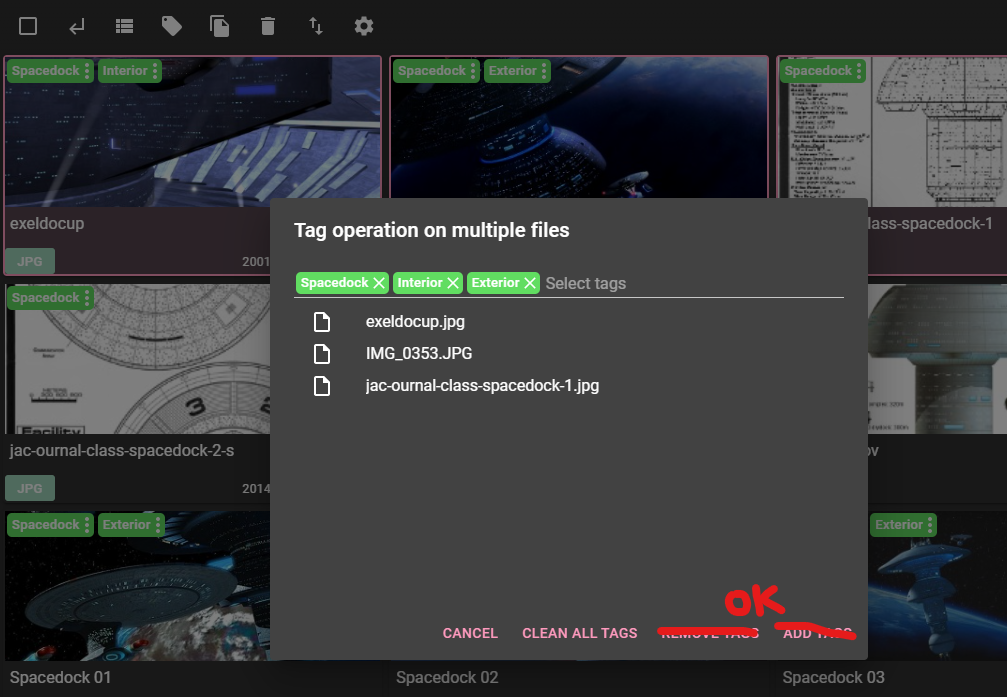
The concept is to add the existing tags to the row above the files list when the window is loaded. I don't know why that would be difficult. The Remove/Add tags buttons could simply be replaced with 'OK'.
When an existing tag is removed by clicking the 'X' button, then it will be removed from any applicable file when the window is closed. When a tag is added to the row, it is added to all of the selected files.
You asked "what will happen if the user click add tag? Add all tags to all files ?" This is already what happens. It is no different, except that you don't need 2 different buttons.