tableau
Vis Issues (v1.8 Extensions API)
A few issues noted while trying out the new features of the Viz in version 1.8 of the Extensions API.
- The Custom Title attribute for row and column values in the dataSpec don’t always work. Even if it works, it only works for either the row or column but not both.
- The middle colour in tableau.VizImagePaletteType.CustomDiverging is always grey.
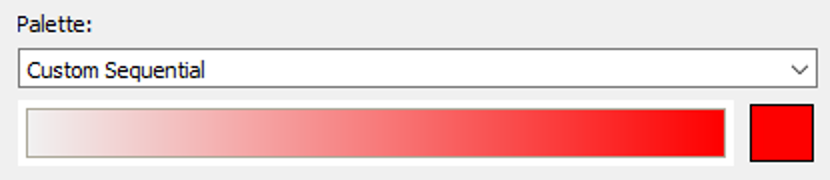
- The starting colour in tableau.VizImagePaletteType.CustomSequential is always grey.
- The new sort feature doesn’t always work. Throws the following error:
Error: internal-error: {"vizapiErrorMsg":"Build Partition Model failed\r\nInternal Error - An unexpected error occurred and the operation could not be completed.\n\nLogicException details: LogicAssert at /Volumes/build/tc/t214/g_pc/tableau-build/bazel/output/external/tabsys__osx_release/include/tabsys/ReferenceCount.h line 340: Null pointer dereferenced\n"}
~AppsForTableau | Infotopics

Thank you @sri4tableau, I'll share your feedback with the vizAPI team.
John

@sri4tableau the vizAPI team has done some investigation. I'm going to put you in contact directly with them. I'm just waiting for confirmation on what contact to use.
Meanwhile, here is their preliminary investigation for #1 and #4:
- The Custom Title attribute for row and column values in the dataSpec don’t always work. Even if it works, it only works for either the row or column but not both.
- VizAPI only allows customizing axis titles. I've tried Tableau to see if it allows customizing the header (discrete) title. It doesn't seem to support it. If the user tried to customize the title for the discrete field, it wouldn't work. I've tried a viz with axis x axis. In that case, I was able to set up the custom title for both row and column. [Perhaps documentation needs to be clarified]
- The new sort feature doesn’t always work. Throws the following error:
- Is there a way to get user's data?
For the custom diverging and custom sequential, since the API currently doesn't support a step count, the middle (or first color) will always be gray. For example, see:
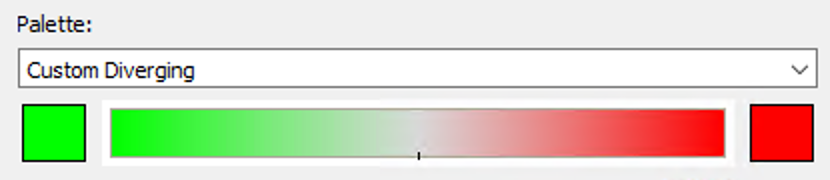 and...