
create-t3-turbo
 create-t3-turbo copied to clipboard
Published
20 hours ago •
 t3-oss
t3-oss
Using NPM. `npm run dev` results in multiple `npm ERR! Workspaces not supported for global packages` errors
Here is the terminal log from a clean template creation using npm 8.6.0 and node V16.14.2 on Windows
> dev
> turbo run dev --parallel

• Packages in scope: @acme/api, @acme/db, @acme/expo, @acme/nextjs
• Running dev in 4 packages
@acme/db:dev: cache bypass, force executing 32a417cc7faf26d1
@acme/nextjs:dev: cache bypass, force executing 4577cc5915a64a16
@acme/expo:dev: cache bypass, force executing b4143d6f076bde8d
@acme/db:dev: npm ERR! Workspaces not supported for global packages
@acme/nextjs:dev: npm ERR! Workspaces not supported for global packages
@acme/db:dev:
@acme/db:dev: npm ERR! A complete log of this run can be found in:
@acme/db:dev: npm ERR!     C:\Users\reddacted\AppData\Local\npm-cache\_logs\2022-08-24T17_53_26_285Z-debug-0.log
@acme/nextjs:dev:
@acme/nextjs:dev: npm ERR! A complete log of this run can be found in:
@acme/nextjs:dev: npm ERR!     C:\Users\reddacted\AppData\Local\npm-cache\_logs\2022-08-24T17_53_26_284Z-debug-0.log
@acme/expo:dev: npm ERR! Workspaces not supported for global packages
@acme/expo:dev:
@acme/expo:dev: npm ERR! A complete log of this run can be found in:
@acme/expo:dev: npm ERR!     C:\Users\reddacted\AppData\Local\npm-cache\_logs\2022-08-24T17_53_26_284Z-debug-0.log
@acme/expo:dev:
@acme/expo:dev: > @acme/[email protected] dev
@acme/expo:dev: > expo start --ios
@acme/expo:dev:
@acme/db:dev:
@acme/db:dev: > @acme/[email protected] dev
@acme/db:dev: > prisma studio
@acme/db:dev:
@acme/nextjs:dev:
@acme/nextjs:dev: > @acme/[email protected] dev
@acme/nextjs:dev: > next dev
@acme/nextjs:dev:
@acme/nextjs:dev: ready - started server on 0.0.0.0:3000, url: http://localhost:3000
@acme/db:dev: Prisma schema loaded from prisma\schema.prisma
@acme/db:dev: Prisma Studio is up on http://localhost:5555
@acme/nextjs:dev: info  - SWC minify release candidate enabled. https://nextjs.link/swcmin
@acme/expo:dev: Starting project at D:\repos\senior\apps\expo
@acme/nextjs:dev: info  - automatically enabled Fast Refresh for 1 custom loader
@acme/expo:dev: Some dependencies are incompatible with the installed expo version:
@acme/expo:dev:   @shopify/[email protected] - expected version: 1.1.0
@acme/expo:dev:   [email protected] - expected version: 4.3.1
@acme/expo:dev: Your project may not work correctly until you install the correct versions of the packages.
@acme/expo:dev: Install individual packages by running npx expo install @shopify/[email protected] [email protected]
@acme/expo:dev: Starting Metro Bundler
@acme/nextjs:dev: event - compiled client and server successfully in 3s (223 modules)
@acme/nextjs:dev: wait  - compiling...
@acme/nextjs:dev: event - compiled client and server successfully in 94 ms (223 modules)
@acme/expo:dev: CommandError: Input is required, but 'npx expo' is in non-interactive mode.
@acme/expo:dev: Required input:
@acme/expo:dev: > Xcode needs to be installed (don't worry, you won't have to use it), would you like to continue to the App Store?
@acme/expo:dev: npm ERR! Lifecycle script `dev` failed with error:
@acme/expo:dev: npm ERR! Error: command failed
@acme/expo:dev: npm ERR!   in workspace: @acme/[email protected]
@acme/expo:dev: npm ERR!   at location: D:\repos\senior\apps\expo
@acme/expo:dev: ERROR: command finished with error: command (apps\expo) npm run dev exited (1)
@acme/nextjs:dev: wait  - compiling /_error (client and server)...
@acme/nextjs:dev: event - compiled client and server successfully in 66 ms (224 modules)
@acme/nextjs:dev: warn  - Fast Refresh had to perform a full reload. Read more: https://nextjs.org/docs/basic-features/fast-refresh#how-it-works

Unable to reproduce this:
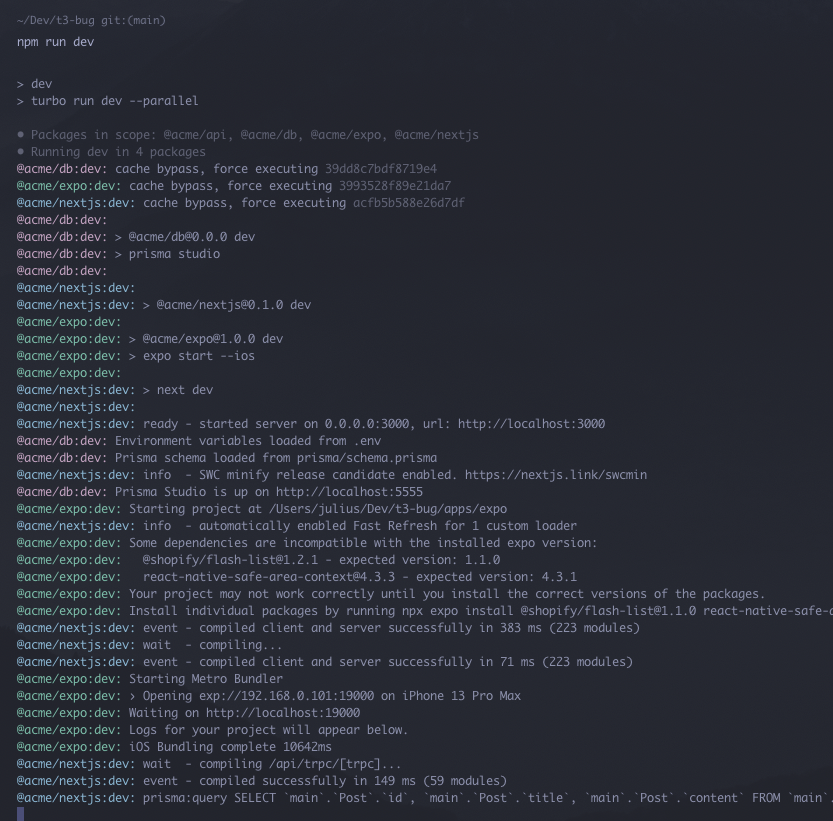
Should probably add some instructions on how to get it running. These are the steps I took:
# Clone
gh repo clone t3-oss/create-t3-turbo

# Create .env for prisma
echo "DATABASE_URL=file:./db.sqlite" > packages/db/.env

# Install deps
npm install

# Run dev
nom run dev
I'm on npm 8.11.0 and Node 16.15.1.

Just FYI. If you are going to use sqlite you also have to change the provider of prisma schema. The default is for postgres.

Just FYI. If you are going to use sqlite you also have to change the provider of prisma schema. The default is for postgres.
Yea will update this. See #13.
This doesn't have anything to do with this error though