

 synonymdev
[Bug]: App closes after 5 seconds
Describe the bug
Was able to set up the app and receive a payment. I was also able to create a lightning channel (that didn't credit me the correct amount, but that's another issue).
Now, when I open the app, it closes after around 5 seconds without any error code. It does not crash when I turn off my internet.
Reproduce
- Open App
- Wait 10 seconds
Screenshots / Recording
https://user-images.githubusercontent.com/90209865/199477487-5c8502a5-f630-4814-9c7a-4a3e1d800763.mp4
Operating system
Android 12
Bitkit version
v1.0.0
Log output
No response


I updated to v0.1.0.0-beta30 On Android 12 (LineageOS) Appeared the message "wallet restored" but when I click on "get started" button the app crash and close, literally disappear instantly.
I tried also on another device with vanilla android12, same behavior. I tried wiping the app from device and install fresh, this new beta version. Restored with seed, app crash and close.
I tried disabling the wifi/internet. App stays in "settings up your wallet". Of course, is trying to connect with the server, bu no connection. In this moment is nothing more I can do.
This is also a crash error I got on another device Android 11 vanilla, trying to restore a previous seed.
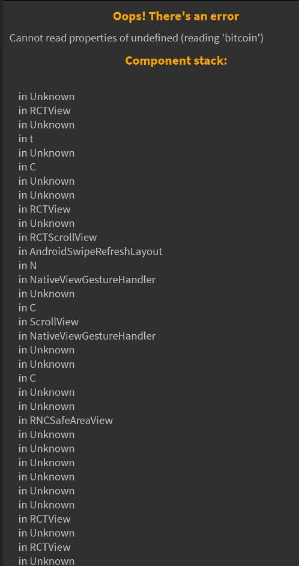
Is this still an issue for you on the latest version of Bitkit v0.1.0.0-beta35? If so please use the new Recovery feature to share your LDK logs here or dm me on Telegram (logs do not contain sensitive information). To export the log .zip file:
- Close Bitkit
- Start Bitkit
- Tap the screen repeatedly until shortly after the logo disappears (it's a double tap until 500ms after splash screen, but you have to be fast)
- Press
Export Lightning Logs

@pwltr Thanks to remind me about the new update. Any updates should be also announced on the telegram group.
Yes, I installed the beta36 update, app is not longer crashing, it stays active, but is showing only the remaining few sats from onchain wallet. The LN channel opened with Blocktank it says inactive, If I go to Settings - Advanced - LN node info, it says LDK node disconnected, Bitkit failed to inititalize the LN node. In LN connections, is empty and should be a LN channel of around 98k sats. Electrum server is connected, seems to be working well the connection.
Is it something more I can do to help you identify what is causing this issue? My Bitkit nodeID is 030587afffaf646d768ef71ef46fe2cde422a81bc24c0695165ba15158b354210f (I save it first time I create this Bitkit node).
@Darth-Coin Looks like LDK is having trouble starting. If restarting the app doesn't fix it please try to export the logs as described above and upload them here. In any case there is a chance your channel got closed by Blocktank due to inactivity and funds will show up in a few days.
@thejokoono Can you confirm the app is not crashing anymore on the lastest patch? Then I'll close here (can open follow-ups for any other issues you're facing).
@pwltr Is not working as you described with repeatedly tapping the screen. But I found the LN logs into Settings - Advanced - LN connections - Export logs. See them attached here. Reading into those logs, seems that the LN node is not starting.
Regarding that Blocktank could close the channel, that should've be done long time ago, but I don't think they were closed. If would be closed, it should appear in LN connections as closing, but is nothing.
If there is a limit of time a channel must be active, that should be informed to the user when will open the channel. I wasn't informed about that in any way. bitkit_ldk_logs_1676386715295.zip
Anyways, we have progress, the app at least is not crashing :) If you find out the channel for my nodeID, please consider to close it. Let's start over this testing.
Closing here.
@Darth-Coin Regarding the LDK node not starting please move any communication to https://github.com/synonymdev/bitkit/issues/770.
Was able to open the app and type in my recovery phrase but immediately crashes again.
Please reopen the issue.
https://user-images.githubusercontent.com/90209865/220378173-4529e316-dd02-42e4-961d-f712ac4c5900.mp4
@thejokoono and @Darth-Coin Test if you still have the same problem?
After last release, we can no longer reproduce the error on our side.

@JeanlChristophe The last release 39 do not contain in the assets the apk file. I do not use google services. Please can you upload the apk file to be able to test it again ? For me the release 36 was not crashing, but instead the LDK node is not starting (see issue #770 ) so no LN channels, no force closing option, no restore funds. Only onchain works.
OK I updated with the latest release beta 43 over an existing Bitkit install (where LDK node it doesn't start). Update went OK, app is not crashing, I can see the onchain balance remained from opening that old channel. But the LDK node still do not start, so no LN balance.
Ok I said, let's start over with a new install. Uninstalled Bitkit, restart device, install v1.0.0 Beta43. When appear the screen with "preparing your wallet" and rocket flying, app is crashing, poof, disappear. So practically same situation, on the same device (Android 12, LineageOS). I tested also on a vanilla Android. Same behavior.
Please note that we do not currently support or test within alternative Android builds (LineageOS). That said, JC, please continue to assist this issue and isolate whether it is OS-specific, or what.

@Darth-Coin In your case are you restoring from a mnemonic or creating a new wallet when you start over with a new install?
@pwltr please note that we tested it from a mnemonic and also by creating a new wallet on: Graphene OS, iOS and Android 13 . No problem. Didn't test on LineageOS.
@JeanlChristophe thanks for testing. As I said, I tested with two different devices:
- a LineageOS Android 12
- a vanilla Android 11 (stock ROM) Both same hardware Motorola G9 Plus.
On LineageOS, before beta 43, the app it was opening (only that LDK node do not start - see issue #770 ), after update, it just crash. On vanilla Android, before beta 43, the app it just restart after 5 seconds. After update is also crash instantly. I tried on both, erase the app and restore from seed, but now is crashing at start, in the "prepare your wallet" screen. I don't think is about Android version. And why was still opening the app in beta 36 ?
Issue unfortunately persists.
Reinstalled the newest version of BitKit and clicked on restore. After entering the seed, it says "setting up your wallet", then crashes. Reopening the app brings back "setting up your wallet" and crashes after a few seconds again.
Still Android 12, no custom ROM.
Since you both seem to be creating the wallet from restore, my guess is that this is the same issue with LDK remote backup/restore that we are already tracking. To confirm please share LDK logs by going into Recovery and clicking "Export Lightning Logs". Here's a recording showing how to access Recovery, while the app is starting keep tapping anywhere on the screen and it should bring it up. You might have to disable your internet connection to avoid it crashing before in this case.
https://user-images.githubusercontent.com/8538369/233767938-ed60c85d-82ef-411a-90bf-3bc174754bd4.mov
@Jasonvdb Do you think this is still the scorer caching issue? Was this supposed to be fixed for already existing installs as well in the latest release?
@pwltr I tried that, without internet connection. The menu it doesn't show up and in the end the app crashed. Then I tried to go back to an older version beta 36 and 34 and same result. Is not moving away from that setting up wallet nor hidden recovery menu appearing.
I tested on both of my devices.
You guys should be able to enter recovery now with v46 by tapping the upper half of the screen during startup with two fingers like shown here:
https://user-images.githubusercontent.com/8538369/234293926-e1225bbc-df1d-4e33-94a1-9ec1a371dc80.mov
You may have to try a couple of times as there is only a small time frame where it registers taps since we don't want to delay app startup too much. If that is working please share your LDK logs here.
@pwltr thanks for looking into this. I tried that method indicated in the video. I can bring on the recovery screen. But the app still crash in the starting wallet. Here are attached the logs I could export from that recovery screen. 1684840209338.log
I tried also wiping the app and reinstall v46, then recover with seed. App crashed, then I restarted and activated that hidden logs screen and exported the logs.
I hope this could help to find out what is causing this crash.
Okay, unfortunately the logs don't help much. If I would have to guess I'd say you may have restored a seed/backup with open channels on multiple devices which will cause LDK to crash because it tries to avoid broadcasting an old state. As you certainly know you can't run the same node on multiple devices, we have since added UI to the restore flow to warn the user against this.
I just tried to replicate this and here is what that looks like:
https://github.com/synonymdev/bitkit/assets/8538369/a51caae3-7819-4a81-984f-2d33ef24bb05
DEBUG (LDK): Reconnected channel 0240568fa19ca4d1dbb2689dce7c8ba6475f63d584ad5ff688617c2363436379 with no loss
ERROR (LDK): We have fallen behind - we have received proof that if we broadcast our counterparty is going to claim all our funds.
This implies you have restarted with lost ChannelMonitor and ChannelManager state, the first of which is a violation of the LDK chain::Watch requirements.
More specifically, this means you have a bug in your implementation that can cause loss of funds, or you are running with an old backup, which is unsafe.
If you have restored from an old backup and wish to force-close channels and return to operation, you should start up, call
ChannelManager::force_close_without_broadcasting_txn on channel a11d8fc38c44a5f97c6ca0e87266683b8e834a854587d5e23312de63dccdf1fc with counterparty 03b9a456fb45d5ac98c02040d39aec77fa3eeb41fd22cf40b862b393bcfc43473a or
ChannelManager::force_close_all_channels_without_broadcasting_txn, then reconnect to peer(s).
Note that due to a long-standing bug in lnd you may have to reach out to peers running lnd-based nodes to ask them to manually force-close channels
See https://github.com/lightningdevkit/rust-lightning/issues/1565 for more info.
If this is the case for you we may be able to add a button to the recovery where you can force close your channels or something like that. Does the app also crash if you create a new wallet?
you may have restored a seed/backup with open channels on multiple devices
I know that. That's why I avoid doing it, on the same time on 2 devices. I tried alternatively with 2 devices, yes, being sure the other device do not have it open or even installed. I am running LN nodes for many years, I know the consequences of doing this. The thing is that the app crashed way before trying to recover in a secondary device. So must be something else.
Does the app also crash if you create a new wallet?
No. I just wipe the restored wallet and app , install it again (just to be sure) and works fine. But I didn't open any other new channel. I don't want to bork another wallet with crashing the app.
add a button to the recovery where you can force close your channels
That could work in the hidden recovery screen at the startup. Do you think that after FC the app will start normally?
The thing is that the app crashed way before trying to recover in a secondary device.
That sounds like you ran into this issue which should be resolved as of this PR. I think you should be fine with opening new channels with a new wallet on the latest version.
Do you think that after FC the app will start normally?
I cannot tell for sure. I am not the LDK dev. We can look into adding functionality like that but we may be missing the required channel information because it looks like your logs were wiped at some point. Is there a way for you to ask your channel peer to force close the channels? That could be worth trying depending on how many sats you have stuck in those channels.
Is there a way for you to ask your channel peer to force close the channels?
As you may know, Bitkit LDK is opening channels automatically with Blocktank node, user do not have the liberty to choose the peer when is opening a channel in Bitkit. I sent an email to support, indicating my Bitkit nodeID so they can identify the channel. Also in those logs I sent you, I see there is information about some channel. But I can't be sure, I don't know how Bitkit works in this matter.
If I can recover the funds from this zombie channel, then yes I am willing to test more Bitkit, with a new wallet.
You are right of course, somehow I forgot about that. (Although it is possible to open a channel to Bitkit by using the nodeId). Let me see if we can close the channel from our side and if not I'll look into adding a force close option to recovery using your the data from logs and/or the (broken) backup.
@pwltr Today I did another logs export. I see now 3 log files inside that zip. Also I see in the logs the channel id, maybe that can help to force close it. See attached here. 1684840209338.log 1684924842153.log 1684840874501.log
@pwltr Today I did another logs export. I see now 3 log files inside that zip. Also I see in the logs the channel id, maybe that can help to force close it. See attached here. 1684840209338.log 1684924842153.log 1684840874501.log
will close these asap
