
jbeans-emacs
 jbeans-emacs copied to clipboard
 synic
synic
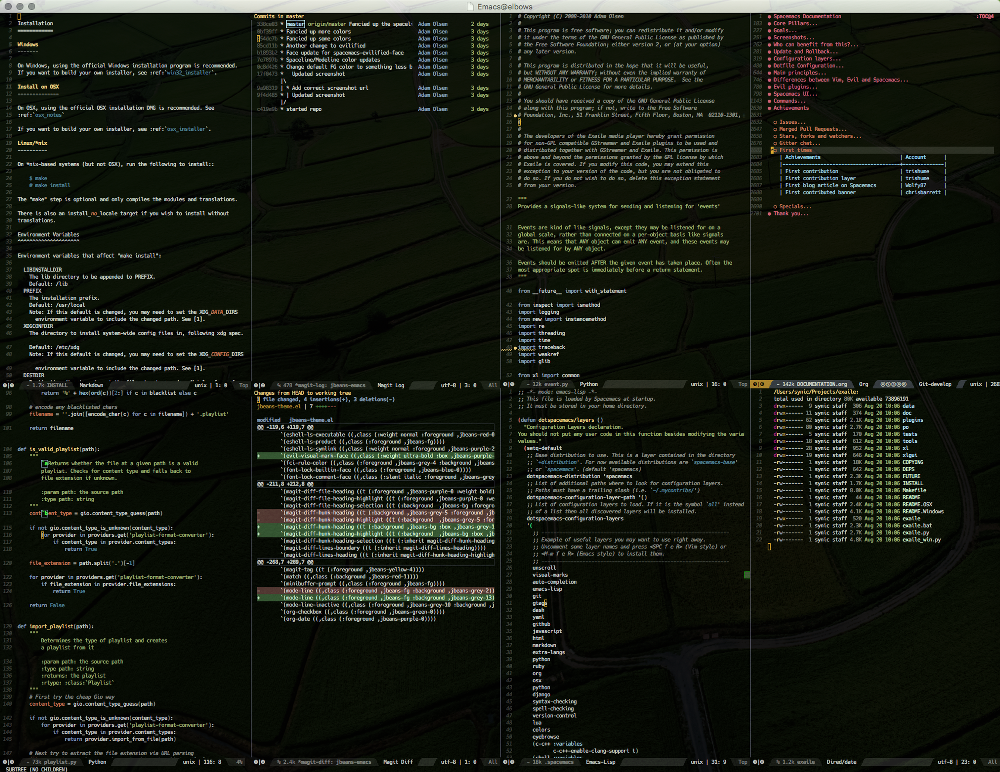
Jellybeans.vim based theme for emacs
jbeans-emacs-emacs
A jellybeans.vim inspired theme. Original work by http://github.com/marktran.
This takes the ujelly codebase and adds in the things that were missing for the plugins I use.
This theme uses the new built-in theming support available starting with Emacs 24.
Screenshot
Installation
package.el
jbeans is available in MELPA.
You can install jbeans with the following command:
M-x package-install jbeans-theme
To load it automatically on Emacs startup add this to your init file:
(load-theme 'jbeans t)
Manual
Download jbeans-theme.el to the directory ~/.emacs.d/themes/. Add this to
your .emacs:
(add-to-list 'custom-theme-load-path "~/.emacs.d/themes/")
Now you can load the theme with the interactive function load-theme like this:
M-x load-theme RET jbeans
To load it automatically on Emacs startup add this to your init file:
(load-theme 'jbeans t)
Ugly colors in the terminal Emacs version
If your Emacs looks considerably uglier in a terminal (compared to the
GUI version) try adding this to your .bashrc or .zshrc:
export TERM=xterm-256color
Source the .bashrc(.zshrc) file and start Emacs again.
Bugs & Improvements
Please, report any problems that you find at the project integrated tracker. If you've added some improvements and you want them included upstream don't hesitate to send me a patch or even better - a GitHub pull request.
 synic
synic