
syncthing-android
 syncthing-android copied to clipboard
 syncthing
Emoji replaced by replacement characters (�) in machine name
Some of my Syncthing instances have emoji in their machine names (e.g. "🦑", v0.14.50 macOS; "🐛", v0.14.49, FreeBSD).
When adding these instances to the Syncthing Android app (app version 0.10.14, syncthing version v0.14.50, LineageOS 14.1) the machine names are at first correctly detected and shown with emoji:
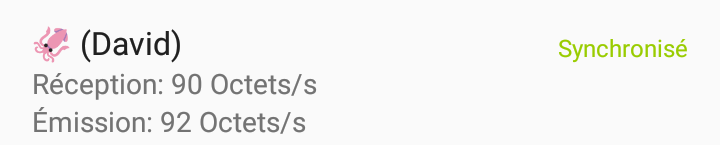
However, when the app is closed and subsequently re-opened, the emoji are replaced by UTF-8 replacement characters:
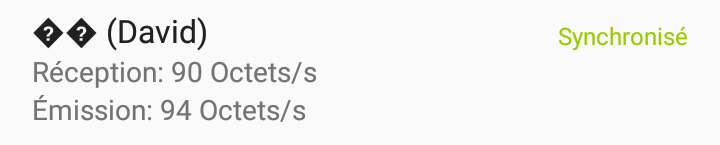
The emoji work on all my other platforms (macOS, Windows, FreeBSD, Linux) but aren't shown properly in the Android app.
Version Information
App Version: 0.10.14
Syncthing Version: v0.14.50
Android Version: LineageOS 14.1

I suspect this could be a problem within the gson parsing when reading and writing the config forth and back. Can you please confirm (Case 1) for me to be sure, if adding the folder in the android wrapper UI shows the emojis correctly until you hit "Restart" on the left-side drawer. Additionally: Case 2 Create the folder on the web UI displayable in the wrapper and then go back to the wrapper UI and tell me if (without restarting) the folder appears correctly or incorrectly.

@calmh Is this issue related to your PR addressing this? https://github.com/syncthing/syncthing/pull/5254
I don’t think so. That issue is that when the change is done in the web GUI the device name doesn’t “take” at all - it’s not sent to the backend.
This looks like an encoding issue. Everything in Syncthing is utf-8, perhaps it’s getting interpreted as something else Android-side.

But I can see how my PR description might be misinterpreted under the circumstances. :D
@calmh Thanks for your feedback on this. I'll look into it when I'm near my computer next time and make some tests on the android emulator.
Apologies for not following up sooner. Reinstalled Syncthing on an Android device today so tested adding another device with emoji in the familiar name, both via the Android UI and the Web UI. In both cases the 'familiar name' with emoji is correctly shown when first added, then on the next launch of the app it is converted to replacement characters (see screen recording). The Android device is version 0.10.19 of the app, the other device in this case is macOS 10.14, syncthing v1.0.1.