

 syncfusion
Can't select .net 6 core version while creating project from 'Syncfusion Blazor Template Studio (vscode)'


Hi rqx110,
Thank you for contacting Syncfusion support
We checked this issue from our side. We are able to select a .NET 6.0 version and create an application successfully.
Could you please share the below details to check further about this issue from our side?
- Share the OS Version on your machine
- Share the screenshot of VSCode information by going to Help->About in Visual Studio Code.
Please let us know if you have any concerns about this.
Regards, Abishake Dakshinamoorthy

Version: 1.69.0 (system setup) Commit: 92d25e35d9bf1a6b16f7d0758f25d48ace11e5b9 Date: 2022-07-07T05:28:36.503Z Electron: 18.3.5 Chromium: 100.0.4896.160 Node.js: 16.13.2 V8: 10.0.139.17-electron.0 OS: Windows_NT x64 10.0.19044
And version info of "Syncfusion Blazor Template Studio" extension:
Name: Blazor VSCode Extensions - Syncfusion Id: SyncfusionInc.Blazor-VSCode-Extensions Description: Syncfusion Essential Studio for Blazor Visual Studio Code extension includes Blazor project templates, code snippet, conversion, and migration tools. Version: 20.2.36 Publisher: Syncfusion VS Marketplace Link: https://marketplace.visualstudio.com/items?itemName=SyncfusionInc.Blazor-VSCode-Extensions
Hi rqx110,
Thank you for sharing details
We checked this issue in given VS Code version and machine combination. But we unable to reproduce this issue. We seem some issue occurred while getting .NET6.0 sdk version from registry editor.
So could you please do the below steps and share the log file to provide the proper solution for this issue from our side?
-
Download this GetSDKVersionTool.zip file and extract it. In extracted location, double click GetSDKVersionTool.exe and share the generated SyncfusionLog.txt file in the same location.
-
Share the log file located in the below locations
“{UserProfile}.vscode\extensions\syncfusioninc.blazor-vscode-extensions-20.2.36\logs” “{LocalAppdata}\SyncTS\Logs”
Please let us know if you have any concerns about this.
Regards, Abishake Dakshinamoorthy
syncfusionlog.txt
Windows:

Register Entry:

Register Details: HKEY_LOCAL_MACHINE\Software\Wow6432Node\dotnet\Setup\InstalledVersions\x64\sdk

isDotNetCoreSdkInstalled: False


Command Line:

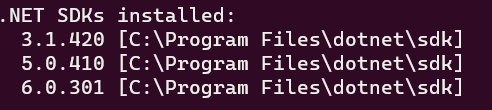
3.1.421 [C:\Program Files\dotnet\sdk]
5.0.411 [C:\Program Files\dotnet\sdk]
6.0.400 [C:\Program Files\dotnet\sdk]


isDotNetCoreSdkInstalled: True
it looks like missing .net6 info in registry. I add it manually and it works