

 swcarpentry
Episode 02-loop.md: Improving visualization of the "for loop"
Link to the lesson: https://github.com/swcarpentry/python-novice-inflammation/blob/gh-pages/_episodes/02-loop.md
Several other instructors in training and I had some difficulty understanding the visualization of the for loop while we were rehearsing this lesson. We thought that a better visualization could help students more clearly understand the logic and execution of a for loop, ideally making use of animation if possible. The graphic I am suggested replacing is below:

As an alternative to that graphic I created a visualization of the same code block using: http://www.pythontutor.com/visualize.html#mode=display
A screenshot of what that would look like is below:
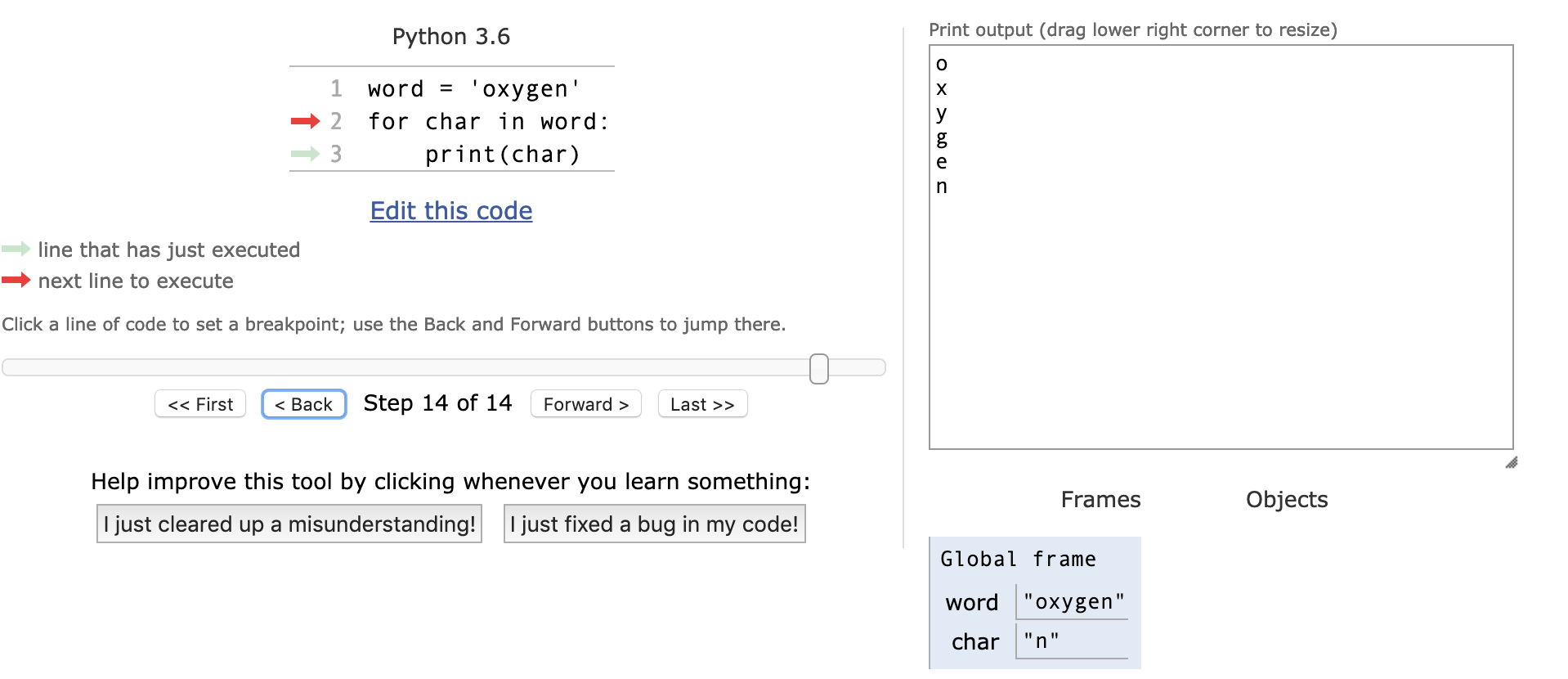
Here is code to generate an embedding:

Thanks for the suggestion, Patrick. I am aware of pythontutor but would prefer our episodes to be independent of external resources. I'm curious what @annefou thinks about it.

 Hi @maxim-belkin, I agree with @pbeukema and co that the python tutor is very useful.
If we don't want to rely on external availability maybe we could include a GIF like the one I attached?
Hi @maxim-belkin, I agree with @pbeukema and co that the python tutor is very useful.
If we don't want to rely on external availability maybe we could include a GIF like the one I attached?

I did not know about pythontutor. It is very nice. I agree WITH @maxim-belkin : we should try to have self contained lessons (and try not to rely on external tools) but adding a link (either in the lesson or instructor notes) would be great (and why not with an animated gif too)

@annefou @maxim-belkin I have made a pull request for my suggestion to incorporate the image and link to the website. Is there a preference for who to assign this to?

I made this animation in power point and exported as a gif. It looks better then the screen capture. Maybe we could use this in the lesson to illustrate better the for loop?

Thank you, @jdeligt and @rafaellucas3, for creating these GIFs! Both of them are very nice and I appreciate the time you spent creating them. However, I am not convinced that GIF image is the right visualization tool for this lesson. My main complaint is that it is very difficult to explain what's happening in the GIFs at the speeds they are played. We could slow them down but then the question becomes: wouldn't it be better to use one (or a series of) static image(s) instead? For example, like this one:

If we consider animations shown in both GIFs specifically, one may ask: how does Python know that it has to go from line 3 back to line 2? Yes, we can explain that, but it has the potential to bloat the episode.
But again, I would like to thank you for these GIFs as they made me realize another issue that we might have to look into: we use the term "memory" a few times but we don't really talk about / explain it (and there is no time for that). So, I wonder if we should take a closer look at how we use it and, perhaps, try to avoid it when possible...(?)
Hi all, may I suggest a possible alternative option for these images?
It is a modification of the original loops image, and now shows how the loop sequentially moves through the string:


Hi, I also have a suggestion, would it be more consistent with Python index to start with the first element being 0 instead of 1? Since accessing stuff through index was introduced a few paragraphs before, it would be more consistent with Python since in this word[1] from this graphic would actually be x instead of o. The default enumerate(word) and range(len(word)) behavior is also starting at 0. Having the first element being number 1 can be seen as inconsistent and unclear.
