
swagger-js

swagger-js copied to clipboard
 swagger-api
Fix setting bearer header
With latest swagger-ui-express (swagger-ui-dist has updated from 3.5 to 4) I'm receiving object { bearer: 'my key' } instead of 'my key' as value.
curl -X 'GET' \
  'https://example.org/api/me' \
  -H 'accept: application/json' \
  -H 'Authorization: Bearer [object Object]'
Description
It doesn't fix the source of the bug but at least it solves the problem.
Motivation and Context
How Has This Been Tested?
Screenshots (if appropriate):
Types of changes
- [ ] No code changes (changes to documentation, CI, metadata, etc)
- [ ] Dependency changes (any modification to dependencies in
package.json) - [ ] Bug fix (non-breaking change which fixes an issue)
- [ ] New feature (non-breaking change which adds functionality)
- [ ] Breaking change (fix or feature that would cause existing functionality to change)
Checklist:
- [ ] My code follows the code style of this project.
- [ ] My change requires a change to the documentation.
- [ ] I have updated the documentation accordingly.
- [ ] I have added tests to cover my changes.
- [ ] All new and existing tests passed.

Hi @andrzej-erli,
I'm not able to reproduce what your setting.
Steps To Reproduced I've used:
- Open https://editor.swagger.io/
- Use following definition
openapi: 3.0.1
info:
  title: OAS2 response examples
  version: 1.0.0
servers:
- url: /
paths:
  /foo1:
    get:
      summary: Response without a schema
      responses:
        200:
          description: Successful response
          content:
            application/json:
              example:
                foo: custom value no schema update fail apple
    parameters:
      - $ref: "#/components/parameters/x-user-agent"
  /foo2:
    get:
      summary: Response with schema
      responses:
        200:
          description: Successful response
          content:
            application/json:
              schema:
                $ref: '#/components/schemas/Foo'
              example:
                foo: custom value changes ok
security:
  - bearerAuth: []
components:
  securitySchemes:
    bearerAuth:            # arbitrary name for the security scheme
      type: http
      scheme: bearer
      bearerFormat: JWT
  parameters:
    x-user-agent:
      name: test
      in: header
      required: false
      schema:
        type: string
  schemas:
    Foo:
      type: object
      properties:
        foo:
          type: string
          example: bar
- Click on Authorize button
- Enter Bearer token value:
test - Run one of the two operation
Here are the results:
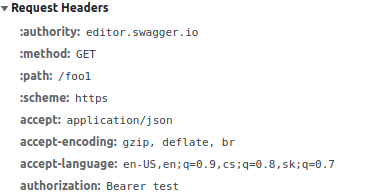
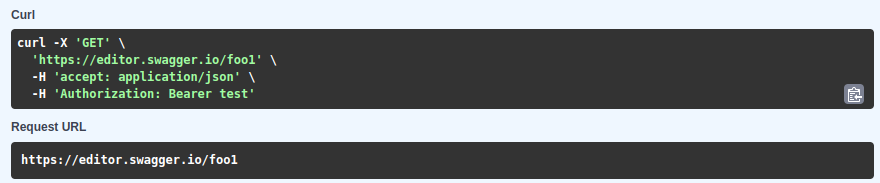
I've seeing that the Bearer token gets passed to HTTP Headers properly and curl command is generated properly as well. Can you maybe create steps of reproduction for me to demonstrate that this really happens?
Thank you!

I'm closing this for now as there's been no follow up from the @andrzej-erli