

 swagger-api
SwaggerEditor@next: When I change the url nothing changes
System
- OS: Windows 10 Pro 21H1 (build 19043.1466)
- Browser: Chrome (108.0.5359.125)
- Swagger-Editor version:
^5.0.0-alpha.44
My situation
I'm trying to build an MVP project based on Vue 3. I have SwaggerEditor@next 5.0.0alpha44 sources and I'm running them locally with npm run start on localhost:3000.
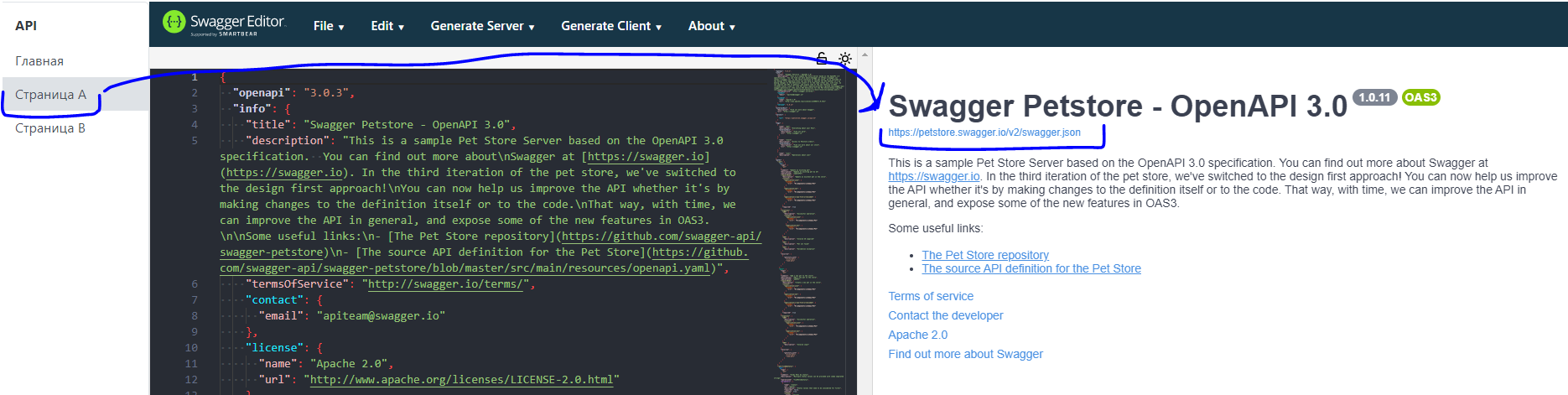
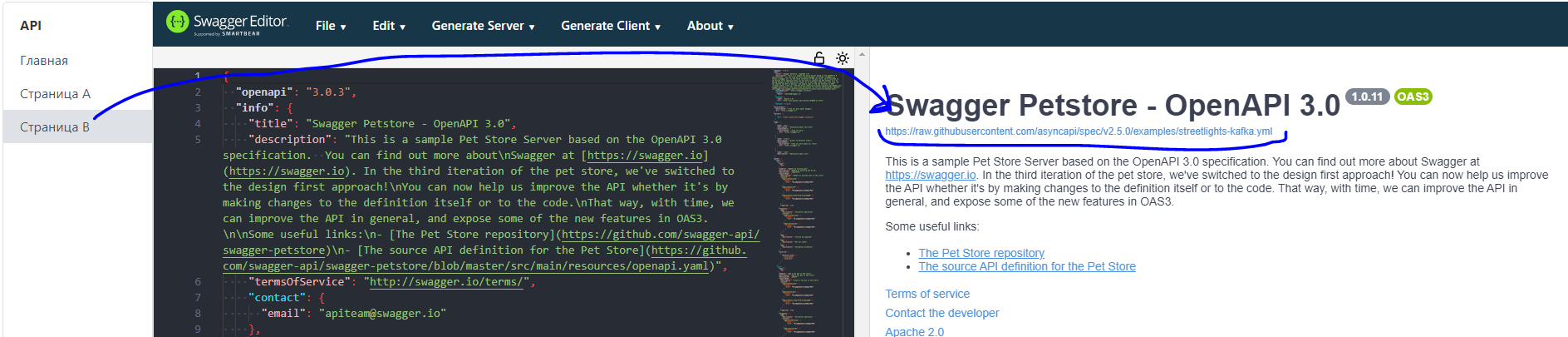
I then use the iframe to get the SwaggerEditor@next instance. In an iframe, I send the url I need using postMessage(). I know that SwaggerEditor@next gets my url and it changes depending on the context. But the value of monaco-editor does not change, and therefore the api I need is not generated.
Code
Page A Vue 3
<template>
  <iframe
    src="http://localhost:3000/"
    width="100%"
    frameborder="0"
    ref="targetIframe"
    @load="postMessage"
  />
</template>

<script setup lang="ts">
const postMessage = () => {
  const iframe = window.document.querySelector("iframe");
  if (iframe) {
    iframe.contentWindow!.postMessage(
      {
        url: "https://petstore.swagger.io/v2/swagger.json",
      },
      "*"
    );
  }
};
</script>

<style scoped></style>
Page B Vue 3
<template>
  <iframe
    src="http://localhost:3000/"
    width="100%"
    frameborder="0"
    ref="targetIframe"
    @load="postMessage"
  />
</template>

<script setup lang="ts">
const postMessage = () => {
  const iframe = window.document.querySelector("iframe");
  if (iframe) {
    iframe.contentWindow!.postMessage(
      {
        url: "https://raw.githubusercontent.com/asyncapi/spec/v2.5.0/examples/streetlights-kafka.yml",
      },
      "*"
    );
  }
};
</script>
<style scoped></style>
index.js SwaggerEditor@next
import React from 'react';
import ReactDOM from 'react-dom';
import 'swagger-ui-react/swagger-ui.css';

import SwaggerEditor from './App.jsx';

let url = '';
window.addEventListener('message', (e) => {
  if (e.origin === 'http://127.0.0.1:5173') {
    console.log(e.data.url);
    url = e.data.url;
    ReactDOM.render(<SwaggerEditor url={url} />, document.getElementById('swagger-editor'));
  }
});
Screenshots
Page A
Page B
How can we help?
So, I send different urls, but the code in the editor does not change, and therefore the new api is not generated. What am I doing wrong?

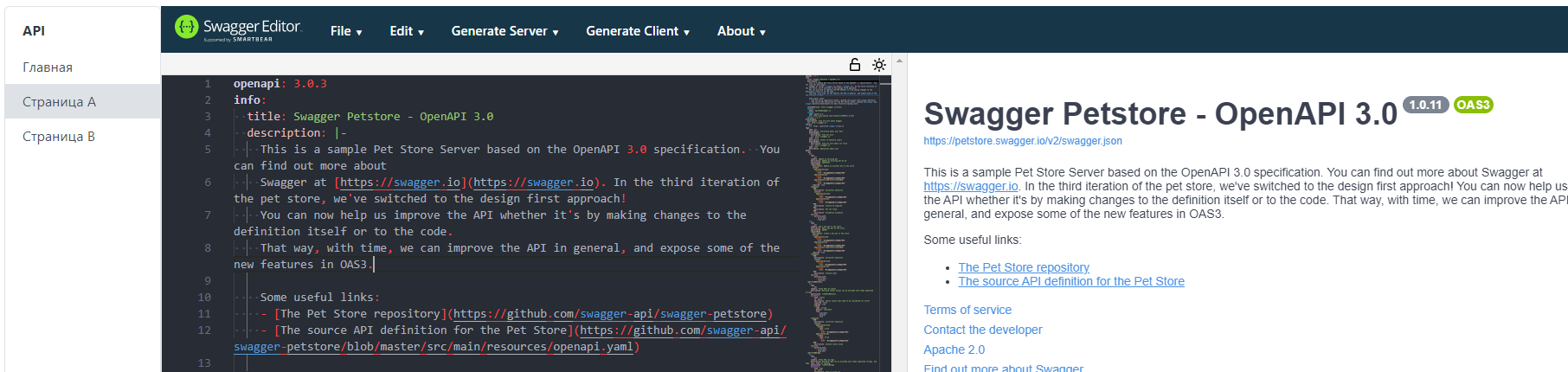
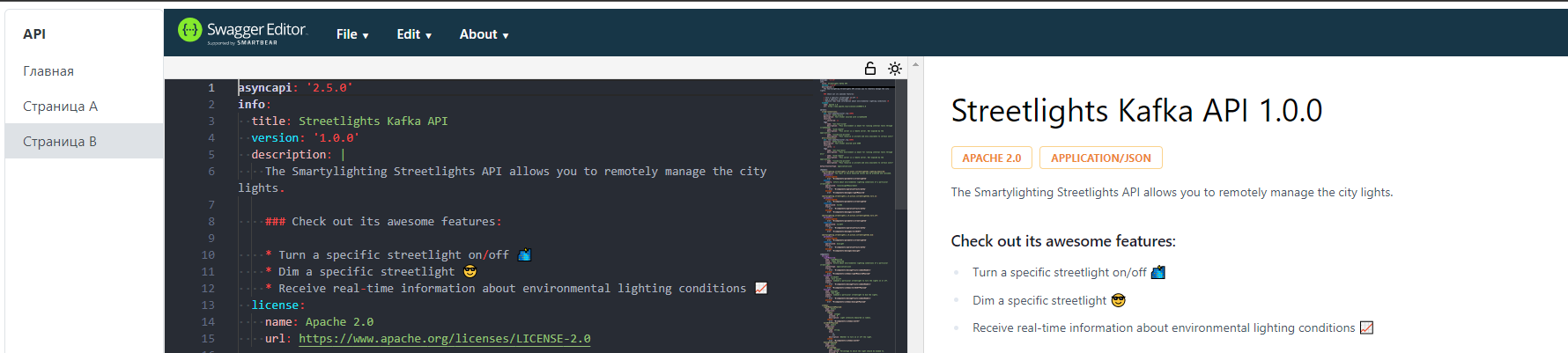
I found a solution to my problem! SwaggerUI has a prop spec that is responsible for the api specification. Why is this not in the documentation?
export interface SwaggerUIProps {
    spec?: object | string | undefined;
    ^^^^^^
    url?: string | undefined;
    layout?: string | undefined;
    onComplete?: ((system: System) => void) | undefined;
    requestInterceptor?: ((req: Request) => Request | Promise<Request>) | undefined;
    responseInterceptor?: ((res: Response) => Response | Promise<Response>) | undefined;
    docExpansion?: 'list' | 'full' | 'none' | undefined;
    defaultModelExpandDepth?: number | undefined;
    defaultModelsExpandDepth?: number | undefined;
    defaultModelRendering?: "example" | "model";
    queryConfigEnabled?: boolean;
    plugins?: Plugin[] | undefined;
    supportedSubmitMethods?: string[] | undefined;
    deepLinking?: boolean | undefined;
    showMutatedRequest?: boolean | undefined;
    showExtensions?: boolean | undefined;
    presets?: Preset[] | undefined;
    filter?: string | boolean | undefined;
    requestSnippetsEnabled?: boolean | undefined;
    requestSnippets?: object | undefined;
    displayOperationId?: boolean | undefined;
    tryItOutEnabled?: boolean | undefined;
    displayRequestDuration?: boolean;
    persistAuthorization?: boolean;
    withCredentials?: boolean;
}
Screenshots
Page A
Page B
Code
In addition to the link, I also send the full specification in the iframe. Vue Template Ref's work incorrectly with iframes, so we use native js and onload event.
PageB.vue
<template>
  <iframe
    src="http://localhost:3000/"
    width="100%"
    frameborder="0"
    ref="targetIframe"
    @load="postMessage"
  />
</template>

<script setup lang="ts">
const postMessage = () => {
  const iframe = window.document.querySelector("iframe");
  if (iframe) {
    iframe.contentWindow!.postMessage(
      {
        url: "https://raw.githubusercontent.com/asyncapi/spec/v2.5.0/examples/streetlights-kafka.yml",
        content: `asyncapi: '2.5.0'
info:
  title: Streetlights Kafka API
  version: '1.0.0'
  description: |
    The Smartylighting Streetlights API allows you to remotely manage the city lights.

   // ... OUR_AWESOME_API_SPEC
  operationTraits:
    kafka:
      bindings:
        kafka:
          clientId:
            type: string
            enum: ['my-app-id']
`,
      },
      "*"
    );
  }
};
</script>
index.js SwaggerEditor@next
I get in iframe like this
window.addEventListener('message', (e) => {
  let url = '';
  let data = '';
  if (e.origin === 'http://127.0.0.1:5173') {
    url = e.data.url;
    data = e.data.content;
    ReactDOM.render(
      <SwaggerEditor url={url} spec={data} />,
      document.getElementById('swagger-editor')
    );
  }
});
Hi @vitjaz,
Thanks for providing so much info. It helped me to determine where the issue comes from.
SwaggerUI has a prop spec that is responsible for the api specification.
SwaggerEditor@5 is based on swagger-ui-react. SwaggerEditor@5 props interface is basically identical to the the swagger-ui-react one (more info here). So yes, spec is one of props it consumes.
Why is this not in the documentation?
We didn't get to it. Our team is very small and we're prioritizing working implementation instead of exhausting documentation. Feel free to issue a PR with suggestion.
Now I can confirm that changing url prop, does change the url within the state, but doesn't download and change the spec that is on this url. So it's a bug.
The code that handles that is here: https://github.com/swagger-api/swagger-ui/blob/master/flavors/swagger-ui-react/index.jsx#L54
I can confirm that the code works, until certain point: https://github.com/swagger-api/swagger-ui/blob/master/flavors/swagger-ui-react/index.jsx#L61. download actions just does nothing and is silent about possible error that might have happened inside it. Needs further investigation...

@char0n Thanks for the feedback. Keep up to date with your investigation, as we plan to use this functionality in production. Of course, it is much more convenient to simply pass a link to the specification than the entire specification.
@char0n One more question - when I pass the spec as json, all the code in the editor becomes one line. There is no such problem with yaml. Is this normal behavior?

Code
const CONTENT = {
 //OUR_JSON_OBJ
};

const postMessage = () => {
  const iframe = window.document.querySelector("iframe");
  if (iframe) {
    iframe.contentWindow!.postMessage(
      {
        url: "https://petstore.swagger.io/v2/swagger.json",
        content: CONTENT,
      },
      "*"
    );
  }
};
@char0n One more question - when I pass the spec as json, all the code in the editor becomes one line. There is no such problem with yaml. Is this normal behavior?
Please, issue a separate ticket for this so that we can deal with this separately. I think it's the same behavior as SwaggerEditor@4, but IMHO it's just wrong