

 sveltejs
Navigation - The NEXT button in the SvelteKit documentation malfunctions
Describe the bug
Navigation - The NEXT button in the SvelteKit documentation malfunctions.
The https://kit.svelte.dev/docs/service-workers url looks like this - wrong title, wrong NEXT button, wrong PREVIOUS button.
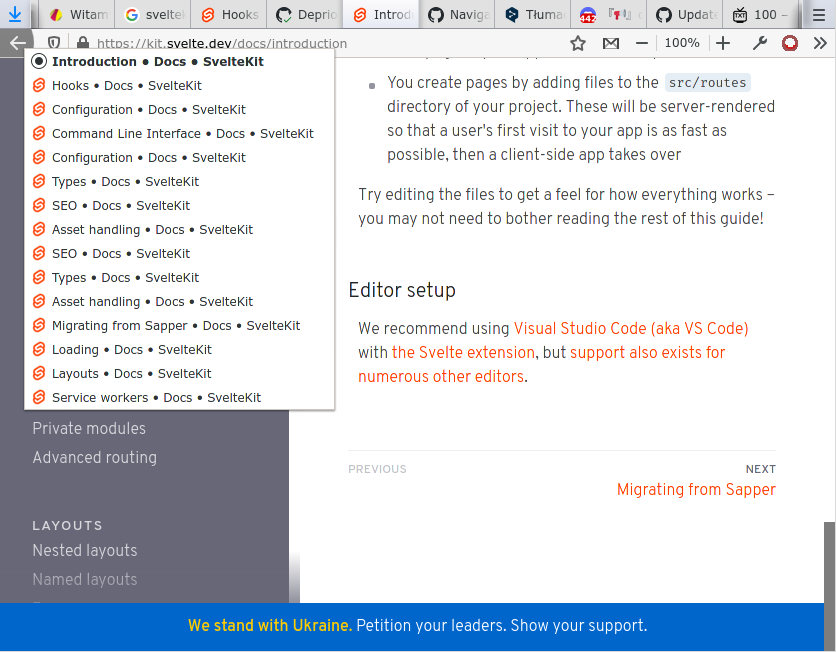
Clicking the back/forward button, NEXT/PREVIOUS, the link in the side panel - none of them set the title or names of the NEXT and PREVIOUS buttons. The links work, but the names of NEXT and PREVIOUS and title are wrong.
The tab title changes.

Reproduction
Difficult to reproduce. I was just going through one by one, from https://kit.svelte.dev/docs/introduction to https://kit.svelte.dev/docs/service-workers and then I noticed it.
But when I do it again now in a new tab, the error is gone.
This has happened a few times already, right after the introduction of the search engine and subdivision it happened.
Logs
No response
System Info
System:
    OS: Linux 5.10 Arch Linux
    CPU: (4) x64 AMD Athlon(tm) X4 950 Quad Core Processor
    Memory: 3.03 GB / 15.07 GB
    Container: Yes
    Shell: 5.1.8 - /bin/bash
  Binaries:
    Node: 16.3.0 - /usr/bin/node
    Yarn: 1.22.10 - /usr/bin/yarn
    npm: 7.17.0 - /usr/bin/npm
  Browsers:
    Brave Browser: 100.1.37.109
    Firefox: 87.0
Severity
annoyance
Additional Information
No response



This is really hard to reproduce, but it is happening with a simple review of the documentation. This error has come up several times over the course of several weeks. MAYBE it would be easier to look at the code and then determine what could be the cause? If not, then this issue needs to be closed for now. :/
I removed the documentation label because if this is a bug, it's a bug in SvelteKit, and this is just a particular manifestation of it. It really does need a repro though

@Rich-Harris I have the documentation tab open NOW, and I was able to get this error.
What I did today
- I opened Firefox
- I clicked on a tab (not to be mistaken with a bookmark) where I had a document open about "Hooks"
- I navigated as shown under "Video - full browsing history"
- I saw that the title froze to "Assets handling"
After that I opened a new tab and tried to reproduce this error - failing! Maybe it's not only the order, but also e.g. the pace that matters? :O Rather, I didn't do backward/forward in the browser.
I have a tab open with the error. Is there anything else I can do with it? Any information to pull from it?
Video - behaviour
Title frozen, NEXT frozem, PREVIOUS frozem (except for hiding when it goes to the first page in the documentation).
https://user-images.githubusercontent.com/16800535/162793075-991893ff-75b6-41ae-8323-2a958231073f.mp4
Video - full browsing history preview
https://user-images.githubusercontent.com/16800535/162797589-d107328a-e46e-43d4-83b1-7a2cd1e01c9b.mp4
Screen title

Screen NEXT and PREVIOUS buttons
@Rich-Harris OMG. I looked at my Firefox extensions, and realized I use this one sometimes: https://addons.mozilla.org/firefox/addon/traduzir-paginas-web/
It just swaps the text on the page, to the translated version... So it's not surprising that some prcise connection between svelte and TextNode gets broken. :roll_eyes:
The question is, is it possible and does it even make sense to include this? Probably not? I can only apologize. I feel silly now. :pray:
EDIT: Because I use it on many sites, and it practically never breaks pages, (e.g. Github, Twitter, blogs).
it's impossible to "fix" website (that is not broken) so it works correctly with all possible browser extensions (that can break website)... correct solution is that user disable extension on specific website.
@Mlocik97 Yes, that's right.
I've made a fork and I'm checking the code for this extension so that it doesn't overwrite the TextNode, but replaces it with the text itself.
It already works better when testing but there are still a few things to do.
EDIT: The built-in translator in Google Chrome, causes a similar error.
I didn't notice this was caused by the built-in translator in Chrome too. Perhaps there's more to look into in that case. Re-opening.
To highlight (because I didn't see it at a glance previously): This is reproducible by using Chrome's builtin Google Translate on the docs. The headline and the previous/next buttons do not update their text.
My assumption is that this is a Svelte core issue. Google Translate is messing with the text content, so it gets out of sync with Svelte, which no longer is able to upgrade the text nodes (they are different nodes now).

@dummdidumm Yes, it's a SvelteJS problem. I mistakenly thought it was a SvelteKit navigation problem, that's why I started the thread in the SvelteKit repo. It can be moved or something.