

 supercollider
docs: server rec sample format additional info
Purpose and Motivation
add specific options for recSampleFormat in Server help file
Types of changes
- Documentation
To-do list
- [x] Code is tested
- [x] All tests are passing
- [x] Updated documentation
- [x] This PR is ready for review

Yes, sorry for the mess. James pointed out that I should be doing $ git checkout develop between commits to base all changes off the current develop branch, instead of accumulating changes along a sequence of new branches. Hopefully this won't be a problem in the future.
Approving all of my PRs should be fine — in the sequence of PRs I created, each includes the commits from the previous. They're all related to help doc cleanup.
Though, I'm looking through the supercollider project on GitHub and I actually don't see any of my changes reflected there. I also cd'd into my local repo, ran
$ git fetch upstream
$ git checkout develop
$ git pull upstream develop
and checked to see if my changes were there — and it seems they aren't. For example, the word "defaul" still appears in the NotificationCenter help file. But, this could definitely be a "me not understanding GitHub" situation...is this because the changes have been "approved" but not actually "merged" yet?
But, this could definitely be a "me not understanding GitHub" situation...is this because the changes have been "approved" but not actually "merged" yet?
Yes, that's exactly the case. The change won't appear on the develop branch unless the PR is actually merged.

Hello @elifieldsteel, now that https://github.com/supercollider/supercollider/pull/5836 is in, we'll need to remove the commits that were already merged from this PR. Instructions to follow.
One can edit commits on a particular branch by doing an interactive rebase. Our wiki is fairly limited on the topic, likely because it's a somewhat of a delicate process where it's easy to mess things up.
The general idea is to enter "interactive rebase" mode in git, remove commits that are not desired, resolve conflicts that occur in the process (hopefully none in our case), then force push the local branch to the origin.
Please be advised that this might result in a messy git state - at the worst case you'd loose your changes in this PR, so to be extra extra cautious, I'd make a copy of the changed files somewhere outside of the repo, to be able to recover them if something goes terribly wrong.
Make sure you don't have any uncommitted changes. Then, let's make a copy of the current branch:
git checkout topic/Server-recSampleFormat-additional-info
git checkout -b topic/Server-recSampleFormat-additional-info-copy
Now, go back to the branch in this PR
git checkout topic/Server-recSampleFormat-additional-info
Now, we're going to do an "interactive rebase", starting from some commit before your commits. Let's first list the last 12 commits:
git log --oneline -n 12 --reverse
You should see a list of commits that include all from this PR, as well as a couple from before. The newest commits are on the bottom. The last commit before yours should be ecbd988 (supernova: use the /error messages to turn on / off the console pri) and it should be the 11th in order, counting from the latest one. If that's not the case, adjust the number of logged commits to see all of yours and some that are not, and make note which one is the first one (in order) that's not yours.
Then, let's rebase interactively starting from that last commit before yours. Note, you can also rebase onto an older commit, just be careful not to change any of the ones that are not yours in the subsequent steps. Here we rebase onto the eleventh commit from the HEAD:
git rebase -i HEAD~11
This should open a text editor (vi by default), where you can edit the commit history. Be careful not to edit any lines with commits that don't belong to you. Here's a cheat sheet for vi. Note that you will be either in "command mode" (default when started) or in "input mode" (after pressing i). Press Esc to go back into command mode.
Per instructions, the lines starting with "pick" or "p" will "keep" the commits. This should be the case for all the commits before the ones you are editing (note that you need to have at least one on top that's unchanged, before you start removing yours).
Now, to remove the commits, either delete the line with the commit information altogether: in command mode, navigate to that line using arrows and press D (capital), or enter insert mode (i) change pick to drop or d. Do this for all of your commits before docs: fix SimpleNumber typo. It's okay to leave empty lines, they will be ignored.
You should end up with something like this:
pick ecbd988dab supernova: use the `/error` messages to turn on / off the console printing (#5820)
# <possibly empty lines>
pick 62c95d7bd6 docs: fix SimpleNumber typo
pick a9d9979056 add additional info about recSampleFormat method options
If that's the case, we need to save the changes in vi and exit it, which will trigger the rebase. In order to do that, press Esc to make sure you're in the command mode, then enter :wq (write quit) and press enter.
Git should perform rebase and there should be no conflicts (since we didn't have removed commits touching the same files as the ones we kept). Let's check the history again:
git log --oneline -n 3 --reverse
It should give you something like
0b51f02ce9 supernova: use the `/error` messages to turn on / off the console printing (#5820)
e6e9a6e5d2 docs: fix SimpleNumber typo
920a3d50df (HEAD -> topic/Server-recSampleFormat-additional-info) add additional info about recSampleFormat method options
If that's the case, now's the time to force push the changes to your branch on github.
First, let's double check we are on the right branch:
git status
Which should print, among other things, On branch topic/Server-recSampleFormat-additional-info.
If that's the case, let's "force push":
git push -f
If all went well, the contents of your branch on github should now be updated with the new commit history and this PR will only show two commits.
Please let me know if these instructions make sens and/or if anything could be clarified better. If these instructions seem helpful, I'd then put them on our wiki.
Thanks @dyfer for these detailed instructions. I'm willing to try this, but I don't have a great feeling about "a delicate process where it's easy to mess things up." Speaking from personal experience, there's a chance I might just create another mess — git is not in my wheelhouse.
Make sure you don't have any uncommitted changes.
But before I attempt anything, I think I do actually have uncommitted changes:
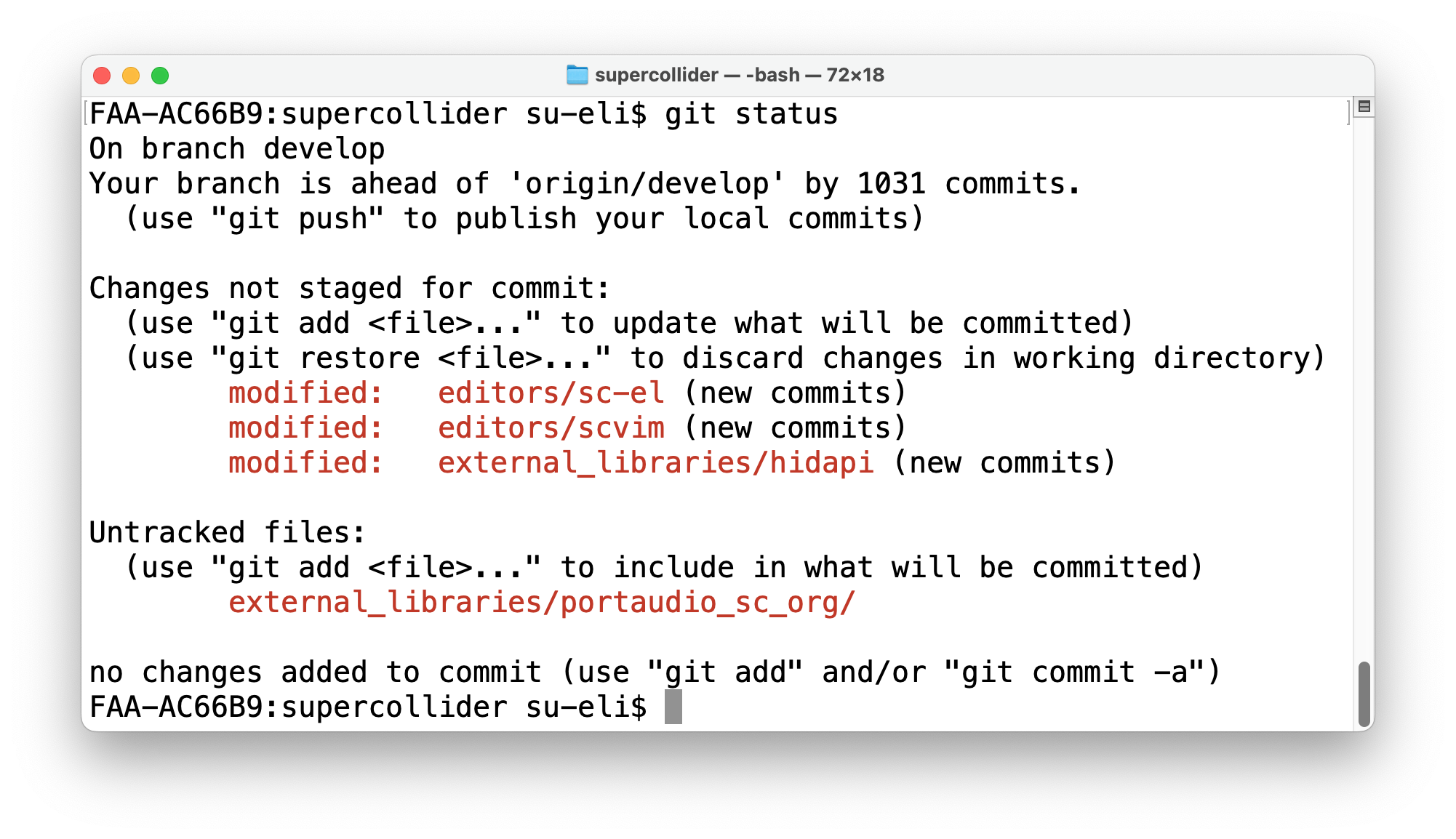
I have no idea what these are or how they got there. In the past several commits, I've just been staging the typo fixes and manually ignoring these. What, if anything, should I do about these?
These look like the changes to git submodules. They show up when switching between branches that refer to different versions of submodules (e.g. some old branch before there were updates to the submodules vs a more recent one).
I believe this would be fixed by updating the submodules:
git submodule update --init --recursive
I believe this would be fixed by updating the submodules:
git submodule update --init --recursive
This cleared up the three changes not staged for commit, but I still have the portaudio_sc_org untracked file. Ok to proceed with your rebase instructions with this untracked file hanging around?
I believe this would be fixed by updating the submodules:
git submodule update --init --recursiveThis cleared up the three changes not staged for commit, but I still have the
portaudio_sc_orguntracked file. Ok to proceed with your rebase instructions with this untracked file hanging around?
I think the rebase just won't happen if there are uncommitted changes, it's safe to try that though.
To clear this up, I think you can just remove the portaudio_sc_org file.
@dyfer Thanks for these incredibly clear instructions. All went exactly as you described it. I think we should be good to go.
Please let me know if these instructions make sens and/or if anything could be clarified better. If these instructions seem helpful, I'd then put them on our wiki.
They definitely made sense to me, but they were specifically written for this particular circumstance, so I wonder if putting them on the wiki as-is will be helpful to others. The Completing a Rebase section of the wiki is ok, but for someone like me (a beginner who still has a hard time visualizing how git works), I don't think I'd be able to do it myself without a dev walking me through it, as you did. I would certainly benefit from studying a lower-level git tutorial.
Regardless, I do have other help doc adjustments on my personal to-do list...am I good to go ahead and make more PRs? Anything else I need to do before returning to business as usual?
Thanks @elifieldsteel , this PR looks good now and I'm glad my instructions were helpful.
I know they were specific to this case (branch names etc), but I personally often use this process quite a bit so maybe it's worth to have it written down as a reference. Since it worked for you, I'm inclined to copy them to the wiki with 1) a warning that this is an advanced and delicate process and 2) changing branch names etc to the generic ones.
Regardless, I do have other help doc adjustments on my personal to-do list...am I good to go ahead and make more PRs? Anything else I need to do before returning to business as usual?
You should be good to go. There are two things to keep in mind:
- Always go back to the
developbranch before creating a new branch for a new pr - Keep the
develop(relatively) up to date with the upstream (main) SC repo
- it's best to do
git checkout developandgit pull upstream developbefore creating a new branch (assuming thatupstreamremote points to the main SC repo) - if you forget to do it, it might also be okay to be a few commits "behind", as long as you're not making changes on top of most recent changes
Since it worked for you, I'm inclined to copy them to the wiki with 1) a warning that this is an advanced and delicate process and 2) changing branch names etc to the generic ones.
Sounds good to me. Thanks also for the tips for making future PRs — will keep them in mind. Much appreciated!