

 sumatrapdfreader
White horizontal straps on print-outs
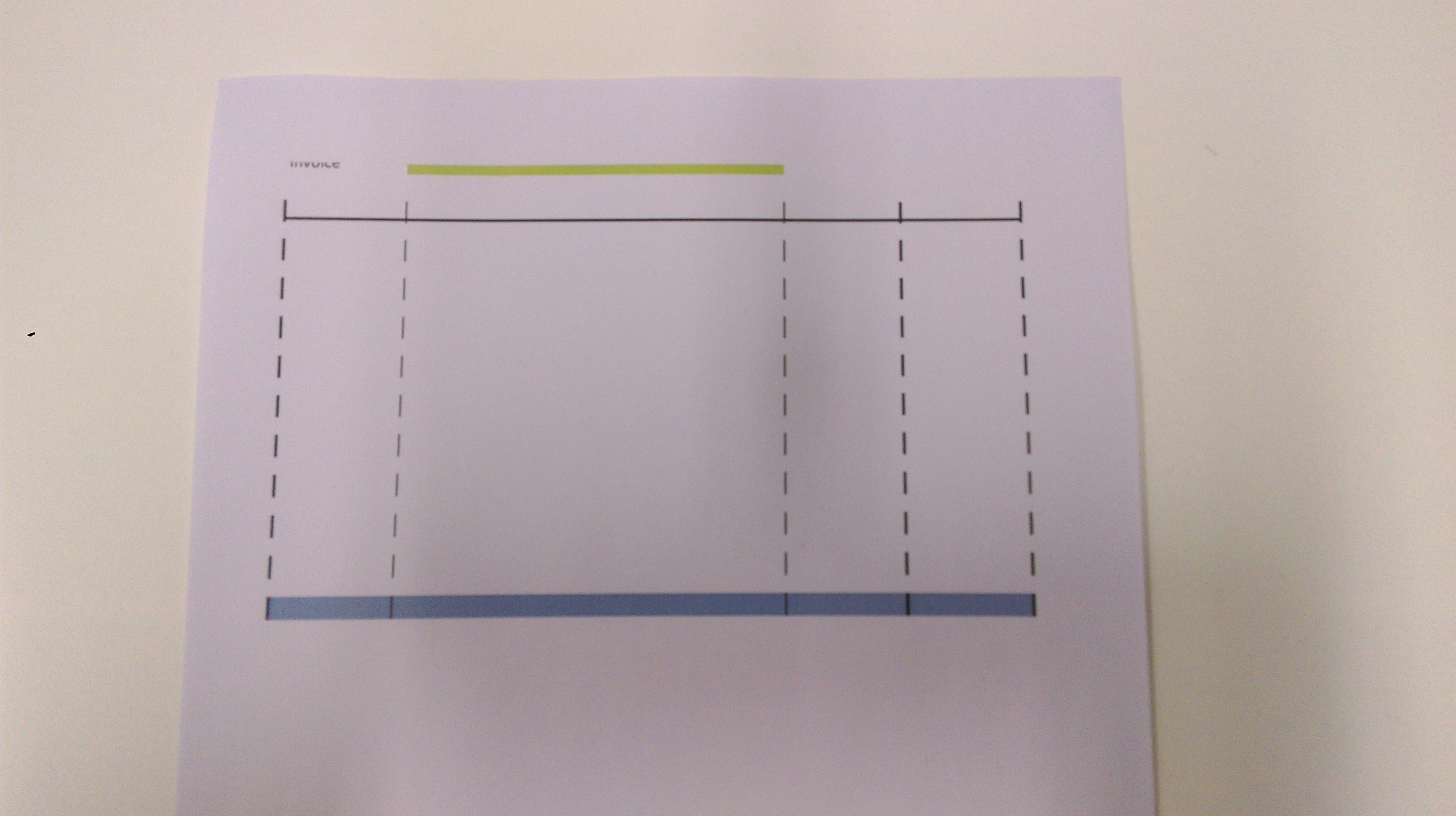
I've come across a printing issue in SumatraPDF 3.1.2 (32-bit and 64-bit). Print-outs have horizontal straps at regular intervals. I'll upload a sample PDF and a photo showing the issue. The sample PDF is just a simple Excel file saved as PDF file. I would get the same result using any PDF file.
This only happens to printer drivers of Xerox WorkCentre 7225 and 7855. But I don't have this issue with driver of other Xerox printers. The WorkCentre 7225 driver version is "5.295 PCL6". I could provide the driver setup if this could help resolve the issue.
Sample PDF file: white_straps_on_print_outs_source.pdf
Photo showing print-out:

You can try toggling the "Print as Image" advanced printing option in v3.0 and see if it helps. Unfortunately this option was removed in v3.1.
In any case this seems to be something for the Xerox printer driver developers to look at since I'm pretty sure Sumatra doesn't treat various Xerox models differently. Have you reported the issue on their forum yet?

Unfortunately, I cannot use v 3.0 because of the bug https://github.com/sumatrapdfreader/sumatrapdf/issues/40 which appeared at this version but corrected at v 3.1
I have not reported on their forum because this issue seems to be more of SumatraPDF than of Xerox, because if I use Acrobat Reader, Foxit Reader or PDF X-Change Viewer, print-outs are good.
No, I have not tried pre-release because there is no obvious link in the website, so I suppose it's not for users to try them. If you could give me the link, I could try.
https://www.sumatrapdfreader.org/docs/SumatraPDF-documentation-fed36a5624d443fe9f7be0e410ecd715.html
Just tested SumatraPDF-prerelease-10740-64-install.exe but unfortunately, the issue is still present.
Can't think of anything else you can try, so good luck and hope the Sumatra dev can solve your problem if the app is indeed at fault.
After some search on Internet, I found that this bug has been reported before. Here are some links as examples.
https://github.com/sumatrapdfreader/sumatrapdf/issues/417 In this bug, the issue appears with HP and Ricoh printers too. There's a suggested workaround. I'll try that.
https://github.com/sumatrapdfreader/sumatrapdf/issues/685 Issues on Sharp printers are reported.
http://forums.fofou.org/sumatrapdf/topic?id=3185289
The suggested workaround seems to be related to the same PrintAsImage option in v3.0 that I mentioned above, but since you can't use v3.0...
The workaround is Printing Preferences -> Advanced tab -> Driver: disable "Print optimization"
Luckily, this works for me when I print on Xerox 7855.
Aah, so it is something that particular Xerox model's driver is configured to do after all. Probably the other models aren't similarly configured by default (or someone changed the setting beforehand), which is why they have no problems with Sumatra.
What does this so-called "Print optimization" do anyway? Are other PDF viewers working around the problems caused by turning this driver feature on, or is it truly Sumatra's fault? If the former then I don't see the point of keeping this issue open.
What!? Somebody found a workaround for a bug in SumatraPDF and you accuse that workaround as culprit? What kind of logic is that?
Really? How do you know it's not other programs working around a bug in this so-called "Print optimization" that only certain printer drivers are performing? All I'm saying is that it's far from conclusively proven that Sumatra's at fault here. Hopefully @kjk can investigate and identify the culprit once and for all, and naturally fix the bug if it's Sumatra. But if it's not then of course it would be pointless keeping this issue open.
As a long time SumatraPDF user I have been encountering this issue on and off with Xerox printers (Xerox PullPrn PS V4.0.548.8.0) at work too. My workaround is to print the same document, with the same printer driver but using Adobe reader.


Really? How do you know it's not other programs working around a bug in this so-called "Print optimization" that only certain printer drivers are performing?
Sure! Because I could return the same question to you: how can you know it's NOT sumatrapdf the source of the problem.
However, by Occam's razor, it's more likely that the problem lies in sumatrapdf than the other way round.
All I'm saying is that it's far from conclusively proven that Sumatra's at fault here.
Once again, by Occam's razor.
Hopefully @kjk can investigate and identify the culprit once and for all, and naturally fix the bug if it's Sumatra. But if it's not then of course it would be pointless keeping this issue open.
I hope the bug would be fixed soon, too, because I have stopped using SumatraPDF since my last comment, ie end of 2017.
But by looking at the number of incidents open in GitHub on this similar issue, this bug really needs to be fixed ASAP.
Why not just revert the code for this part to version 3.0?
@petrasteri Not wishing to disappoint however since SumatraPDF is positioned as a Reader with support for basic system printing (not a virtual print driver) this issue is unlikely to be resolved unless someone can devote a considerable amount of time and even then the result is unlikely to please everyone. Your key point is you wish to revert SumatraPDF to the pre 3.0 print functions which were themselves causing so many issues they were dropped. You point out there are many other good printing applications available and I am struggling as to why it is "essential" that SumatraPDF join them since that was not its aim to be a heavy weight application simply an enhanced lightweight screen viewer (currently providing a number of user interfaces to MuPDF)
Always trying to help IF earlier works for print output but there is an issue with a certain type of file you give as example type #40 which was buggy from 2.5 to 3.0) then either
A) revert to version 2.4 for printing the "old way" B) use latest pre-release etc to first print to Windows PDF then send that to version 3.0

Hello everyone, as I am also impacted by this issue, I decided to dig into it. I am quite vexed by the problem. Short (I hope) summary of my investigation till now:
- release 3.0 32bit: I can print the page normally.
- git: can't print normally anymore.
But I made the 3.0 experience the exact same issues (so I'm guessing this proves that the issue is with this pdf reader) by modifying the following line:
Print.cpp @ +- line 309: if (false && !pd.advData.asImage) {
I added the false there to not go into this if-branch, but go to the else-branch, which is identical to how it is in git.
I outputted the generated HBITMAP to a file so I can have a look at it, and it looks just fine (also printing to PDFCreator 3.3.2 works fine without the horizontal stripes). But it seems that one you do the "bmp->StretchDIBits" it distorts it somehow (but only for certain printer drivers?? -- as I said output to PDFCreator works fine).
That's what's vexing me.
Another thing: I printed 2 pdf's. 1 pdf has 27 horizontal stripes on it (portrait pdf page), and the other only has 7 (landscape mode).
Next: Starting from the 3.0 as I can replicate the behaviour, and I'm thinking it has to do something with the stretching, I went onto trying to stretch things differently.
- Instead of
RectI rc(offset.x, offset.y, bmp->Size().dx * shrink, bmp->Size().dy * shrink);I tried:RectI rc = RectI::FromXY( offset.x, offset.y, paperSize.dx, paperSize.dy );==> So this is the same as in the if-branch. ==> Result: nicely printed (meaning no stripes anymore), just the right and bottom margin are really bad. They're much too close to the edge of the paper.
Conclusion: it definitly has something to do with the stretching, and the target size! What... That I don't understand (yet).
I tried in PDFEngine(2230) to use the if "PreferGdiPlusDevice" branch, but that results in the same thing: stripes.
I also noticed that in pdfium they use StretchDIBits instead of StretchBlt to draw to the HDC.
So I hope this would be of some help to someone, as I'm out of ideas. Maybe changing the code to use StretchDIBits might result in something good? But why does the previous code of "engine.RenderPage" works fine, whereas "engine.RenderBitmap" + "bmp->StretchDIBits(dc)" produces the wrong output?
Both eventually end up in RunPage, so I took a snapshot there of the differences:
- cliprect @ RenderPage: x/y = -120 vs @ RenderBitmap: x/y = 0 (but x1 & y1 are the same)
- ctm @RenderPage is different too, but that's likely because ctm->e = -120, so ctm->f is also 120 less (probably because of the previous differences)
- all functions use the gdiplus variant (RenderPage) instead of the draw variant (RenderBitmap).
So right now I'm giving up on this issue. I'll need to look for another pdf viewer sadly now that opens fast (or go back to 3.0).

@kjk can you please checkout/comment on above analysis from a user with hardware for testing https://github.com/sumatrapdfreader/sumatrapdf/issues/919#issuecomment-453781853 it seems to suggest a possible cause for some users problems
This sure seems like the closest to finding the cause anyone has gotten, and it seems like a pretty solid analysis. Any way you can look into this @kjk? Please see the comment linked to earlier, namely this.
FWIW I'm having the same issue as everyone else in this regard. Printing to a Xerox printer.

@SumatraPeter No, I haven't. I can coordinate with the affected user(s) so that they will do that if needed. But seeing as this issue (not just this particular issue number, there are continously other equal reports) has been running for years, is there anything in the daily build that makes you think that things will be different with it compared to version 3.2.0.0? If not I fail to see the point in trying the daily build, but I'm open to reasons for doing so of course.
@rawtaz: Was just a suggestion since kjk has made lots of changes since 3.2 besides keeping the underlying MuPDF engine updated as of late, so it may have improved matters. Your users can try a portable copy if they wish so that their existing installed version remains untouched. Or not. *shrug*
@SumatraPeter : I just tried it with my installed version (3.0). Works fine.
Afterwards I tried it with Latest SumatraPDF daily build, built on 2020-08-12, commit 3e1de028f81f4c68e570f701022cd028c8041824: horizontal stripes (1 about every cm) in a portrait page. So no change yet.
@SumatraPeter Understood, and thanks for the suggestion :) As indicated by @svaningelgem though it's pointless for me to try it with my users though - the problem will persist. From what I gather, what's needed is that someone with the skill to understand the code that @svaningelgem isolated the problem to digs into that and figures it out - I'm not sure what else would solve this several years long-running issue :)
QUESTION: Can't we just bring back the "Print as image" option? That would work as a workaround for most if not all users encountering this problem, I think?
@kjk I am still facing this issue, was there a conclusion on this or do we know where it's coming from? What did others do to fix it or get around it?
