

 sumatrapdfreader
Unable to show tabs and menubar
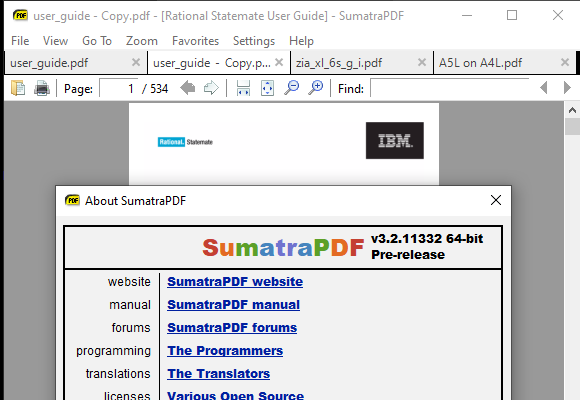
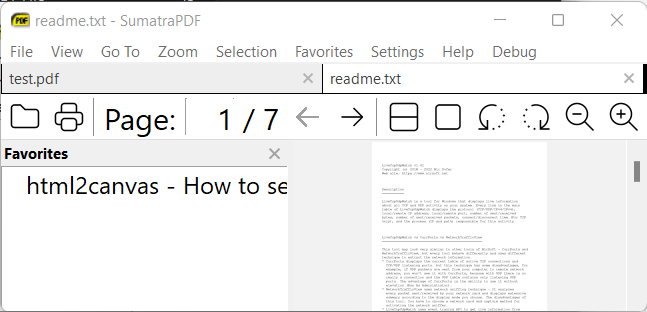
If I disable tabs in the preferences screen, the menubar will show. The command codes in notepad also show the value "true" for showing menubar. Only when tabs are disabled, the menubar will show and otherwise it's behind the hamburger menu.
Is it possible that tabs AND menubar can be shown at the same time?

note this seems to be a "buggy" inconsistant feature since I can get both sometimes
- set menubar to true, and open a pdf, often if tabs option was set on then menubar does not show
- switch off option to use tabs and as stated by Reinier1994 the menubar will show instead of tabs
- reset tabs to checked on in options
- open another file and now you have both tabs and menubar (AS DESIRED) for the session
- close files and recall SumatraPDF now the menubar is not visible (not as expected)

@Reinier1994 commented on 2016. jún. 8. 12:21 CEST:
Is it possible that tabs AND menubar can be shown at the same time?
This restriction is in fact a "feature". No reason/rationale was ever given as for why can't you enable both anymore. No matter how I look at it, it makes zero sense to not allow both the menubar and tabs to appear.
So I either you have the trendy and horrible hamburger menu, or you don't have tabs which is worse. So the best you can do is dig up an old dev build between 2.5.2 and 3.0
PS: you'll need to edit the config file and set "UseTabs = true".
Such as this: SumatraPDF_tabs+menu.zip

@kjk note the above attachment includes an out of date developer release
As I previously mentioned it is possible for the user to achieve the same with a current release, but would be even better if it was an allowable setting via UseMenubar = true and UseTabs= true
Tried it right now and switching both to true does not work (Version 3.3.3). Only the tabs are shwon, menu is hidden.

@herrfrei that is correct behavior you can choose either method using the "newer" tabs interface by design required replacing the older non tabs header (menu bar)
The principle is the canvas should be as large as possible on a phone/tablet or other small device and interface minimal, some users want neither just like MuPDF no tabs (nor menu visible) others want multiple lines of icons filling half a small screen.
@GitHubRulesOK commented on 2022. máj. 14. 12:41 CEST:
@herrfrei that is correct behavior
you can choose either method using the "newer" tabs interface by design required replacing the older non tabs header (menu bar)The principle is the canvas should be as large as possible on a phone/tablet or other small device and interface minimal, some users want neither just like MuPDF no tabs (nor menu visible) others want multiple lines of icons filling half a small screen.
Sumatra is not a mobile app, it never was.
@mzso Agreed I don't use my old widows phone anymore for pdf reading (my fingers are too chubby) and thus I use a 600 pixel netbook much of the time or 768 pixel touch tablet as just wide enough for older icon set. call me a luddite but windows 7 worked fast enough on those but am currently using non touch high speed hi-res laptop for working not leisure.
@GitHubRulesOK You're contradicting yourself a lot. First you claim it's correct, than the you say you use Sumatra with larger displays. Anyway, I think it's quite sure, since it's a windows program that it's mostly running on PCs and laptops. And mobile apps don't have button bars, tabs or menus for the most part.
@mzso I am Devils Users Advocate,
As supporter I can argue for both sides, on the one hand the Application Ethos was Screen Viewer with minimal graphics UI with as many features as possible available via a keyboard or mouse. Touch screen/pad features are limited by lack of a programming team.
My "argument" is that there are both ends of scale of users to be catered for not just those that like me can afford hi-definition screen, but need a lightweight viewer for their Raspberry PI with Windows or Whine
I would love to see this resolved, as I myself like to have the menu bar always present (I use a large screen and use the File - (exec) commands a lot) and at times also want tabs...
- If I open with menu and no tabs I get the menu, and if without closing I change tabs to true I get the desired outcome of tabs + menu, but when then closed it loads up with just tabs. This shows there's no fundamental issue with having both.
- Arguments about saving screen space don't hold because the user can themself choose in options to set one or both as they wish; there's no reason Tabs and Menubar should reduce to Tabs only when the user can just chose Tabs alone if they desire that.
Cheers, David

@GitHubRulesOK commented on Jun 18, 2024, 2:48 PM GMT+2:
@meteorquake actually seems to resolve the tabs background issue when both active :-) but dependant on users screen layout can be over bearing.> Originally posted by @GitHubRulesOK in https://github.com/sumatrapdfreader/sumatrapdf/issues/549#issuecomment-2176021156
What seems to resolve?
@mzso you are right there is no difference in themed backgrounds, so deleted my off topic remark
I am using version 3.5.2 on Windows. Has there been any progress on this issue during last eight years? I still fail to intuitively figure out how to show the File, View, Go to. etc. at the same time as tabs. If this is somehow possible it is behind some truly obfuscated process which leads to bad user experience.

@ahakkar
no it is "unintentional" to have both since the core MuPDF viewer has neither.
But SumatraPDF adds the minimum of one or the other but both can be triggered so when seen it is considered a "bug" by some or a "feature" by others
There are many abilities that are not part of main application and thus use of SumatraPDF in Browsers or browsing with SumatraPDF features function both ways but are thus "wont fix" but not listed as such just simply "historic" functions.
There are many abilities that are not part of main application and thus use of SumatraPDF in Browsers or browsing with SumatraPDF features function both ways but are thus "wont fix" but not listed as such just simply "historic" functions.
I have installed the latest pre-release 3.6.16779 but how do i get it to show the tabs and the file menu bar at the same time like you did?

@onlinestatements it is not a "working feature" but old behaviour read my comment
https://github.com/sumatrapdfreader/sumatrapdf/issues/549#issuecomment-226971909