

 sumatrapdfreader
Problem copying text from PDFs
Attached is a PDF example where I cannot properly copy text. The PDF has been tested with Foxit and Adobe and there seems to be no problem in the PDF itself. But Sumatra copies a space after each character and looses the original spaces on the way. This looks like this:
l a n g u a g e s c n i e n c c s i s g r a m m a t i c a l o r u n g r a m m a r i r o l . W e a t t e m p t t u t r a i n n e u r a l n e t w o r k , w i t h o u t t h e b i f u r c a - t i o n i n t o l e a m u d v s . i n n a t e c o m p o l r a n a s s u m e d b y C l i o m < l < y , t o p r o d u c c t h e s o m e ) u d g m e n t s u s n a t i v e s p e a k e r s o n s h a r p l y g m m m n r i c a l / u n g r a m m a i i c n i d a r n . O n l y r e c u r r e n t l w u r a l n e t w o r k s a r e i n v e s t i g a t e d

Also unable to search for words in the pdf. I am encountering similar issue with attached. Possibly related to #547 ? example.pdf

pdf.js shows similar issues, although text is garbled worse in SumatraPDF.
So far only noticed for pdfs generated by tesseract (#382) on Windows.

A shot in the dark here, but I think it has to do with the "glyphLessFont" used as an "overlay" for the PDF. Other OCR engines use a hidden underlay of regular fonts, Times, Arial, etc.. I have the same "space between characters" problem that ruins searching. (And I know that font over image PDF works in other viewers.)

In the tesseract-project I referred to this issue, so I hope they're reading this suggestion. But as far as I know, they're working on a fix already. I'm not sure what that fix entails, though.
Any update yet? Using ocr and Sumatra together is no fun at the moment.

This type of file was a problem with 3.1.2 Newer SumatraPDF pre-release has less problems with OCR output. Still not perfect but better when the OCR editor is outputting simple text.
Here I simply viewed the "example.pdf" above in PDFXedit told it to redo a basic OCR with tesseract and here is the result of copy from SumatraPDF to Notepad. There are two very minor space related discrepancies but spaces between characters is not one of them 544 example OCR using tesseract.pdf .
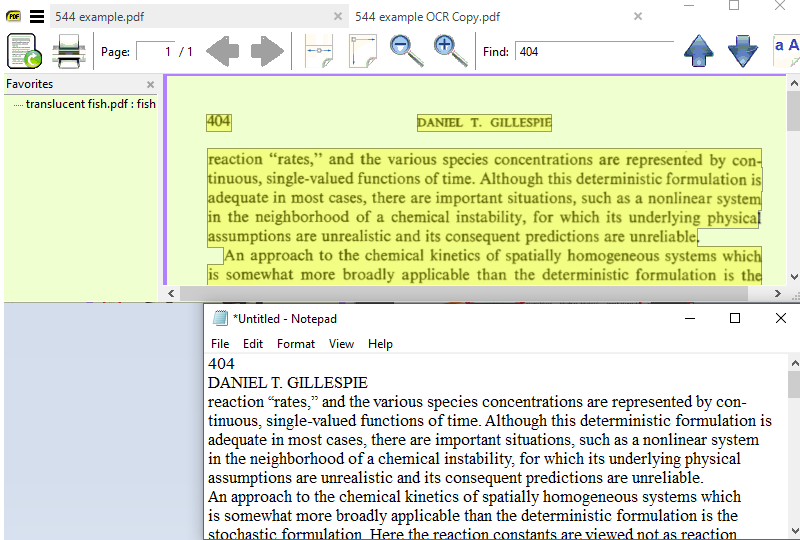
-
A line feed has been introduced between the Page Number and Header This appears to be from SumatraPDF since it is not introduced in a copy from Adobe acrobat
-
There is no paragraph indent. which is normal as it is the same in a copy from Adobe acrobat

@kjk I am unsure how much the different problems generated by OCR output are One common problem as described for first example is a space between characters causing words to become unsearchable. A second common problem is that a larger than normal space between words (usually when justified) causes an effect of extra linefeeds or paragraph spaces. Here is an example where copied words appear on each line book1.pdf
Just a comment that the sample related to this thread really is so poor the spaces issue is not as bad as the very poor text output (as shown below in a text extraction). The best result would be to remove the bad OCR and replace with better.