
sumatrapdf
 sumatrapdf copied to clipboard
 sumatrapdfreader
Already opened files are re-opened after CmdDuplicateInNewWindow
Steps to reproduce:
- open a file (from the win explorer or search bar)
- press ctrl-shift-N (open current document in new window)
- open a different file (from the win explorer or search bar)
You now will have four windows with the first file and another one with the new file. I wasn't expecting that the opened windows would be duplicated.

Which version of Sumatra?
How many Sumatra processes are when you do it and if any of them is admin vs regular? (Ctrl + Alt + Del for task manager).

Version is 3.4.6 64-bit. Here's what comes up on the task manager:
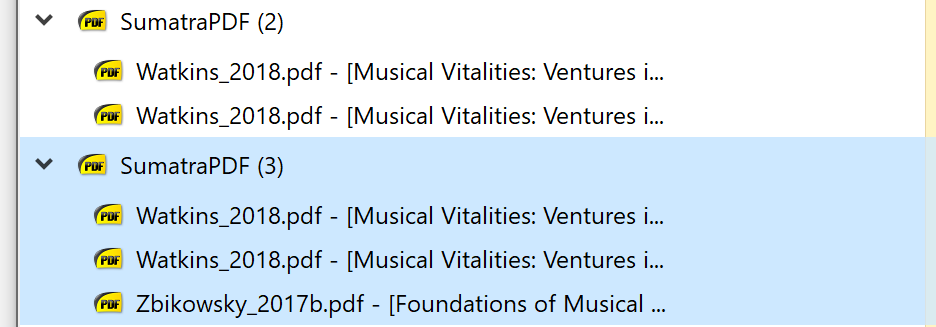
On the 'details' tab I have two processes, both under my user name.
Are those exactly same executables i.e. if you look at executable file path in details, is it the same?
In general there should only be a single instance of SumatraPDF because that's the only way to ensure proper restoration of previous state. If you start another instance of SumatraPDF it restores the state because it doesn't know about the other instance.
Also, if you can see and post the exact cmd-line.
Reasons you might get multiple instances:
- mixing admin vs non-admin
- running a different executable (different executable path)
- via advanced settings
I'm trying to establish why did you end up with 2 different processes.
Are those exactly same executables i.e. if you look at executable file path in details, is it the same?
Yes, it's the same path.
if you can see and post the exact cmd-line.
I'm sorry, I don't know what you mean. I just opening pdfs through windows explorer. Sumatra is the default program.
If, after ctrl-shift-n, I open the second file from the menu in either of the existing Sumatra windows, it works correctly. It's only when I open the second file from the OS that files get re-opened.
I don't think I changed anything in advanced settings... is there any particular option that would produce this behavior?
Also just to be clear: am I the only one getting this?
I use System Open on say 4 separate files so the single process (current pre-release installed)shows the active tab here its the unnamed home tab
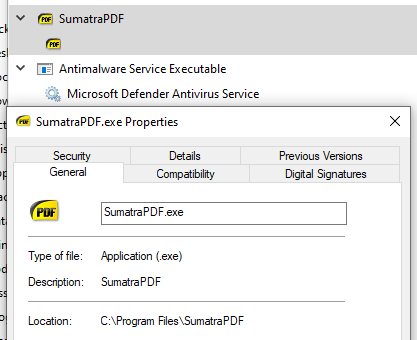
open any other file it will add a tab in the same session

related settings
RestoreSession = true
ReuseInstance = false
ReloadModifiedDocuments = true
So note in this case that middle one is not relevant, the use of tabs automatically encourages Reuse, any file opened by the system will reuse that master session, unless
If I run a separate copy of 3.4.6 with multiple tabs (here the last one opened is showing) I will have 2 sessions (hence the questions about how yours is running 2 copies) Is it a customised portable call ?
settings should not be a problem
RememberOpenedFiles = true
RememberStatePerDocument = true
RestoreSession = true
ReuseInstance = false
ReloadModifiedDocuments = true
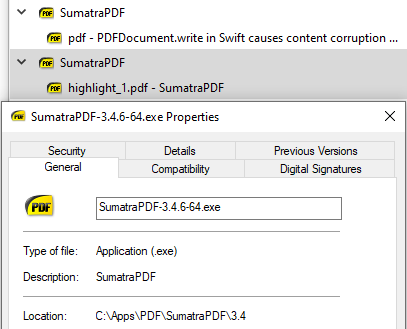
Using Ctrl+N will open a second window in that one of 2 sessions
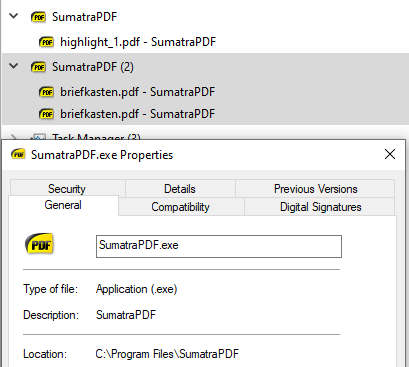
another document called via system should be added to the second window
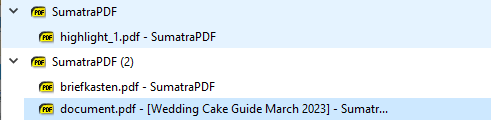
and if we open another window with file it will look similar to your state, but 2 sessions requires 2 different session starts
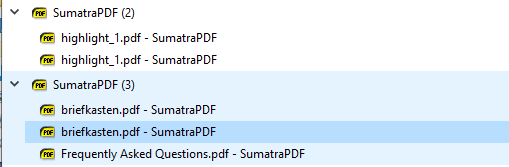
@kjk
the only way I can get same as @ntrocado
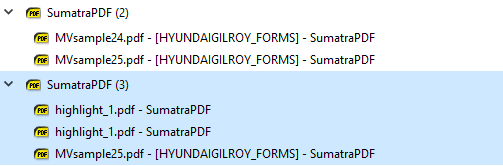
is to have two ways of different start-ups however if windows were open at time of closing 3.4.6 then naturally 3 windows will open with the new file in primary window, the behaviour is the same in current pre-release so cant see any reason for any difference.

@ntrocado in Task Manager (Ctrl + Alt + Del) go to Details view (right click on SumatraPDF process and pick Go to details)
There right-click on list column headers and pick Select Columns.
Select Image Path Name and Command Line.
Use the search bar at the top to narrow to only sumatra process (type suma).
Post a screenshot of that.
Regarding: are you the only one? There are occasional reports but it's certainly not how it works for most people.
I'm not using tabs. The option to remember opened files is on.
Incidentally, I figured out how to get the behavior that I wanted: I just had to set ReuseInstance = true. Now it doesn't reopen files.
I think it is a bit surprising to get duplicate windows just because I had used ctrl-shift-N sometime before in the same session... something that never happens otherwise.
But feel free to close the issue if you don't see a bug here... thank you for your help!
@ntrocado in Task Manager (
Ctrl + Alt + Del) go toDetailsview (right click on SumatraPDF process and pickGo to details)There right-click on list column headers and pick
Select Columns.Select
Image Path NameandCommand Line.Use the search bar at the top to narrow to only sumatra process (type
suma).Post a screenshot of that.
Regarding: are you the only one? There are occasional reports but it's certainly not how it works for most people.
With ReuseInstance = false I get one process for each open file. The command line for each is "path-to-sumatra\SumatraPDF.exe" "path-to-file\filename.pdf".
Now say I have fileA open.
There is one process. The command line is "path-to-sumatra\SumatraPDF.exe" "path-to-file\fileA.pdf".
I press ctrl-shift-N, but no new process spawns, even though now I have two windows with the same file.
Then if I open fileB the previous process stays as it was, plus I get a new one, whose command line is "path-to-sumatra\SumatraPDF.exe" "path-to-file\fileB.pdf". But fileA and its duplicate get reopened in new windows. So now I have two processes and five windows.
Throughout this the image path name is always the same for all processes.
as mentioned reuse is ineffective for tabs but does work without tabs. (One reason older Latex instructions say ensure reuse is set true)
For pre-release 3.6.15850+ default ReuseInstance has been changed to true (should help many users including LaTeX users)
Hitting this too, tabs disabled, every open file starts a new process and reopens everything so far, windows geometrically growing.
Reusing instance sounds like a workaround, separate processes should not reopen all currently open documents.
Since this was not happening in the past, I assume reopening documents is a new feature. Is the use case people closing app with multiple tabs and wanting to come back to them, or is it meant to be a recovery, e.g. after Windows Update?

@miloush people are just piling it on this report even though their specific case might be different.
Please open a new issue, provide detailed repro steps with as much detail as you can, include the version of sumatra, are you using tabs, are you reusing instance etc.
Closing this because the issue reported at the top doesn't repro for me in pre-release 16067
I've tested the following combinations:
- UseTabs = true, ReuseInstance = true
- UseTabs = true, ReuseInstance = false
- UseTabs = false, ReuseInstance = false
If you see other issues with restoring session, describe the steps needed to reproduce it and provide the value of UseTabs and ReuseInstance andvanced settings