

 sumatrapdfreader
Print preview not working
For some reason Print preview is not working for me, I tried with the same PDF's on Acrobat Reader DC and it shows with no issues.
I am running Win 11 22H2 build 22621.819 SumatraPDF v3.4.6 64-bit
Screenshot https://i.imgur.com/Ma0qGaF.png

It will (/ not) in some cases, depends totally on the print drivers methods
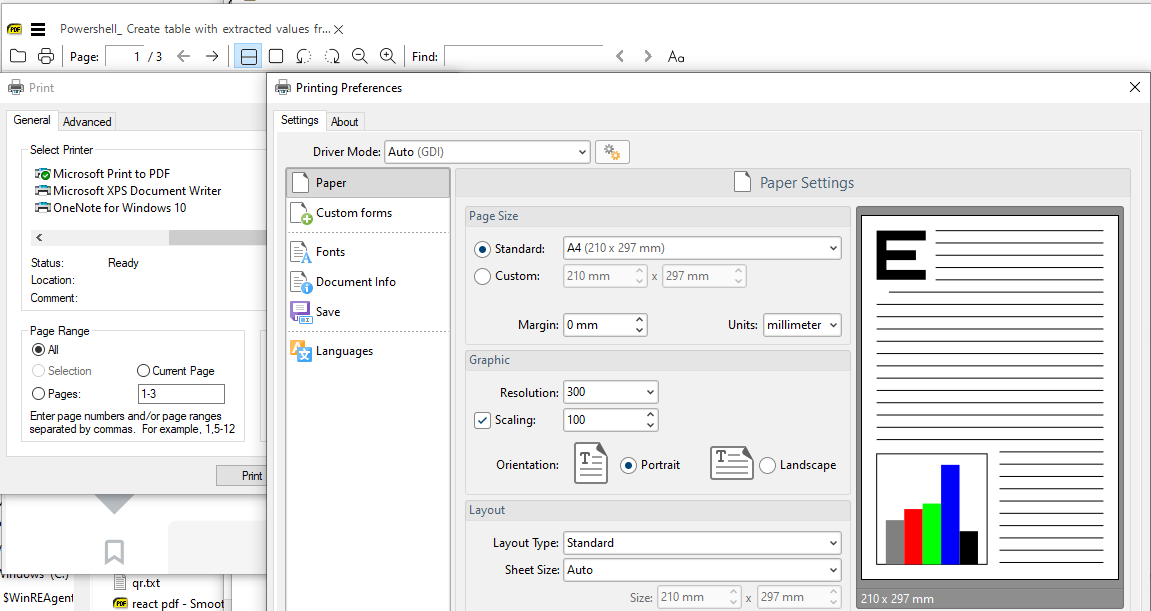 .
.

Preview is a new thing in printer dialog in win 11 (or 10).
Sumatra doesn't have code to provide so it's not surprising it doesn't show.
I'm not sure how this is supposed to work.

Preview is a new thing in printer dialog in win 11 (or 10).
Sumatra doesn't have code to provide so it's not surprising it doesn't show.
I'm not sure how this is supposed to work.
Hei, i figured this out a while ago, other bloated applications like Acrobat Reader have their own print dialog, which allow for you to preview and change setting to the print before printing, SumatraPDF uses the system dialog, which doesn't support previews, for my printer work at least, I am using a Canon network printer. I tried all the drivers (PS, PCL, etc...) With no different results
Some printers have an enhanced previewer see https://support.usa.canon.com/kb/index?page=content&id=ART136795
my HP printer has such a tool but not if I use the basic windows version.
I too have a canon network printer at work, an older model. With Windows 10, printing preview used to work fine, since upgrading to Windows 11, no preview anymore (but printing works fine). So if I am in doubt, I use another program. SumatraPDF still rocks.

@celmi
The newer print preview in win 11 is poor and there is a way to change system settings to use the windows 10 legacy dialogs. Currently stuck on 10 ! I dont have the same problem as you, but on a windows 11 trialled about a year ago I was able to revert to win10 dialogs. The method was raised in another thread so cant point you to that topic however It was a system wide means of regressing 11 to 10 behaviour so not SumatraPDF specific.
Thanks @GitHubRulesOK , I have found the thread you mentioned: https://github.com/sumatrapdfreader/sumatrapdf/issues/3216
In that thread, one posting points to: https://www.winhelponline.com/blog/restore-legacy-print-dialog-windows-11/
I've tried it, and it works so far, as the printing dialogue is now back to old-fashioned styling. But there is no preview either.
So now I am confused: did I not have any print-preview in SumatraPDF before on Windows 10 either? Or did there used to be a preview that is now on Win 11 broken anyway, be it with the modern stile print layout or with the old fashioned one?????

@kubsztal there is nothing to fix in SumatraPDF it simply calls WinPrint so if the Manufacturer such as HP provide a WinPrint Driver with preview Windows will use that driver supplied dialog. That is why every single previewer is different as the manufacturer decides what their printer needs. So depending which machine I am on for each printer or even the same printer the "Preview" differs. Printing is not a SumatraPDF supplied module, That's why the printing is as images only and positioning etc is difficult as it uses the Windows Default Minimal Print system.
Windows 10+/11 changed the system and thus even less likely to show some historic previewers
Hi, thanks for the quick reply. So, the reason is: "Printing is not a module provided by SumatraPDF." This means that other software like Libre Office or Adobe Viewer don't rely on the preview dialog provided by the driver, but implement the print preview themselves, right?
@kubsztal Correct this device has no printers and thus sumatraPDF cannot show any dialog for printing but Adobe provide a fax driver of their own (much of the reason it has 5,112 Files, 1,727 Folders)