

 sumatrapdfreader
Support for vertical text

Please provide a document that shows lack of such support (see https://github.com/sumatrapdfreader/sumatrapdf/wiki/Submitting-bug-reports)

A public domain book http://www.mobileread.com/forums/attachment.php?attachmentid=106819&d=1370779912
In Sumatra PDF http://i.imgur.com/f68VqQF.png In a reader supporting vertical text http://i.imgur.com/gQeIJpi.png
EDIT: Which reminds me, Sumatra doesn't support furigana either.
that seems to be. anyway, SumatraPDF supports Chinese quite well. It might be a good idea to learn Chinese and you can read those novels :) -------------smart cut-off-------------- BTW, there are several question about the sources which are too hard to read to ask kjk. 1.in all those message loop, which is the first, the runMessageLoop() in startup.cpp? and how about the relationship between wndProcToolBar and WndProcFindBox , WndProcPage ? and where do DefWndProcFindBox and other DefWndProc*** get the values? 2.the question might be a bit strange: where is the main()? (I used to use Qt, so the way how you create the form only by api and begin the program without main() is unfamiliar to me. I only know it seems to start with winMain().)
I wanna to join the project and do something about notes. but I am new to that. so I hope you kjk could do me a hand. Thanks a lot. Pleaaaase answers it ,kjk.

@ShiYw I can't spend too much time explaining the code. There's a lot of it and if you can't figure it out by yourself, then you won't be able to make changes.
I can offer few strategies:
- Do a search in all the source code. For example, where does DefWndProcFindBox is set? I don't have that detail in my head but a search tells me that it's only ever referenced in DefWndProcFindBox
- Use the debugger, set a breakpoint and go through the code in the debugger. On Windows everything starts in WinMain in SumatraStartup.cpp. Set a breakpoint there and see where does that go.
- Be precise when asking questions. "In all those message loop" - which ones? On windows there's only one message pump which we dispatch in RunMessageLoop(). There might be a question there, but I don't know what it is.
- Read a basic introduction to win32 programming like http://www.winprog.org/tutorial/start.html and http://www.catch22.net/tuts. I don't have time to explains basics of what WinMain is or how message loop works in win32.
thanks a lot. I did as what you said, and it did work. I read the 1.0 version code and this helped me understand the control part. I will try to make it and do some differences.and , I do know the Message Loop of win32.Thanks a lot.
Date: Sat, 15 Aug 2015 19:50:16 -0700 From: [email protected] To: [email protected] CC: [email protected] Subject: Re: [sumatrapdf] Support for vertical text (#259)
@ShiYw I can't spend too much time explaining the code. There's a lot of it and if you can't figure it out by yourself, then you won't be able to make changes.
I can offer few strategies:
Do a search in all the source code. For example, where does DefWndProcFindBox is set? I don't have that detail in my head but a search tells me that it's only ever referenced in DefWndProcFindBox
Use the debugger, set a breakpoint and go through the code in the debugger. On Windows everything starts in WinMain in SumatraStartup.cpp. Set a breakpoint there and see where does that go.
Be precise when asking questions. "In all those message loop" - which ones? On windows there's only one message pump which we dispatch in RunMessageLoop(). There might be a question there, but I don't know what it is.
Read a basic introduction to win32 programming like http://www.winprog.org/tutorial/start.html and http://www.catch22.net/tuts. I don't have time to explains basics of what WinMain is or how message loop works in win32.
― Reply to this email directly or view it on GitHub.
@Cupbox: Unless I'm mistaken the issue doesn't seem to be fixed yet, so why close this?

For reference since the original comparisons are missing here is one view in a vertical format
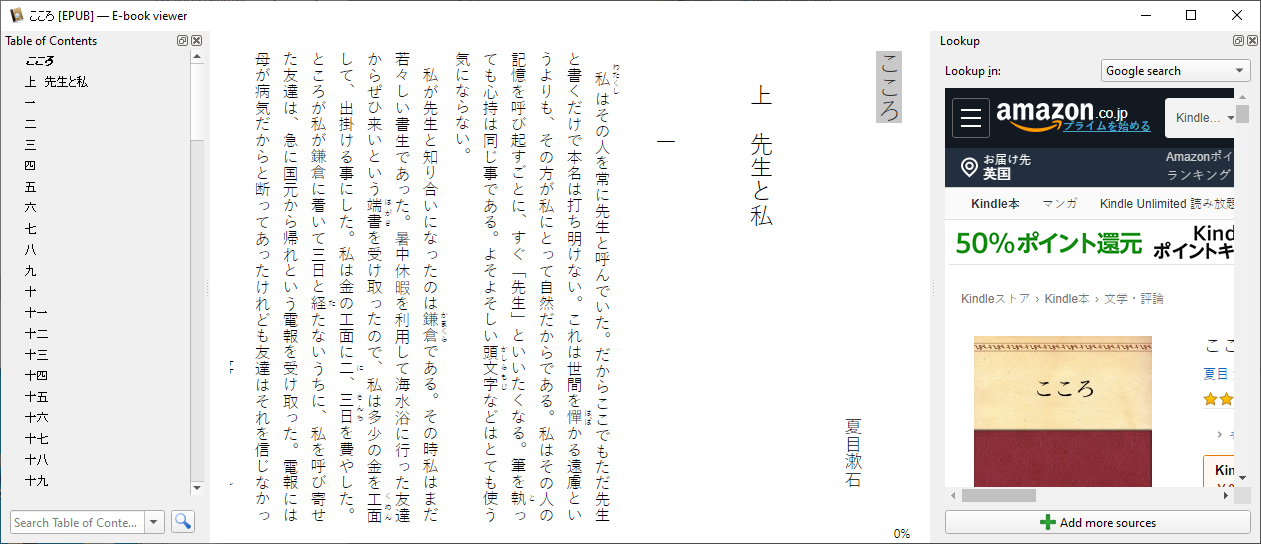
However MuPDf does not suport rotating charcters from horizontal to vertical and this is still the case in 2025/6

@SumatraPeter I found an alternate reader and assumed there wasn't any interest in working on it. Should I reopen?
@Cupbox: Yes, that would be best IMO. If it's an open issue then the dev might get to it some day, but if it's closed then it's guaranteed to be ignored.
See: https://developer.mozilla.org/en-US/docs/Web/CSS/CSS_Writing_Modes
