

 sukeesh
Installation failed: this should not have happened
When I cloned the repository and ran the command python installer from the terminal, I recieve this error message:
Installation failed with unexpected error - This should not have happened. Please check logs at "/var/folders/yl/1y_2z49d7ks9xn5dscy_t9800000gn/T/tmpcu5fq7oc". If you open a bug report, please include this file.
I have tried both python installer and python3 installer, but get the same message each time. I am on Mac OS, if that helps any. Any support would be appreciated. Thanks!

Can you upload this file:
Please check logs at "/var/folders/yl/1y_2z49d7ks9xn5dscy_t9800000gn/T/tmpcu5fq7oc". If you open a bug report, please include this file.

I am not sure where to find this file, as I can't seem to find the yl folder in the project directory.
Also, when I try to run source setup.h, I get a much lengthier error message, but I think this is the most important part of it:
ERROR: Can not execute setup.py since setuptools is not available in the build environment.\n [end of output]\n \n note: This error originates from a subprocess, and is likely not a problem with pip.\nerror: metadata-generation-failed\n\n\xd7 Encountered error while generating package metadata.\n\u2570\u2500> See above for output.\n\nnote: This is an issue with the package mentioned above, not pip.\nhint: See above for details.\n', 1891, 1892, 'ordinal not in range(128)')
Could someone get back to me on this issue? I would like to contribute to this project but need to get the application running on my end first. Thank you!
Sorry, it's a bit complicated for me since I don't have a Mac. But Okay; it says it is missing setuptools for some reason. Can you try:
cd JARVIS_FOLDER
source env/bin/activate
python3 -m ensurepip --default-pip
python3 -m pip install --upgrade pip setuptools wheel
# and if above command works:
pip3 install -U -r installer/requirements.txt
(So basically switch to Jarvis virtualenv and do things descriped here: https://packaging.python.org/en/latest/tutorials/installing-packages/#requirements-for-installing-packages)
Hello,
I followed your given instructions. Once I entered the virtual environment, the ensurepip and pip install commands both worked, and I double-checked to make sure that setuptools was installed, but the last command still did not work.
This is the error message I recieved:
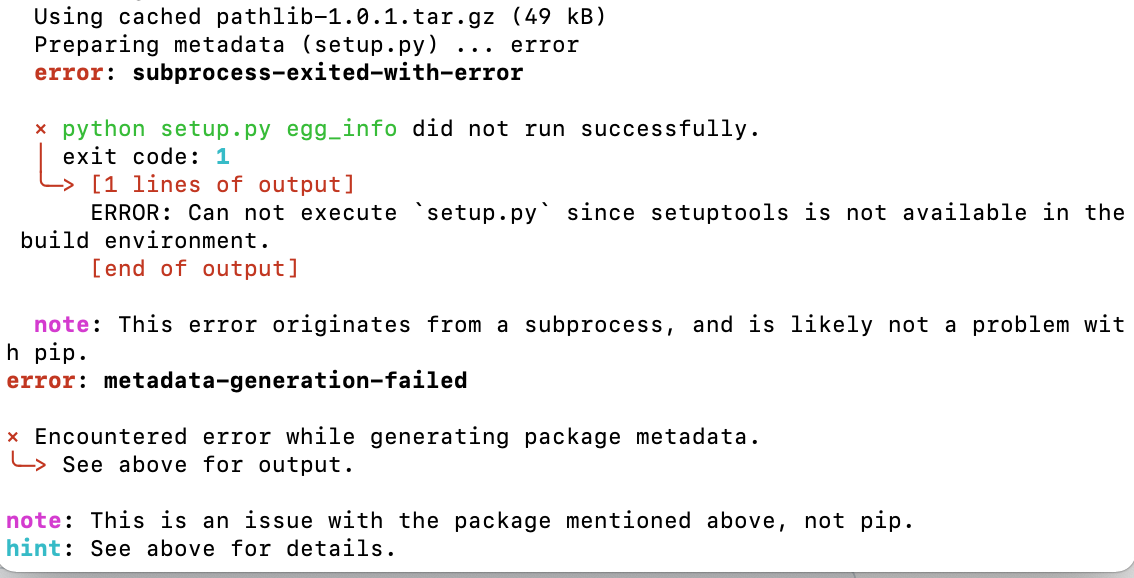 Both python installer and python3 installer still display the same error messages as before.
Thank you for your help!
I'm having (probably) the same error, I don't know what else to attach other than the file it said to open and a picture of the error.
 tmpk2cb0gla.txt

Okay, funny - the error is different, but the problem appears to be in pathlib, too.
https://pypi.org/project/pathlib/
I just noticed two things:
- In Python 3.4, pathlib is now part of the standard library.
- Attention: this backport module isn’t maintained anymore. If you want to report issues or contribute patches, please consider the pathlib2 project instead.
So basically:
Edit installer/requirements.txt
Replace line
pathlib
with
pathlib2; python_version < '3.4'
And check if it works ;).
This worked for me as well. I've noted it's fixed on the master branch - but it hasn't been on the dev branch yet...
