

 sublimelsp
Function parameters highlight the wrong text in the tooltip
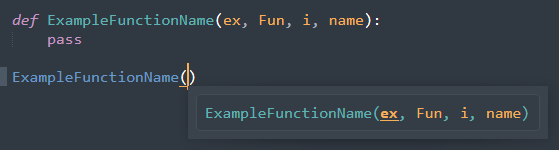
Describe the bug I don't know how to call this, but when typing out function name and parenthesis you get the tooltip with function's parameters and maybe description. The parameters highlight in orange color, but if the parameter name is a substring of the function name (case-sensitive) it will highlight that substring instead (look screenshot).
Expected behavior Parameters inside the parentheses should be highlighted.
Screenshots
Notice the params are highlighted in the function name instead of inside the brackets:

How it should be:
Environment (please complete the following information):
- OS: Windows 10
- Sublime Text version: 4107
- LSP version: 1.3.1
- Language servers used: pylsp
Additional context This bug was present right after updating ST3 to ST4 (with old LSP and pyls). I had some error regarding LSP/pyls after updating ST, so I uninstalled LSP and python-language-server, installed new python-lsp-server and LSP (I had to change in the LSP settings 'pyls' to 'pylsp') but after all that the bug is still there.

labelOffsetSupport was added in 3.14 of the spec. We're at 3.17 now. labelOffsetSupport is a much more clear way to communicate to a language client (us) on what to emphasize. pylsp still uses the unreliable old way of using substrings. I'll add word boundary checks for this, but pylsp should really use labelOffsetSupport. It might be the only language server left that's still using this bad way of communicating labels.
