LSP
 LSP copied to clipboard
 sublimelsp
Auto-show completion documentation after triggering once
Is your feature request related to a problem? Please describe. When showing a completion list, sometimes instead of finding a specific item, the user wants to browse available options and read their description. For example when using LSP-json and browsing through a list of available options for a given configuration option. In that case, it's annoying to have to press F12 for every completion separately.
Describe the solution you'd like I propose to introduce a behavior where if the user presses F12 for one item then switching selection to another item will automatically trigger documentation resolve. The flag will be reset on completing or closing the popup.
Describe alternatives you've considered Pressing F12 for each item.

I also wanted this feature, and have hacked up a simple plugin to enable exactly this. https://github.com/iamkroot/sticky-docs-st It works by hijacking the Up/Down arrow keybindings and invoking the doc popup command every time the keys are pressed. It's still quite primitive, as the "enabled" flag is maintained globally instead of per-view.


Here is my solution (keymap):
  {
    "keys": ["up"],
    "command": "chain",
    "args": {
      "commands": [
        ["move", { "by": "lines", "forward": false }],
        ["auto_complete_open_link"]
      ]
    }
  },
  {
    "keys": ["down"],
    "command": "chain",
    "args": {
      "commands": [
        ["move", { "by": "lines", "forward": true }],
        ["auto_complete_open_link"]
      ]
    }
  }
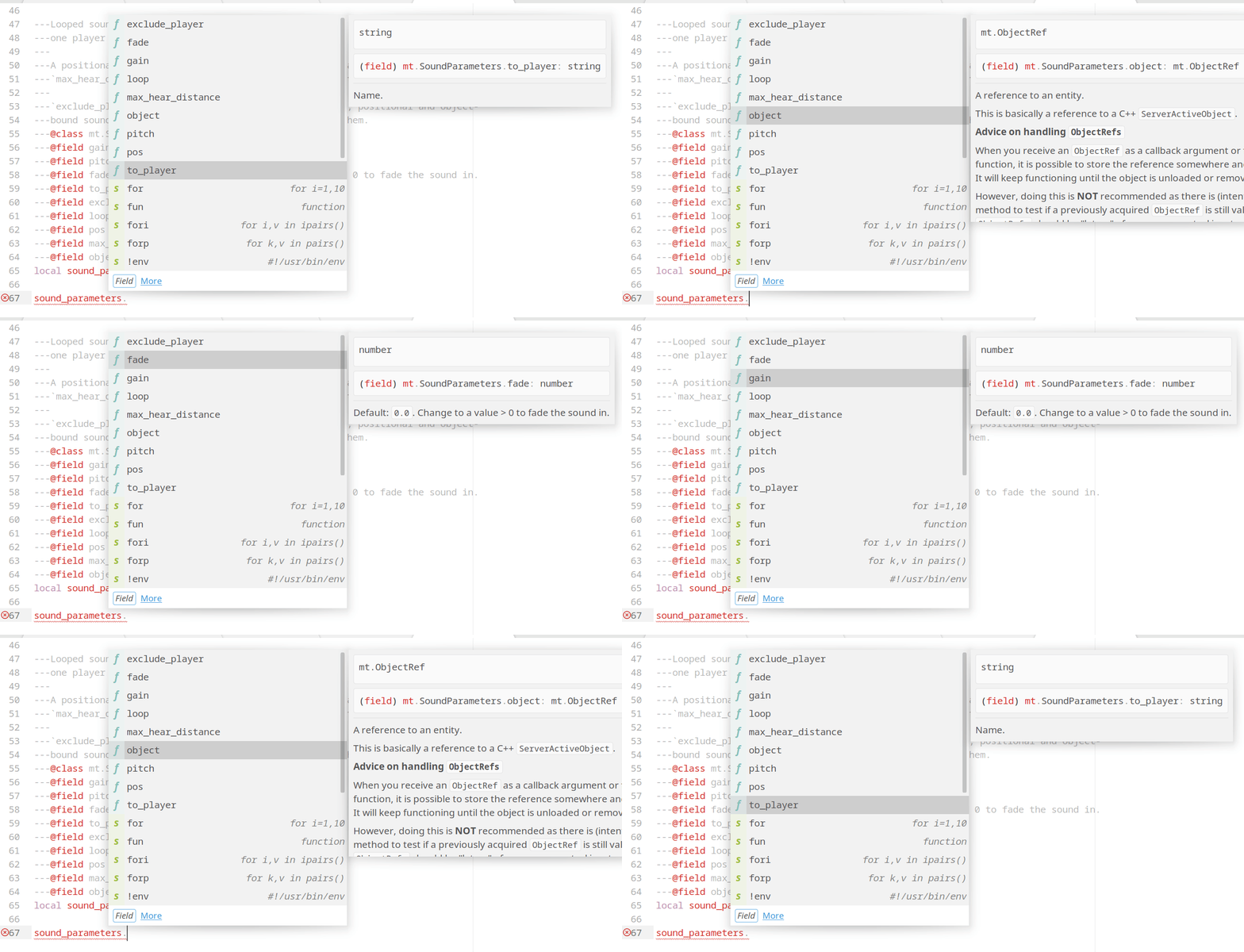
Unfortunately, the first field is not shown when opening the menu.

You could also add a context to avoid triggering this on every key press (even if it might do nothing).
"context": [{"key": "auto_complete_visible"}]
I would even add another context for "popup_visible", because then it will only open the docs popup after you manually clicked the link with the mouse or with F12 and keep it open when you scroll through the items.
    {
        "keys": ["up"],
        "command": "chain",
        "args": {
            "commands": [
                ["move", { "by": "lines", "forward": false }],
                ["auto_complete_open_link"]
            ]
        },
        "context": [
            { "key": "auto_complete_visible" },
            { "key": "popup_visible" }
        ]
    },
    {
        "keys": ["down"],
        "command": "chain",
        "args": {
            "commands": [
                ["move", { "by": "lines", "forward": true }],
                ["auto_complete_open_link"]
            ]
        },
        "context": [
            { "key": "auto_complete_visible" },
            { "key": "popup_visible" }
        ]
    },
I've tested it and it seems to work, but there is still a "bug" with that, because when ST adds its own completions from the words in the buffer, it sometimes adds a link to the definitions in the "details" pane. If you highlight such an item, it will directly trigger the "goto definition" link. And something similar could also happen if another plugin adds completion items with other links in the "details" pane.

So LSP should probably create an own command lsp_open_completion_documentation and use that in the keybindings, instead of auto_complete_open_link. But I'm not sure if that is even possible, because auto_complete_open_link is implemented in ST core and not in Python.