
LSP
 LSP copied to clipboard
 sublimelsp
is posible that LSP should show ST's result if there is no LSP's result?
Feature description or problem with existing feature is posible that LSP should show ST's result if there is no LSP's reulst?
in some case php code work correctly like this post:
https://github.com/bmewburn/vscode-intelephense/issues/1299
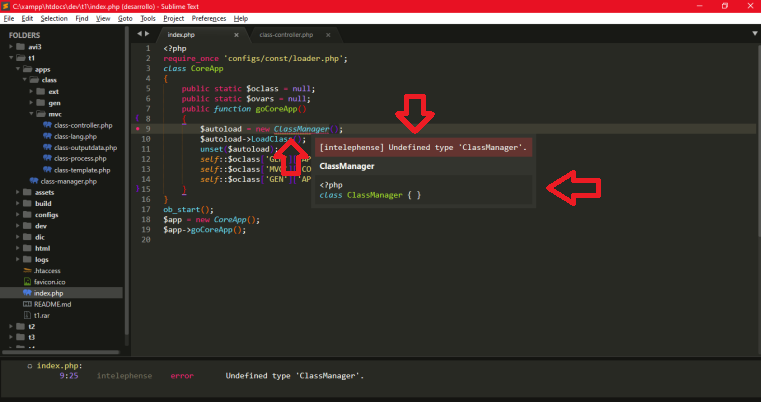
But the plugin LSP-Intelephense keeps showing error that extract from LSP; Can there be a way instead of this "LSP" error to show the native or overwritten result of the ST?
Describe the solution you'd like
This is an example of what the ST and file indexing brought. it already exists is just a matter of showing it, possibly adding some parameter like LSP Enable native Search on Error (this show_symbol_action_links this not work) ....
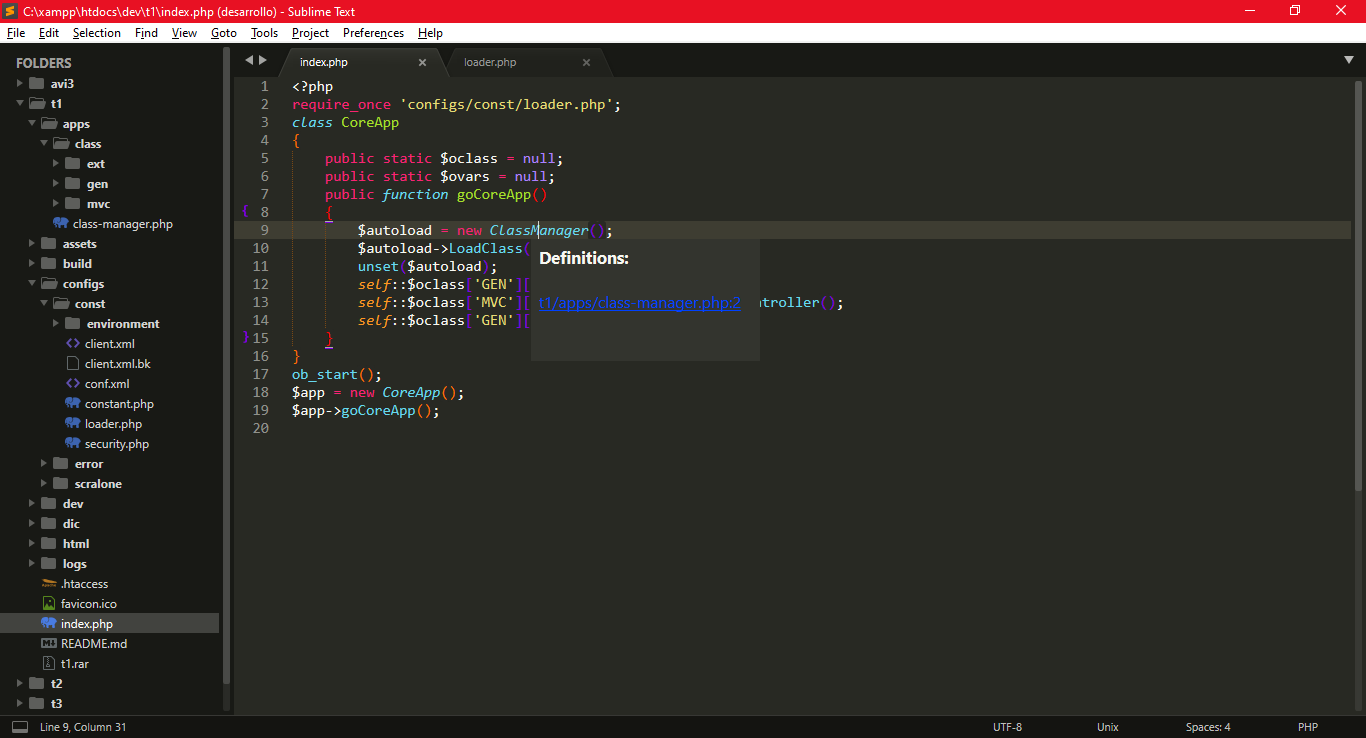
Additional context
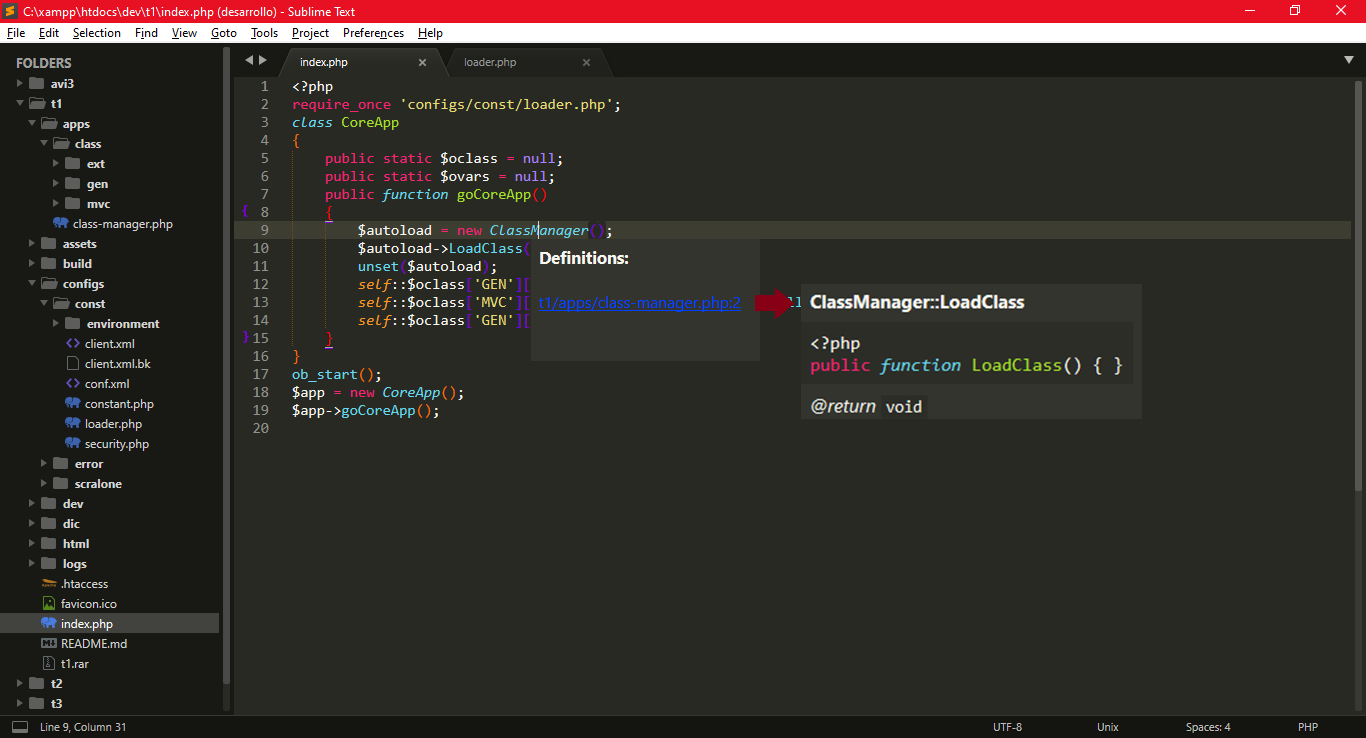
It even seems to me that the results of the popup can be a little more rich; since the editor made the job more difficult to locate the line where a definition was found by ST (there is a parent class, which; there are return of that type or they are void) or the way to passes the native link or store it on LSP to be implement by external plugin like LSP-Inteliphense.
Likee this:

The Python API of SublimeText is not designed around a "provider" pattern where plugins "provide" the hover popup with information. There can be only one plugin, and that plugin will "take over" what ST is doing.
There might be ways around this possibly, but it'll be a hard task to accomplish.
Note that you can set "show_symbol_action_links" to true in LSP.sublime-settings. This will show clickable links in the popup so you can comfortably goto-def and find-references.

show_symbol_action_links put on true not work at the same time with native definition popup; it not appear... need disable LSP, remove all cache and re-index all project to work... i have update mi queestion with some more words to enhancement the description...
any way to passes the native link or store it on LSP to be implement by external plugin like LSP-Inteliphense instead of show and error...
As I understand you want to augment the LSP result with the ST's knowledge of the symbols it has indexed. So if the LSP sees an error somewhere but ST knows about that symbol, you want to not see the error.
I'd say that, if even possible, would be quite hard to implement and possibly also not that performant. I think that it should rather be implemented on the LSP server level - for example, some kind of ignore list. Or you could possibly create some kind of types / mocks in your project to handle that.

Or do you just want LSP to fall back to native "go to definition" when LSP doesn't resolve to any? That could be doable.
Or do you just want LSP to fall back to native "go to definition" when LSP doesn't resolve to any? That could be doable.
yes... only need re-enable the native layout on mause hover i send this to the owner and he say that is not interesting... onaly way to get it working is if a user join the slp and create a branch update of the script relationed.... and the owner approve this.
Or do you just want LSP to fall back to native "go to definition" when LSP doesn't resolve to any? That could be doable.
This would be great.
Even better if there was an an option to see both: native hover popup with all possible references for functions and classes, and LSP popup with language-server info (or decide which one we want to see first. Probably with a hotkey? Maybe some mdpopup link to show another, when both are available?)
Some fluent settings would be great, (e.g. to use default popup only for functions and classes, not all symbols (because symbols like PHP variables doesn't have any native ST popups anyway)) but also I can see a simple way, which, algorithmically, I can describe like this:
- Check which hover popup is user preferred (native ST or LSP one)
- Check if it can be shown
- Show it and provide some way to show another popup (with hotkey, for example) if there is one.
If it's still too much work to implement, at least there should be an option to disable LSP popup on mouse hover, and only use it with hotkey. Since we can't bind ST native popup to hotkeys right now (as far as I know), we loose it completely in case we want to use LSP.
Why the problem is matter:
Native ST popup has richer results, and some of them are vital under certain circumstances.
For example, when working with PHP template engines (such as Smarty), there is no way to get function references with language server provider, but ST native symbol links works fine. Or, another example, if we have to works with project which uses "magical" function calls, such as php __call(), LSP-intelephense can't find function definition, so it shows "no references", although they're present, and ST3/4 really shows us all these function calls.
In order to use LSP with PHP language server, we have to sacrifice these abilities.

@rusproject
At some point I asked in the beta of ST4 in the development chat and the answer was that whoever wanted something had to participate and do it, in slp or a new plugin... that the developers were not focused on doing new things. only in maintaining the existing... new functionalities are not received. That's why this proposal was left aside...
now explaining a bit ST has a native indexer based on the string search, these definitions and symbols are the great advantage that ST has and for which I use it in some old projects... since it tracks all the magic methods:
For example: if a class variable is instantiated and then the whole system applies a SPA architecture you will see that by nesting layers you will be able to navigate through that class variable:
require_once 'class.Main.php';
$WebApp = new Core();
$WebApp->Main();
so you can have
class Core
{
    public static $ObjClass = null;

    public static $ObjVar = null;

    public function Main()
    {
        require_once 'const/Security.php';
        require_once 'const/Constant.php';
        require_once 'class/ClassManager.php';
        date_default_timezone_set(ZONA);
        $this->AUTOLOAD = new ClassManager();
        $this->AUTOLOAD->LoadClass();
        self::$ObjClass['GEN']['APPMANAGER']->RunInit();
        self::$ObjClass['MVC']['MVCMANAGER']->GetContent();
        self::$ObjClass['GEN']['APPMANAGER']->RunClose();
    }
}
or you can access to:
class Class_AppManager
{
    public function RunClose()
    {
        if (!isset($_SESSION)) {
            $Cont = CORE::$ObjClass['GEN']['LOGSMANAGER']->LogEventBuild();
            CORE::$ObjClass['GEN']['LOGSMANAGER']->LogEventSet($Cont, 'user');
        } else {
            if (true === CORE::$ObjVar['CRON']['SERVICE']['RUN']) {
                $Cont = CORE::$ObjClass['GEN']['LOGSMANAGER']->LogCronServiceBuild();
                CORE::$ObjClass['GEN']['LOGSMANAGER']->LogEventSet($Cont, 'system');
            } elseif (true === CORE::$ObjVar['WEB']['SERVICE']['RUN']) {
                $Cont = CORE::$ObjClass['GEN']['LOGSMANAGER']->LogWebServiceBuild();
                CORE::$ObjClass['GEN']['LOGSMANAGER']->LogEventSet($Cont, 'system');
            }
        }
        CORE::$ObjClass['GEN']['VARSMANAGER']->CleanVars_C();
    }

    public function RunInit()
    {
        CORE::$ObjClass['GEN']['VARSMANAGER']->DecVars();
        CORE::$ObjClass['GEN']['LOGSMANAGER']->CheckLog();
        CORE::$ObjClass['GEN']['EXECTIMEMANAGER']->GetTimeExecInit();
        CORE::$ObjClass['GEN']['MEMORYMANAGER']->GetMemoryStandBy();
        CORE::$ObjClass['GEN']['SESSIONMANAGER']->M_Session();
        CORE::$ObjClass['GEN']['HTTPMANAGER']->HTTPProtocol();
        CORE::$ObjClass['GEN']['DEVICEMANAGER']->DetectDevice();
        CORE::$ObjClass['GEN']['USERMANAGER']->GetUserStatus();
    }
}
so I only implement it in old projects where programmers refused to implement namespaces or other object-oriented programming and design techniques...
The big difference in these examples is that this object that belongs to a class is built as the SPA structure is traversed, unlike other designs where you have to declare everything and give it a default value type ... which It has its pros and cons that I'm not going to delve into at the moment. Greetings and have nice day.