

 sublimehq
Invisible folded region/ellipsis icon
Description of the bug
Sometimes, when using the command "Code Folding: Fold", the folded region icon appears invisible. If I type any character next to the folded region, the icon appears.
Invisible folded region icon:
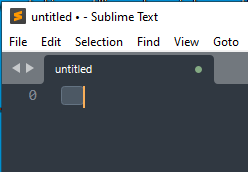
The icon appears when there's a character next to it:

Steps to reproduce
- Open SublimeText
- Open a new view.
- Enter a new line.
- Selection everything (using Ctrl+A)
- Execute: "Code folding: Fold"
Expected behavior
The folded region icon appears.
Actual behavior
The folded region icon isn't visible.
Sublime Text build number
4138
Operating system & version
Windows 10 21H2 (build 19044.2130)
(Linux) Desktop environment and/or window manager
No response
Additional information
I can reproduce it using the portable version, which I used to avoid having installed packages/preference settings pre-set.
The simplest repro is to merely open a new view and enter a single newline, giving you two empty lines.
OpenGL context information
No response

FYI There's also https://www.sublimetext.com/docs/safe_mode.html, in case you don't really want to keep the clean portable.
