

 sublimehq
Highlighting matches not working with #
Description
I'm using Sublime Text 3.2.2, and when I double click on a string with # the feature "Highlight Matches" does not work properly.
https://stackoverflow.com/questions/63193261/sublime-text-3-highlight-matches-with
Steps to reproduce
- Find two identical strings with # , e.g. #test #test
- double click on one string
- Notice that it don't find the matching string
Expected behavior
The identical strings should be highlighted.
Actual behavior
The feature "match_selection": true doesn't work with # and ? characters. Maybe other characters...
Environment
- Build: 3211
- Windows 10
Thank you!

Can't second that. On Windows 10 ST 4079.
While all matches are highlighted if the find panel is open, it does not work if you just select the whole token #123 or do a ctrl+d.

I feel the feature is actually more of Highlight Matched "Words" and it's related to word_separators. In that case, I think the current behavior is by design.

Like I said, highlighting matched word works even with #TEST if find panel is open.
If you just select a word in the buffer, it works only for those without #. It looks like word_separators setting is ignored then.
@Tomorax Can you include some info about the Find panel? What is your search term? Is the Find panel open?
From my understanding, this is working correctly. I understand that it is supposed to:
- If you select a "word" (with the Find panel open or closed), it will highlight other instances of that word. This requires an entire word be matched since it is designed to effectively highlight other instances of a variable/function on the screen. It would be really distracting if every time you made any selection that every other instance of that substring was highlighted. Imagine selecting
abfrom a variableabcand having part ofabs()highlighted, along withabort()and others. The feature would not be useful. - If you have the Find panel open, and search for any string, all matches will be highlighted.
I've tested this, and word_separators does affect situation 1. I took a CSS file, added - to a number of class names and set "word_separators": "./\\()\"':,.;<>~!@#$%^&*|+=[]{}~?",. After this, selecting a class name with -` resulted in it highlighting all other instances of that class on the screen.


I've tried again with Bash. Removed the following as those denote the beginning of variables.
	// removed `$`, `@`, `%`, `-`
	"word_separators": "./\\()\"':,.;<>~!#^&*|+=[]{}`~?",
It does not effect situation 1. (find panel closed)
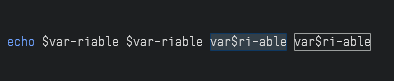
If I ctrl+d $var-iable only this one instance is selected. No other instance is highlighted nor can I add more via following ctrl+d presses.
Selecting the whole variable via double-click works.
It looks like ctrl+d and highlighting don't use the word_separator - at least on Windows.
@deathaxe I am guessing if you put the $ in the middle it would work. I think the word matching does require a \b match at either end, and \b won't match next to a $.
That's it. Unfortunatelly \b is not sufficient in a couple of syntaxes. It should ideally respect/use the specified word_separators
Can't second that. On Windows 10 ST 4079.
While all matches are highlighted if the find panel is open, it does not work if you just select the whole token
#123or do actrl+d.
Yes, I only used as I described in steps 1-3. I didn't use the 'Find Panel' (CTRL+F). When I do ( double click on string, CTRL+F ) it works properly. I just noticed that.
Like I said, highlighting matched word works even with
#TESTif find panel is open.If you just select a word in the buffer, it works only for those without
#. It looks likeword_separatorssetting is ignored then.
Yes, it seems to me now that we are talking about two different features:
- highlight matches with find panel
- hithlight matches without find panel (when I only select the string)
Like I said, highlighting matched word works even with
#TESTif find panel is open.If you just select a word in the buffer, it works only for those without
#. It looks likeword_separatorssetting is ignored then.
my word separators for this syntax: "word_separators": "~!$%^&*|+=`~,()[]{}"
I think I will use only the 'find panel' for now on.
@Tomorax Can you include some info about the Find panel? What is your search term? Is the Find panel open?
From my understanding, this is working correctly. I understand that it is supposed to:
- If you select a "word" (with the Find panel open or closed), it will highlight other instances of that word. This requires an entire word be matched since it is designed to effectively highlight other instances of a variable/function on the screen. It would be really distracting if every time you made any selection that every other instance of that substring was highlighted. Imagine selecting
abfrom a variableabcand having part ofabs()highlighted, along withabort()and others. The feature would not be useful.- If you have the Find panel open, and search for any string, all matches will be highlighted.
I've tested this, and
word_separatorsdoes affect situation 1. I took a CSS file, added-to a number of class names and set"word_separators": "./\\()\"':,.;<>~!@#$%^&*|+=[]{}~?",. After this, selecting a class name with-` resulted in it highlighting all other instances of that class on the screen.
@wbond I didn't use a search term, because I didn't use the search Panel - I didn't use 'CTRL-F' nor 'CTRL-D' . I only double click on the string as my most frequent use.
But I think I will use 'CTRL-F' for now on, because it seems more effective. I didn't know that the behaviour ist different.
I've tried again with Bash. Removed the following as those denote the beginning of variables.
	// removed `$`, `@`, `%`, `-`
	"word_separators": "./\\()\"':,.;<>~!#^&*|+=[]{}`~?",
It does not effect situation 1. (find panel closed)
If I
ctrl+d$var-iableonly this one instance is selected. No other instance is highlighted nor can I add more via followingctrl+dpresses.Selecting the whole variable via double-click works.
It looks like
ctrl+dand highlighting don't use theword_separator- at least on Windows.
-
[ ]
-
[ ]
That's it. Unfortunatelly
\bis not sufficient in a couple of syntaxes. It should ideally respect/use the specifiedword_separators
@deathaxe I tryied with T#ST T#ST T#ST And worked as I expected. (It highlighted all 03). So the case is when the character is not in the middle, the behavior ist different. No problem, I will use 'Find Panel' for now on.
Bumping this as I'm looking for a solution to this exact issue.
I understand that making text highlight match any sequence of characters can cause significant drop in performance, but I often need this functionality and I'm willing to take the trade. Please add this as an option.
