

 sublimehq
Underline in path names showed as a space on the tabs bar hovering
Description
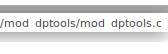
The correct path for the file on the image is: /mod_dptools/mod_dptoos.c
To keep things clear, this is the tabs bar:

Steps to reproduce
- Unknown
- May be open a file with underscore on the name?
- May be add direcotory where where there is a file with underscore on the name?
Expected behavior
/mod_dptools/mod_dptoos.c
Actual behavior
/mod dptools/mod dptoos.c
Environment
- Operating system and version:
- Linux
Mint 19.1 XFCE4 x64- Kernel
4.15.0-45-generic #48-Ubuntu SMP Tue ,Jan 29 16:28:13 UTC 2019 x86_64 x86_64 x86_64 GNU/Linux - Desktop Environment
XFCE4 -> Xfwm4 + Compositing
- Kernel
- Linux
- Sublime Text:
- Build
3200 - 64 bit
- Build
So this is within the tooltip you are seeing the issue?
What font do you have mapped to "Sans" on your machine?

I have DejaVu Sans and am not seeing this, for the record.
You can check with fc-match sans in a shell.


Hi. I am sorry I missed @FichteFoll and @wbond back in 2019. I temporarily muted the Sublime repo.
The output of the command is:
$ fc-match san
DejaVuSans.ttf: "DejaVu Sans" "Book"
I am now using Sublime Text build 4152 and this problem also happens with open files: