

 strukturag
Unwanted color change
Hello. I always use this library to convert jpg to heic since latter takes less space, but I have a problem that color in output heic file is kind of different comparing with input jpg, despite the fact that they both use same settings.
For instance this one, (jpg/heic/difference (I mirrored 2nd one for easier comparison)) the HEIC (2) has orange spot whereas JPG (1) has red one.
Looking at the map for the difference, it is clear that many colors have changed, and not so much their brightness (then the map for the difference would be black and white) as the color values themselves
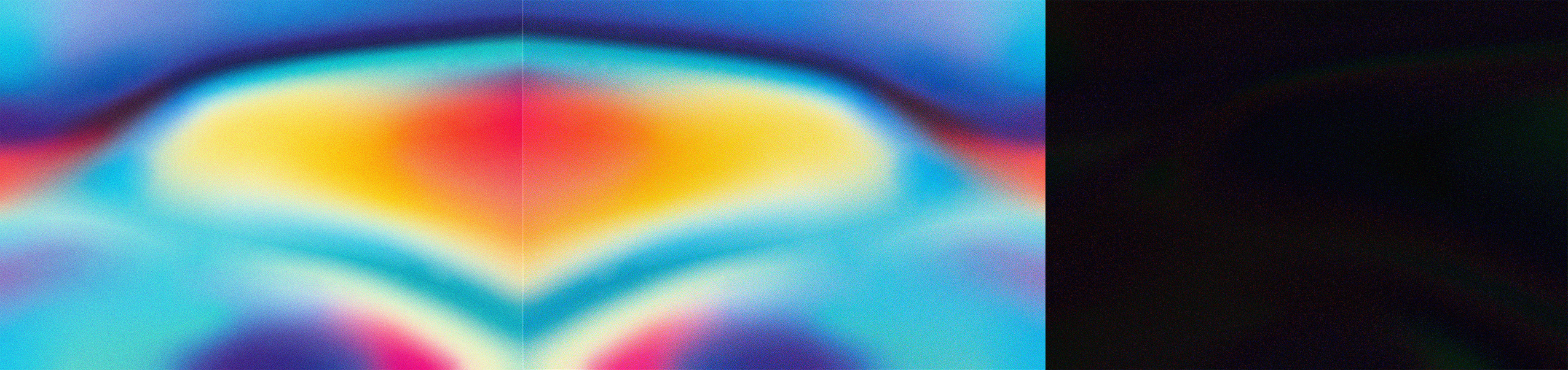
I surfed many issues' pages but didn't find anything helping. Is there any way to preserve color, not its quality but its value. The problem should be in heic, since when you convert png to jpg there ain't any visible color changes. And even I use -L parameter it doesn't help. Thank you.

There was a fix for HDR color conversion coefficients (643ca81c20b065bf9eac2e6d86eaef5da44d0699). Did that fix the issue?

I am experiencing this issue in Windows 11.
I am converting images from tiff to avif using both gimp 3 and very latest ImageMagick (7.1.1-47) (which as far as I understand use libheif for that) - and get absolutely the same slight brightness change, especially visible in midtones.
Image is getting slightly brighter after saving with AVIF. Pixel values seems to be correct, so it is likely some marker on how these should be displayed. Displayed brightness difference is both in FastPictureViewer, Firefox, Chrome. There is no brightness difference if I re-open saved images in Gimp 3.
Small test images are attached. Original image is in sRGB with normal sRGB gamma.
Attempts to embed sRGB color profile in avif file does not improve anything. test.zip

The color issue with HEIF has been a longstanding problem. Currently, there seems to be no way to convert other formats to HEIF/AVIF while preserving the original colors. Even HEIF images taken by Sony cameras exhibit incorrect colors.

I am experiencing this issue in Windows 11.
My issue was on ImageMagick side and it was fixed by allowing custom CICP parameters. I was able to get perfect match for sRGB colors. https://github.com/ImageMagick/ImageMagick/issues/8212