

 strongbox-password-safe
Adding a single tag always requires return
I determined that you have to press return to create a new tag even if you want to create only one. Typing and then switch to another field or press done (without a return) doesn’t work. Without pressing return the tag doesn't turn blue and the button "Done" is disabled if there are no other changes.
Pressing return to finish a tag is ok, but I would expect that switching to another field or pressing done will complete the last tag that was added.
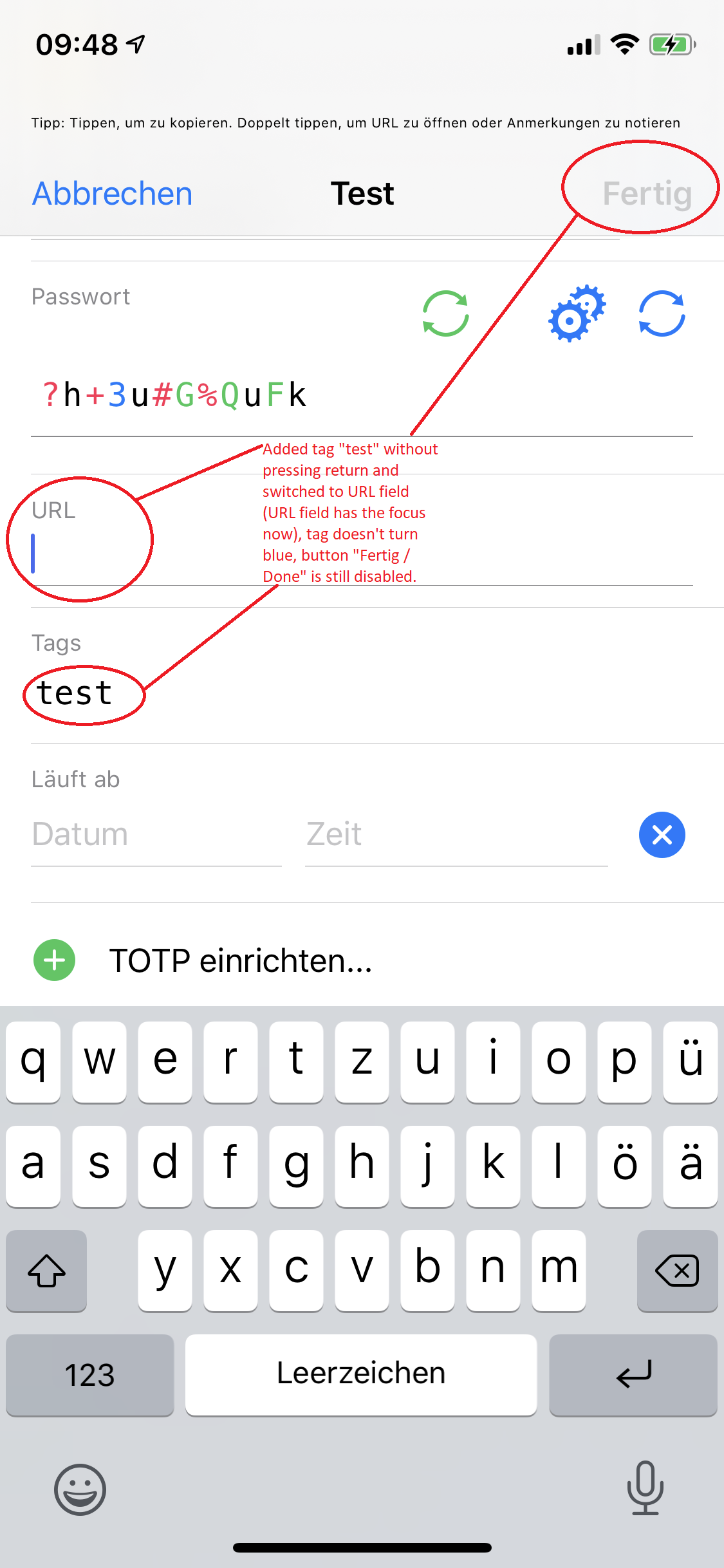

Hi @mmcguill It's better now in 1.47.4, but I think not yet perfect.
-
You can now complete a tag by pressing return or switching to another field, but not by tapping 'Done' when there are no other changes in that entry, because 'Done' doesn't get enabled just by typing in the tags field (only after pressing return or leaving focus).
-
You can select a tag by tapping it (highlighted in grey), but you can't overwrite it just by typing a new one. You can only remove it by pressing backspace when it's marked. Otherwise a new tag is appended.
And a small thing I noticed during the tests: In editing mode you have to exactly tap on an entry's text field to modify it. If you accidentally hit the label of the field it's just highlighted grey as if you would like to copy it, but the field doesn't get the focus and you have to tap it again to edit the field. Perhaps this is something for a separate issue?!
Hi @Slummi
- Interesting, hadn't noticed that, I'll see if it's an easy fix in next release.
- Again, I'll look at a quick fix.
- Yes, aware of this issue, thanks.

Hi @Slummi - This isn't a super quick fix, none of them are, so they'll probably take a while to patch.