vscode-spell-checker

vscode-spell-checker copied to clipboard
 streetsidesoftware
[Bug]: VSCode: `noConfigSearch` not working as expected
Kind of Issue
No response
Tool or Library
cspell
Version
v2.16.0 (VSCode extension)
Supporting Library
Not sure
OS
Windows
OS Version
Win10 Pro x64 21H2
Description
In the VSCode CSpell extension, the noConfigSearch option isn't working as expected -- CSpell still finds and uses config files that are "local" to files opened outside the current VSCode workspace folder.
Steps to Reproduce
- Create a new folder called
primary - Create a
primary\README.MDfile - Create a minimal
primary\cspell.jsonfile, contents:{ "version": "0.2" } - Make a copy of the
primaryfolder calledsecondary - Ensure your layout looks like this:
root
├─┬ primary
│ ├── README.md
│ └── cspell.json
├─┬ secondary
│ ├── README.md
│ └── cspell.json
- Open VSCode
- (Install the CSpell extension as needed)
- File -> Open Folder ->
primary - File -> Preferences -> settings ->
User - Enable
noConfigSearchin the CSpell section (cSpell.noConfigSearch) - File -> Open File ->
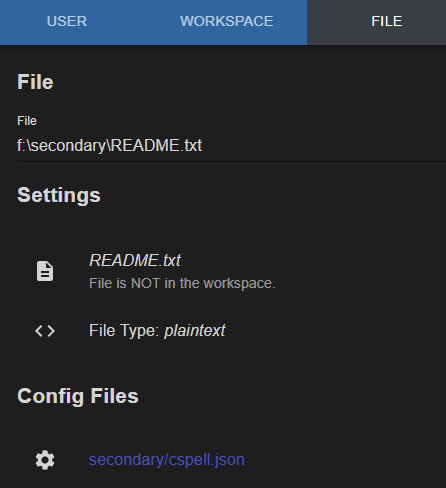
secondary\README.md - Open the
Spell Checker Preferenceswindow - Click the
FILEtab - Make sure the "File" drop-down shows
\secondary\README.md Config Filesshould now showsecondary/cspell.json
Expected Behavior
At step 16 above, Config Files should show primary/cspell.json only.
Additional Information
No response
cspell.json
{ "version": "0.2" }
cspell.config.yaml
No response
Example Repository
No response
Code of Conduct
- [X] I agree to follow this project's Code of Conduct