

 streamlit
Taking more complex user input
Problem
We need to take some complex data or configuration from the user in a GUI way.
But streamlit currently allows the following types of input:
- text
- text area
- number
- slider (number)
- slider selection (str)
- checkbox (bool)
- multiselect
- radio
(am I missing something ?)
-
Streamlit does not have a list input. Something where users can click a small
+icon and add any number (min and max may be defined) of items to a list. Each item on the list may be a text or number. -
Streamlit does not have a dict input, where the user can give some key-value pairs, and add items to the dict.
this image gives the flavor of what I am trying to say.

you see the + icon and the delete icon. they should allow an arbitrary no of items in a list or dict.
Solution
It would be great if we could input more complex custom types in streamlit. (beyond list and dict as said above)
For example, we may define a pydantic base model, and streamlit would input that.
from typing import List

from pydantic import BaseModel
import streamlit as st

class MyCustomData(BaseModel):
    name: str
    age: int
    friends: List[int]

st.get_input(MyCustomData) # imaginary
Some code like shown above should generate a form to input the data of the structure defined.

That is really a good idea! It will make the speed of develop an App faster, because it provided some methods that used widely in it. That is the value of Streamlit.
By the way, it is easily to make the method come true. Just create a "widget" with some methods which Streamlit had yet. The only problem of it is change the style of buttons.

Hi, Streamlit does have a way to add lists its called streamlit-tags Check it out here: https://github.com/gagan3012/streamlit-tags

Hi @gagan3012 , what you have built is really great. But I am not looking for tags.
I am looking for list, with the ui as described in the issue description.
The main problem is I don't know any frontend. Otherwise I would have attempted to build something.
The streamlit tags outputs a list and it also does have a min/max limit of elements from your description above I think it can solve your problem Also you can create an issue for enhancements in my repo and I will try to incorporate it Thanks
The streamlit tags outputs a list and it also does have a min/max limit of elements from your description above I think it can solve your problem
The objects in the list is only strings.
What if I want another datatype(customly complex) to be in the list ?
I may sound vague and foolish. But I will soon create a discussion on streamlit community forum, about the usecase that streamlit can cater to in future.
Streamlit does not have a list input. Something where users can click a small + icon and add any number (min and max may be defined) of items to a list. Each item on the list may be a text or number
If you are talking about, this line, then your project is great. But this is just a part of the larger picture, I am trying to cover.
Yes 🥰 your project is just wonderful for list of text or integers.
I see your point. It would be really interesting to see the UI for complex data input.
I've made a hacky solution by generating text inputs in a form in a for loop linked to a number input. It kind of works for my use case but it's not pretty or super practical. I actually expected streamlit to have some kind of list input(besides multiselect) since a to-do list app is such a common starter project :) So +1 for this one from me!

Thanks for the suggestion @aahnik! We'll keep this in mind as a potential improvement to make going forward.
Feel free to link the discussion you've started in the community forums here if you've already made that post -- the more community interest we have in this, the more likely we'll be to prioritize it on our roadmap!

Hi @vdonato, the community post is https://discuss.streamlit.io/t/broadening-streamlit-usecase/12724
Just to support the feature request & topic starter. I had a similar problem - needed to accept more complex data into database. Ended up pasting a table + a selectbox with empty element + a generic form generator for dataclasses. If selectbox is empty - allows to create a new entry, if item is selected - allows to edit / delete (depends on options).
Looks like this:
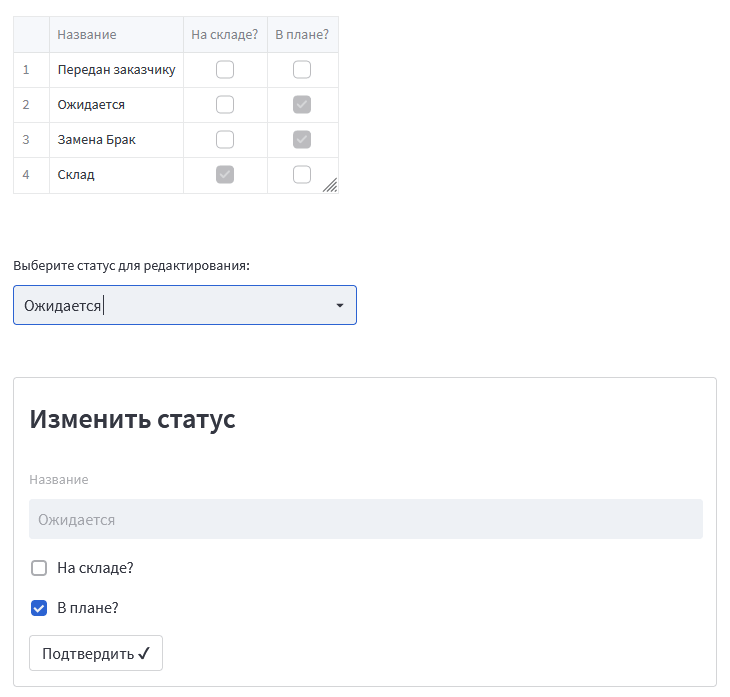
I'd badly want some more convenient way to enter new data - editable table, or a list of generated rows of fields with buttons, like in example above.

Hey all! We are working on adding a widget that lets you edit dataframes, arrays, lists, and dictionaries. For this first iteration, it will only allow editing existing objects. But we already have a follow-up project planned to allow adding and deleting items/rows. I think this should solve the original problem. Expected launch date is January!

This should be solved with the data editor we just published, which allows list and dict input: https://blog.streamlit.io/editable-dataframes-are-here/
Closing.
@jrieke thank you for update. Blog post and main article are quite short and not detailed enough. Could you clarify a few points?:
- which data types are supported? Enums? Dates? Nullability?
- What about custom classes with limited selection of options (i.e. like selectbox)?
- What about tag-like things (multiple options, i.e. multiselect-like)?
- Can I track somehow which row is selected to give a form for that element editing?
@CHerSun
which data types are supported? Enums? Dates? Nullability?
Editing is currently supported for text, numbers, boolean. Other common types (e.g date, datetime, time) will be supported very soon. Nullability is supported for all types, but it can't be deactivated yet.
What about custom classes with limited selection of options (i.e. like selectbox)?
With dataframe as input, you can convert the column to category. This will give you a dropdown. You can find an example here: https://github.com/streamlit/streamlit/issues/6194#issuecomment-1447165374 We might also support this soon via column configuration (without the need to use Pandas DataFrame).
What about tag-like things (multiple options, i.e. multiselect-like)?
This is not yet supported for editing in the data editor. But we have this on our list of potential improvements.
Can I track somehow which row is selected to give a form for that element editing?
Row selections is one of the next features we will add to st.dataframe.
which data types are supported? Enums?
Do you have an example on how you would like to use enums?

Thank you, @LukasMasuch, for a detailed answer. I'm really looking forward to the upcoming changes. This is cool.
For enums I'm interested in things like:
class Supportability(IntEnum):
    NotSet = 0
    Low = 1
    Medium = 2
    High = 3
    Full = 4
being one of the class fields. With category I guess that should be fine (though without translations currently, as there's no format_func).