

 streamlit
Width of Altair vconcat chart not correct
Summary
I am trying to implement multiple concatenated charts with same x-axis to share a selection functionality. When adding them to streamlit one at a time, the width seems to adjust to the container automatically, but something goes wrong when adding the concatenated charts.
Steps to reproduce
Code snippet:

import pandas as pd
import numpy as np
import altair as alt
import streamlit as st

st.set_page_config( layout='wide')

x = np.linspace(10,100, 10)
y1 = 5*x
y2 = 1/x

df1 = pd.DataFrame.from_dict({'x': x,'y1': y1, 'y2': y2})

c1 = alt.Chart(df1).mark_line(
).encode(
    alt.X('x'),
    alt.Y('y1')
)

c2 = alt.Chart(df1).mark_line(
).encode(
    alt.X('x'),
    alt.Y('y2')
)

#Individual, Static Charts
st.altair_chart(c1, use_container_width = True)
st.altair_chart(c2, use_container_width = True)

#Concatenated Charts with shared zoom function
zoom = alt.selection_interval(bind = 'scales', encodings = ['x'])
st.altair_chart(c1.add_selection(zoom) & c2.add_selection(zoom), use_container_width = True)
Expected behavior:
Concatenated charts of full width with zoom functionality.
Actual behavior:
Concatenated charts of standard width with zoom functionality
Is this a regression?
No.
Debug info
- Streamlit version: 0.76.0
- Python version: 3.8.5
- Using PipEnv
- OS version: macOS Mojave
- Browser version: Chrome
Additional information


I have this problem too. I'm using vconcat to share the legend across multiple charts, but doing so prevents the charts from filling the container width.

I also experience this issue. Just commented on #700 as I only noticed this open issue just now :)


This issue stems from how the width is set when useContainerWidth is true in streamlit/frontend/src/components/elements/VegaLiteChart/VegaLiteChart.tsx.
When you create a vconcat chart, the spec that is created has a field called vconcat, which is an array holding encoding, mark, and width information about each subchart. Currently, this width field is not being set when useContainerWidth is true.
The fix is to introduce this updateWidth() function, and then update the generateSpec() function:
private updateWidth = (spec: any, width: number) => {
  spec.width = width
  if (spec.vconcat) {
    for (const chart of spec.vconcat) {
      chart.width = width - EMBED_PADDING // vconcat charts need the embed padding twice
    }
  }
}

public generateSpec = (): any => {
  const { element: el, theme } = this.props
  const spec = JSON.parse(el.get("spec"))
  const useContainerWidth = JSON.parse(el.get("useContainerWidth"))

  spec.config = configWithThemeDefaults(spec.config, theme)
  if (this.props.height) {
    // fullscreen
    this.updateWidth(spec, this.props.width - EMBED_PADDING)
    spec.height = this.props.height
  } else if (useContainerWidth) {
    this.updateWidth(spec, this.props.width - EMBED_PADDING)
  }
  // Function continues below ...
While testing this fix, I saw that there are still noticeable width issues with vconcat charts when the length of the labels of the y-axis are long. In this case, the chart ends up being wider than it should be. I am not currently sure what the fix for this is, but I imagine there is something else in the spec that needs to be set. Any guidance on fixing this long label issue would be helpful.

I played around with @kylelrichards11 code and modified it to work with both hconcat and vconcat. A few things I changed:
- First recursively compute the base width/height of all the charts
-
hconcat: the width is equal to the sum of the individual chart widths. The height is equal to the heighest individual chart. -
vconcat: the width is equal to the biggest width of the individual charts. The height is equal to the sum -
single: Use spec.width or TopLevelSpec.config.view.ContinuousWidth if there is no width for that chart. Idem for height.
-
- Adapt the widths of the individual charts as explained above, but keep the different chart ratios by using the hconcat/vconcat widths. (Note: You only need to set width/height for the base charts and not on the concat charts)
As @kylelrichards11 mentioned, this almost seems to work, besides some issues with long tick labels.
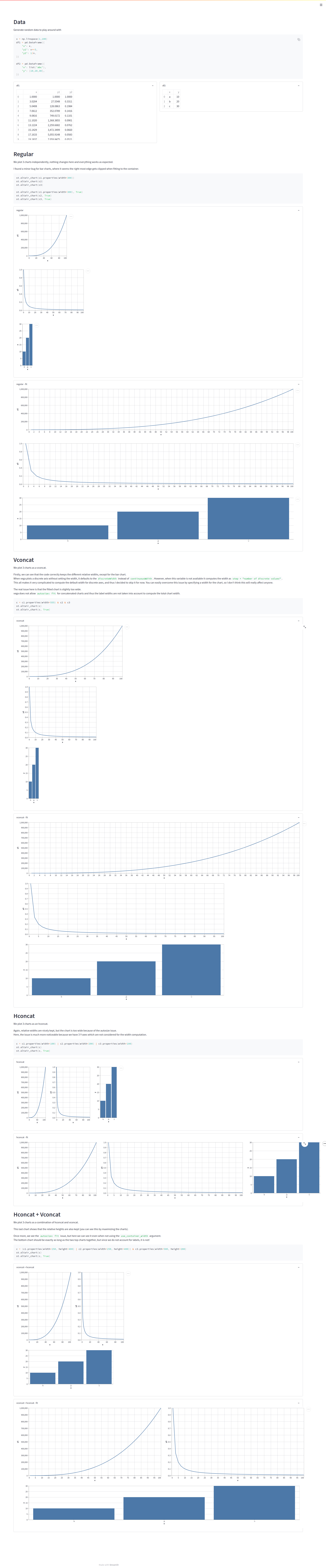
I tracked this issue a little further and it seems to be because vega-lite does not support the autosize fit type for concatenated charts. This means that the chart's width/height are not adapted to take into account the required space for the labels and thus our charts are bigger than we want.
This is a known vega-lite limitation and they cannot / wont fix it until there is a change in vega, which does not seem to be happening any time soon. (vega-lite - vega)
AFAIK, there is thus no real solution to this for streamlit, without fixing both issues mentioned above.
For those interested, here is my code, which almost works, except for that annoying label issue. For vconcat the results are not too bad, since there is only one Y label to take into account, but with hconcat the issues stack, because each chart adds an extra axis.
I am pretty annoyed at this issue and might look to see if things are better with Bokeh... :disappointed:
code
/*********
 * TYPES *
 *********/
type Size = [number, number]

/*********
 * FUNCS *
 *********/
function getChartSize(spec: any, defaultSize: Size): Size {
  if ("hconcat" in spec) {
    // Sum widths & maximum height
    return spec.hconcat
      .map((subspec: any) => getChartSize(subspec, defaultSize))
      .reduce(([w0, h0]: Size, [w1, h1]: Size) => [w0 + w1, Math.max(h0, h1)])
  }

  if ("vconcat" in spec) {
    // Maximum width & sum heights
    return spec.vconcat
      .map((subspec: any) => getChartSize(subspec, defaultSize))
      .reduce(([w0, h0]: Size, [w1, h1]: Size) => [Math.max(w0, w1), h0 + h1])
  }

  // Set width & height for updateChartSize
  spec.width = spec?.width ?? defaultSize[0]
  spec.height = spec?.height ?? defaultSize[1]
  return [spec.width, spec.height]
}

function updateChartSize(spec: any, chartSize: Size, viewWidth: number, viewHeight: number | undefined): void {
  if ("hconcat" in spec) {
    spec.hconcat.forEach((subspec: any) =>
      updateChartSize(
        subspec,
        chartSize,
        viewWidth - EMBED_PADDING,
        viewHeight
      )
    )
  } else if ("vconcat" in spec) {
    spec.vconcat.forEach((subspec: any) =>
      updateChartSize(
        subspec,
        chartSize,
        viewWidth - EMBED_PADDING,
        viewHeight
      )
    )
  } else {
    // Rescale Width & Height whilst maintaining ratio
    spec.width *= viewWidth / chartSize[0]
    if (viewHeight) {
      spec.height *= viewHeight / chartSize[1]
    }
  }
}

/***********
 * UPDATES *
 **********/
// Update code in generateSpec()
if (this.props.height || useContainerWidth) {
  // Adapt chart to viewport width
  const chartSize = getChartSize(
    spec,
    [spec.config.view.continuousWidth, spec.config.view.continuousHeight]
  )
  updateChartSize(
    spec,
    chartSize,
    this.props.width - EMBED_PADDING,
    this.props.height
  )
}
EDIT
I also pushed my code changes above to a branch on my forked repository.
I did not write any tests, because this does not work as intended and thus I will not push this to the main branch.
However, I tested this with a small demo application (see screenshot below).
demo screenshot

Does the recent label change mean someone is working on this? Would be great to understand if it has been prioritised or if more information is needed!


Thought I'd mention: Altair only provides interactivity between charts when they are concatenated (e.g. shared selections), so this width issue locks out some great functionalities of altair if a user wants to have charts with dynamic sizing. Thanks in advance for a fix!


does `autosize='fit-x' help here?
chart = alt.vconcat(c1.add_selection(zoom) & c2.add_selection(zoom)).configure(autosize='fit-x')
st.altair_chart(chart, use_container_width = True)
