

 streamaserver
Anonymous access cannot be disabled in Settings after being enabled
Issue description
After anonymous access is enabled in the Settings page (app.url/#!/settings/settings), it cannot be disabled through the Settings page.
I believe this issue is fairly high priority, as there's no easy way I can see to disable the access once enabled. I don't know how to bypass the Settings UI and edit this setting directly on my machine.
Steps to Reproduce
- Navigate to settings page on a fresh instance
- Allow anonymous access by checking "Enable Anonymous Access" checkbox
- Click save changes.
- Refresh the page. Anonymous access is now enabled, so the check box remains checked.
- Uncheck "Enable Anonymous Access"
- Save changes
- Refresh the page. The checkbox is still checked, and anonymous users can still access the dashboard
Expected Behavior
On step 7 above, the checkbox should be unchecked and anonymous users should be redirected to the login page
Actual Behaviour
Anonymous users continue to be able to access the dashboard.
Environment Information
- Operating System:
Linux redacted 4.9.0-12-amd64 #1 SMP Debian 4.9.210-1 (2020-01-20) x86_64 GNU/Linux - Streama version:
v1.8.3 - Custom streama build, describe customizations or provide link to fork (If Applicable): N/A
- Container Version (If Applicable): N/A
Hmm, this may be a duplicate of or related to #962, although I was able to get other settings on the Settings page to persist: changing application name and "show version number" both appeared to apply correctly.
Alright, I was curious, so I did a bit of investigation.
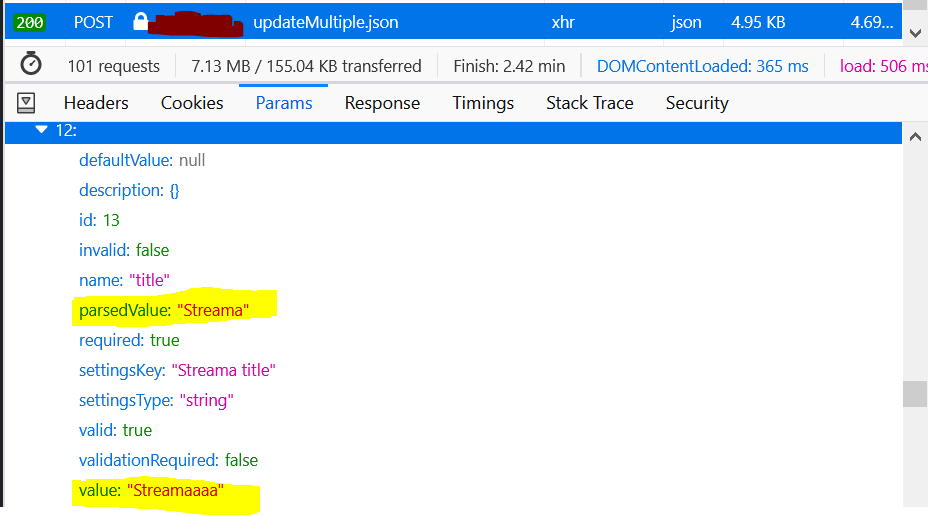
Looking at the POST that the settings page sends to the server, the problem seems to be client-side. I don't think the checkbox is updating its value properly: the POST data contains a true value for the checkbox.
Process: I unchecked "Enable anonymous access", then clicked "Save Settings"
From the resulting POST to updateMultiple.json I see (in Firefox devtools):

It appears to update other properties correctly. For example, from that same POST request:
Hope this saves you a little bit of debugging time :)
Found a fix: going to users and disabling the anonymous account disables Anonymous access. This also unchecks the checkbox in settings.
This technically resolves my issue, but I don't know if I should close it, since the checkbox behavior is definitely still bugged.
You can too: You go to Users. Change the name of the user anonymous. Turn off Anonymous Access in the Manage settings. Delete the user you changed the name, although it is not necessary. It should already be solved

This is my workaround:
- Open H2 Database console
- Delete all records related to Anonymous user (in my case the ID of Anonymous was 65):
DELETE FROM VIEWING_STATUS WHERE USER_ID = 65 DELETE FROM USER_ACTIVITY WHERE USER_ID = 65
The issue is caused by integrity contraints between VIEWING_STATUS and USER and USER_ACTVITY and USER. When disabling Anonymous access, Streama tries to DELETE "Anonymous" from USER, but is not able to due to integrity constraints.
