

 strapi
Count Metadata doesn't take filtering into account
Hello.
I have this situation, where {entity}/count REST endpoint with deep filtering and using '_or' clause is not working properly. Count value is even bigger than number of items that are stored in my db (of that type) at time of request.
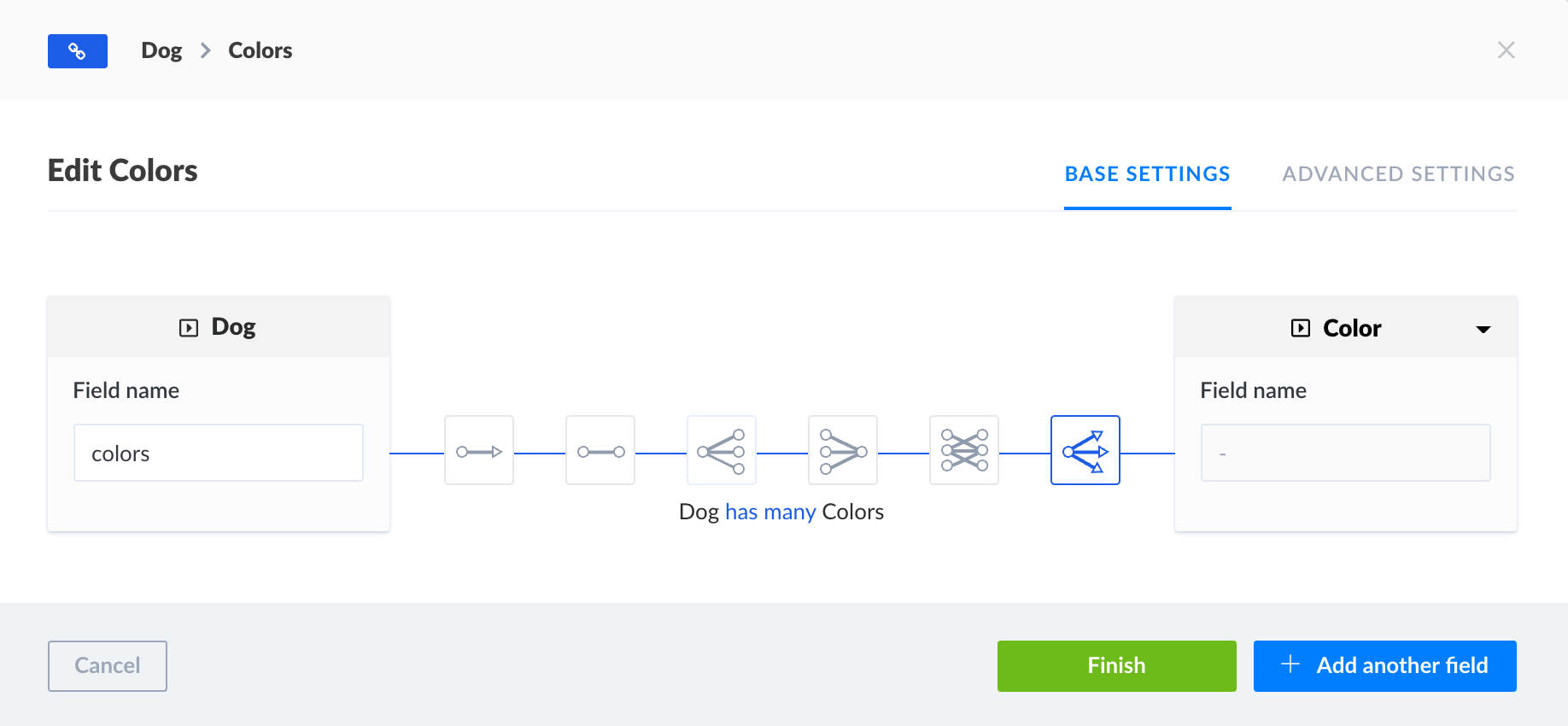
So we have these two tables: Dogs and Colors. Every dog can have multiple colors assigned using following relation:
Please look at following picture to see, what query params are comming from our Frontend to strapi endpoint (endpoint is overriden only for purposes of this test. We normally use pre-generated endpoint):

As you can see, I have 11 dogs in my development DB, but count endpoint has provided 15 as result.
Cause of the issue is the most probably a fact, that some of dogs have multiple colors assigned. When I use only 1 color per dog, thne the filtering problem dissapears.
Does anyone know, what could be the reason for this behaviour?
Thank you so much and have a nice day!
System
- Strapi version: 3.1.4
- Database: tried on SQLite and PostgreSQL
- Operating system: macOS Catalina

Hello,
I tested this on all supported databases and it appears to be working fine (not your custom controller but just the built in default count routes)


@emahuni can you provide any steps to reproduce the issue because I haven't been able to.
Can definitely reproduce on my machine in the app, but can't put my finger on how to do it elsewhere, yet. Here is the funny thing. The same code filtering the same model, but just different records, is producing the bug and another is not. ie:
query convs {
  conversationsConnection(
    where: {
      assignedTo: "115"
      disposition: { id: "136", departments_in: ["79", "83"] }
    }
  ) {
    aggregate {
      count
    }
  }
}
is counting 4 instead of 2 (note that it's always doubling when this happens), but the following:
query convs2 {
  conversationsConnection(
    where: {
      assignedTo: "115"
      disposition: { id: "108", departments_in: ["79", "83"] }
    }
  ) {
    aggregate {
      count
    }
  }
}
is counting 12 as expected. The difference between the 2 queries is just that disposition association.
So I want to go through each record to see any anomalies that I can associate with the bug, because it seems like there is something about the records that is causing the code to misinterpret things. Locating the issue in the data can help with identifying and fixing the problem in the code.
important models and associations:
Conversation.settings.json:
{
    "attributes": {
      "assignedTo": {
        "model": "employee",
        "via": "assignedConversations"
      },
      "disposition": {
        "model": "disposition"
      }
    }
}
Employee.settings.json:
  {
    "attributes": {
      "assignedConversations": {
        "via": "assignedTo",
        "collection": "conversation"
      }
    }
  }
Disposition.settings.json:
  {
    "attributes": {
      "departments": {
        "via": "dispositions",
        "collection": "department",
        "dominant": true
      }
    }
  },
Department.settings.json:
  {
    "attributes": {
      "dispositions": {
        "collection": "disposition",
        "via": "departments"
      }
    }
  }
I think I now have a lead. You see, the records retrieved by the first query with disposition 136 are doubling becoz its disposition is associated with both departments it asked for, but the second query for disposition 108 is associated with only 1 of the departments it asked for.
One of the records' values for the first query (producing bug), notice departments 79 and 83 are present in the following:
"values": [
        {
          "id": "392",
          "disposition": {
            "id": "136",
            "departments": [
              {
                "id": "44"
              },
              {
                "id": "79"
              },
              {
                "id": "80"
              },
              {
                "id": "81"
              },
              {
                "id": "83"
              }
            ]
          }
        },
]
but not in one of the records' values for the second query, notice only department 79 is present in the following (working query):
"values": [
        {
          "id": "4",
          "disposition": {
            "id": "108",
            "departments": [
              {
                "id": "44"
              },
              {
                "id": "79"
              }
            ]
          }
        },
]
It works as expected if I remove department 83 and change the query to:
query convs {
  conversationsConnection(
    where: {
      assignedTo: "115"
      disposition: { id: "136", departments_in: ["79"] }
    }
  ) {
    aggregate {
      count
    }
  }
}
This means the code is counting for each department found when there is an _in or maybe also _or filter. They both seem to work from the same principles and am sure is the same code doing this. This is where we start from. Somehow the code is not counting correctly when it's like that. It needs to break from the count if one of the _in / _or filter conditions are met.
So, to reproduce, create those models with those associations and records as depicted. You should be able to reproduce it.
Just to assert this, if I ask for an additional department "80" to make a total of 3 departments associated with disposition 136, it triples. ie:
query convs {
  conversationsConnection(
    where: {
      assignedTo: "115"
      disposition: { id: "136", departments_in: ["79", "83","80"] }
    }
  ) {
    aggregate {
      count
    }
  }
}
That produces 6 instead of 2. That's correct count of '2' for each department found. Happens for each department I add that is associated with disposition (see above values list).
I probably have the same bug:
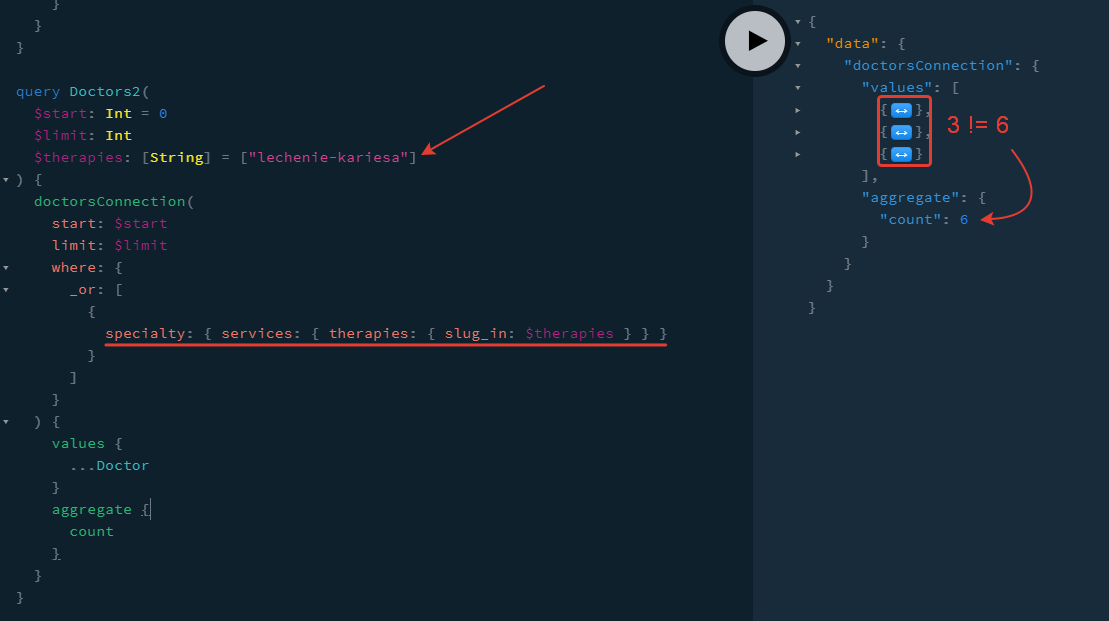
But the simplier one works OK:
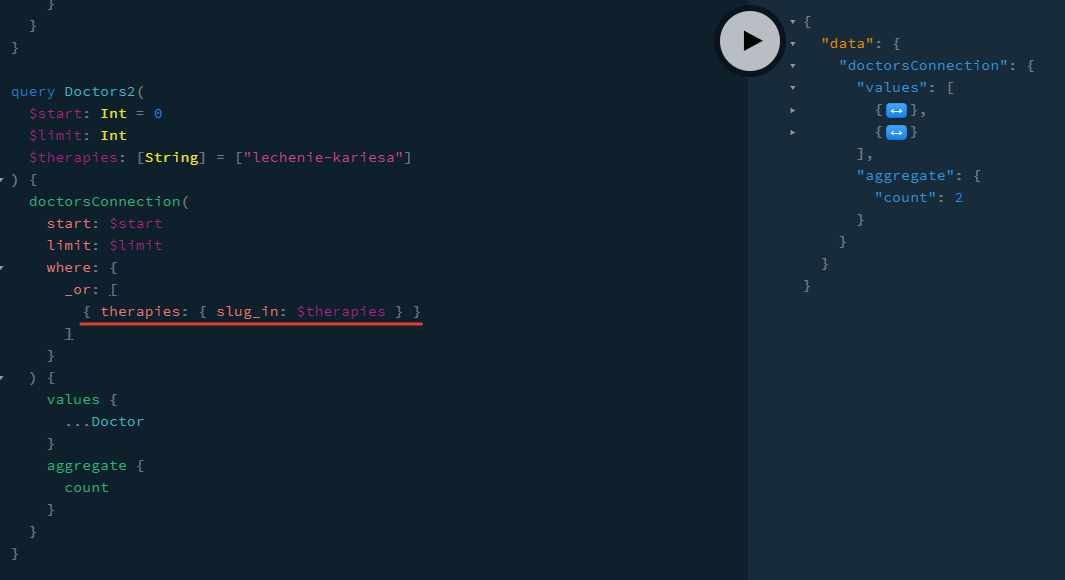
My scheme is:
Specialty has many Services Services has many Therapies Doctor has one Specialty and has many Therapies (for overriding specialty's therapies)

@emahuni @iksent This issue is only for REST not GraphQL, there is a related issue for GraphQL related count aggregations here: https://github.com/strapi/strapi/issues/7547
Any updates on this?
There is probably no solution now for fetching "relational" items with count (neither with aggregate.count, nor with this guide due to the bug).
So it's impossible to create paginated lists.

My temporary solution is to retrieve all elements from DB, count it and slice on Strapi:
/config/plugins.js
module.exports = {
  graphql: {
    amountLimit: 1000, // Fix maximum 100 elements issue
  },
};
Be aware: may be this won't work for REST, I was using it via graphql only
/api/MODEL/services/MODEL.js
"use strict";
const size = require("lodash/size");
const omit = require("lodash/omit");
const { convertToQuery } = require("strapi-plugin-graphql/services/utils");
const { convertToParams } = require("strapi-plugin-graphql/services/utils");

module.exports = {
  async filter(params) {
    const filters = {
      ...convertToParams(omit(params, "where", "limit", "start")),
      ...convertToQuery(params.where),
    };
    const data = await strapi.query("doctor").find(filters);
    return {
      count: size(data),
      doctors:
        size(data) > 0 ? data.slice(params.start, params.start + params.limit) : [],
    };
  },
};
/api/MODEL/config/schema.graphql.js
module.exports = {
  definition: `
    type FilterOut {
      count: Int
      doctors: [Doctor]
    }
  `,
  query: `
    doctorsFilter(sort: String, limit: Int, start: Int, where: JSON): FilterOut
  `,
  resolver: {
    Query: {
      doctorsFilter: {
        description: "Return the list of filtered doctors",
        resolverOf: "application::doctor.doctor.find",
        policies: [],
        resolver: async (obj, options, ctx) => {
          return await strapi.api.doctor.services.doctor.filter(options);
        },
      },
    },
  },
};
Same here. When we use filter, count response incorrect. If the item in several entities it counts it every time. Example: t-shirt(product) in categories shirts and men wear. /products/count?categories.slug=men-wear&categories.slug=shirts result: 2

Same problem. I have a relation field many:many and the count returns the number of related items, not the count of the parent items.

@derrickmehaffy Hello guys! Almost half a year this very important issue is open... Basically, every developer who builds for example an online store with simple filtering and of course pagination, is not able to do that without correct count of filtered items... am not sure why it is set to low priority as it is very important for hundreds of websites. Unfortunately all the temporary solutions are not good because those are absolutely not optimized and 10x times slower than correct count request to a database... (this issue is the same for grapghql and for REST requests). thank you very much for understanding and for your work guys!


My temporary solution is to retrieve all elements from DB, count it and slice on Strapi:
/config/plugins.jsmodule.exports = { graphql: { amountLimit: 1000, // Fix maximum 100 elements issue }, };Be aware: may be this won't work for REST, I was using it via graphql only
/api/MODEL/services/MODEL.js"use strict"; const size = require("lodash/size"); const omit = require("lodash/omit"); const { convertToQuery } = require("strapi-plugin-graphql/services/utils"); const { convertToParams } = require("strapi-plugin-graphql/services/utils"); module.exports = { async filter(params) { const filters = { ...convertToParams(omit(params, "where", "limit", "start")), ...convertToQuery(params.where), }; const data = await strapi.query("doctor").find(filters); return { count: size(data), doctors: size(data) > 0 ? data.slice(params.start, params.start + params.limit) : [], }; }, };
/api/MODEL/config/schema.graphql.jsmodule.exports = { definition: ` type FilterOut { count: Int doctors: [Doctor] } `, query: ` doctorsFilter(sort: String, limit: Int, start: Int, where: JSON): FilterOut `, resolver: { Query: { doctorsFilter: { description: "Return the list of filtered doctors", resolverOf: "application::doctor.doctor.find", policies: [], resolver: async (obj, options, ctx) => { return await strapi.api.doctor.services.doctor.filter(options); }, }, }, }, };
Can you give us an example about your query?

Can you give us an example about your query?
Here is my query with doctorsFilter name:
query Doctors(
  $start: Int = 0
  $limit: Int
  $clinic: ID
  $specialty: ID
  $search: String
  $therapies: [String]
) {
  doctorsFilter(
    sort: "last_name:asc"
    start: $start
    limit: $limit
    where: {
      _or: [
        {
          therapies_null: true
          specialty: { id: $specialty, services: { therapies: { slug_in: $therapies } } } <<< THIS IS A PROBLEM for pagination
          clinics: $clinic
          _or: [
            { last_name_contains: $search }
            { first_name_contains: $search }
            { patronymic_contains: $search }
          ]
        }
        {
          therapies_null: false
          therapies: { slug_in: $therapies }
          specialty: { id: $specialty }
          clinics: $clinic
          _or: [
            { last_name_contains: $search }
            { first_name_contains: $search }
            { patronymic_contains: $search }
          ]
        }
      ]
    }
  ) {
    count
    doctors {
      ...
    }
  }
}
Hi guys, this temporary solution is very slow, just because you will have to pull all your thousands of elements from db.
@derrickmehaffy is it possible to fix this count issue so we can use Strapi on real projects? Thank you
Hi guys, this temporary solution is very slow, just because you will have to pull all your thousands of elements from db.
@derrickmehaffy is it possible to fix this count issue so we can use Strapi on real projects? Thank you
There are some fundamental issues at the database layer, most likely (since this is a bigger issue than just counting) it won't be fixed until the database layer rework in Q3 for the v4 but I am just spitballing here
Hi,
I'm not sure this is related, but I'm getting errors without deep filtering. My collections have relationships, but I'm only filtering data between 2 dates:
https://my.server.com/visits/count?updated_at_gt=2021-10-12T22:00:00.000Z&updated_at_lt=2021-10-15T21:59:59.999Z
it throws a 500 error, logging a related error in postgres:
2021-10-15 07:09:12.077 UTC [231] ERROR:  could not find pathkey item to sort
2021-10-15 07:09:12.077 UTC [231] STATEMENT:  select distinct count(*) as "count" from "visits" where "visits"."created_at" > $1 and "visits"."created_at" < $2
The same happens if I use the count method using created_at_gt and created_at_lt.
Thing is, this used to work it just stopped one day and then it keeps crashing.

FYI the count route and GQL query will be removed in v4 as all requests will now return a count regardless
For me this issue is still present in v4. In my example I have an article content-type and a tag content-type which are connected by a many-to-many relationship.
If I query articles using a deep filter on tags I still get the incorrect count of articles.
query:
http://localhost:1337/api/articles?filters[tags][id][$in][0]=2&filters[tags][id][$in][1]=1&populate=tags
response:
{
   "data":[
      {
         "id":3,
         "attributes":{
            "title":"Third article",
            "content":null,
            "createdAt":"2021-12-09T16:31:08.819Z",
            "updatedAt":"2021-12-09T16:31:08.819Z",
            "tags":{
               "data":[
                  {
                     "id":1,
                     "attributes":{
                        "tag":"tag 1",
                        "createdAt":"2021-12-09T15:59:57.202Z",
                        "updatedAt":"2021-12-09T15:59:57.202Z"
                     }
                  },
                  {
                     "id":2,
                     "attributes":{
                        "tag":"tag 2",
                        "createdAt":"2021-12-09T16:00:04.267Z",
                        "updatedAt":"2021-12-09T16:00:04.267Z"
                     }
                  }
               ]
            }
         }
      },
      {
         "id":2,
         "attributes":{
            "title":"Second Article",
            "content":null,
            "createdAt":"2021-12-09T16:00:56.962Z",
            "updatedAt":"2021-12-09T16:23:38.742Z",
            "tags":{
               "data":[
                  {
                     "id":1,
                     "attributes":{
                        "tag":"tag 1",
                        "createdAt":"2021-12-09T15:59:57.202Z",
                        "updatedAt":"2021-12-09T15:59:57.202Z"
                     }
                  },
                  {
                     "id":2,
                     "attributes":{
                        "tag":"tag 2",
                        "createdAt":"2021-12-09T16:00:04.267Z",
                        "updatedAt":"2021-12-09T16:00:04.267Z"
                     }
                  },
                  {
                     "id":3,
                     "attributes":{
                        "tag":"tag 3",
                        "createdAt":"2021-12-09T16:00:11.444Z",
                        "updatedAt":"2021-12-09T16:00:11.444Z"
                     }
                  }
               ]
            }
         }
      }
   ],
   "meta":{
      "pagination":{
         "page":1,
         "pageSize":25,
         "pageCount":1,
         "total":4
      }
   }
}
The total count of 4 is obviously wrong since the response only contains 2 articles. The GraphQL API also gives the same incorrect count.

The SQL generated for counting looks wrong to me:
select count(*) ascountfrom .....
Looks like what is used to get the pagination values - this is fine as long as you are not doing a join which results in multiple rows per queried entity. When filtering on a 1-to-many relationship this is a problem.
I worked around this by having an a corrected count call (its a kind of ugly hack) which looks something like this select count(distinct t0.id) as countfrom ... - but fixing this in the core would very good

The SQL generated for counting looks wrong to me:
select count(*) ascountfrom .....Looks like what is used to get the pagination values - this is fine as long as you are not doing a join which results in multiple rows per queried entity. When filtering on a 1-to-many relationship this is a problem.
I worked around this by having an a corrected count call (its a kind of ugly hack) which looks something like this
select count(distinctt0.id) ascountfrom ...- but fixing this in the core would very good
Could you please show more detail how to quick fix it outside the core-fixed? (Which file to be modified?)

This issue is causing us problems now, my only workaround is manually set a total in the frontend state from an initial query as a basis for the page numbers

Is this in active development? How long would it take to fix this? And what's the best workaround for it so far? We need to override model right?
