

 storybookjs
Does Storybook 6 supports React Native?
I used previous version of Storybook with RN, now all reference from docs is removed?
Does that mean Storybook does not support RN anymore?
Thank you, Misha

Not yet. We've created a new repo for RN and are in the process of upgrading it to work with SB6: https://github.com/storybookjs/react-native
@dannyhw might be able to comment more on the current status!

Phew its good to know you didn't drop the support 😀
Would be awesome to know the status. We are starting new RN project and I guess we need to use old Storybook for now.
Thx man
@mi5ha you can still use the react native storybook in it's current state however it doesn't support the 6.0 dependencies so if you use the addons then for the react native project you would need to use a 5.3.x version of @storybook/addons. See github.com/storybookjs/react-native to see the new repo and some documentation (improvements ongoing).
I plan to start the work for react native 6.0 soon-ish but not sure how long that will take.

@dannyhw Thank you Danny, I managed to install and run old Storybook version 5 with:
npx -p @storybook/cli@^5 sb init --type react_native -y

npm remove @storybook/addons @storybook/addon-actions @storybook/addon-links

npm install --save-dev @storybook/addons@^5 @storybook/addon-actions@^5 @storybook/addon-links@^5
I used newest RN version with TypeScript support.
I tried running npx -p @storybook/cli sb init --type react_native -y but it breaks for now.
Thanx a lot, will be following the progress of version 6 for RN with great interest 😀
I just followed the storybook.js.org guide for React and it created a .storybook/ folder on my project's root folder; should I delete it?
From what I've tested, those files created inside that folder does nothing, and it's pretty confusing having two storybook folders in my project(one with a dot .storybook/ and one without storybook/)

@betoharres the react native storybook uses a folder without the "." just because of some historical reason and I'm not really sure what that reason is (the project was not created by me). You need a storybook/ folder for react native storybook only if you want to define web addons for the react-native-server otherwise it's not a requirement. For example where I work we use exclusively the ondeviceUI (no react-native-server) and we have no storybook/ folder.
Another note related to the comment by @mi5ha above you can use npx -p @storybook/cli@next sb init --type react_native -y now because I put out a fix for the cli which is currently in the alpha version. I think it will be coming out with the 6.1 release since the cli is part of the storybook repo.
@dannyhw what's the PR for the CLI? i could patch it back to 6.0 if the change is not too big.
Hi everyone! Seems like there hasn't been much going on in this issue lately. If there are still questions, comments, or bugs, please feel free to continue the discussion. Unfortunately, we don't have time to get to every issue. We are always open to contributions so please send us a pull request if you would like to help. Inactive issues will be closed after 30 days. Thanks!
![stale[bot] avatar](https://avatars.githubusercontent.com/in/1724?v=4 "Published by a pub.dev verified publisher")
I was doing good following the tutorial until it says to update screens/LinksScreen.js which doesn't exist in the tabs template. I went ahead and created the file, but then the next step is to edit navigation/BottomTabNavigator.js which no longer loads a home screen. Is there a better tutorial to get started with StoryBook in ReactNative or any suggestions on how I should update these files to make it functional? I really liked that it used tabs and typescript in the tutorial, that's usually what I'm working with. I'd really like to follow that setup.
https://storybook.js.org/tutorials/intro-to-storybook/react-native/en/get-started/

@TurtleWolfe the template from expo has changed since the tutorial was made. I made a new template in order to update the tutorial however I started work on 6.0 in the meantime.
What kind of stuff would you want in the tutorial? I could try put something quick together with the basics if that would help.
Really? That would be awesome, this is my repo for how far I got. I put my bash history in the README.MD and used the --npm flag. Where it says to update screens/LinksScreen.js I just added that file. But then where I'm supposed to edit BottomTabNavigator.js I wasn't sure what to do. I think if I just saw how to add the 3rd tab to the expo tabs I'd be in pretty good shape.
https://github.com/TurtleWolfe/TaskBook
@TurtleWolfe in my opinion the focus of the current tutorial is wrong. It instructs the user to use react-native-web which currently doesn't work well with react native storybook. Also all the screenshots are taken from the reactjs (web) version of storybook and not the react native one. Until the tutorial is reworked I wouldn't consider it worth your time. I do intend to work with the tutorial maintainers on updating it but currently the focus has been elsewhere (updating to v6).
You'd be better off following the getting started steps on the github repo https://github.com/storybookjs/react-native.
However if you think a tutorial would be more helpful maybe we can discuss further either on the storybook discord in the react-native channel or feel free to create an issue in the react-native repo.
ok, this is the ReadMe, Bash history, and a few screenshots when I started to go off the rails with confusion where I've tried to merge my understanding of the two tutorials. All I'm really trying to do is start with the Expo Two Tab template and then load the StoryBook UI into the second tab.
https://github.com/TurtleWolfe/rnStoryBook
expo init --template tabs rnStoryBook --npm
cd rnStoryBook
git remote add origin https://github.com/TurtleWolfe/rnStoryBook.git
git push --set-upstream origin main
# I'm assuming this is 5.3.25, not sure If I should pin the version soon.
npx -p @storybook/cli sb init --type react_native
Inline-style:

export {default} from './storybook';?

npm run storybook
missing script: storybook:

npm i -D @storybook/addon-ondevice-actions
npm test
# npm storybook
npm run storybook
# npm run test
# npm web
npm run web
expo start
# npm run web
# sudo apt install subversion
# svn export https://github.com/chromaui/learnstorybook-code/branches/master/src/assets/icon assets/icon
# svn export https://github.com/google/fonts/trunk/ofl/nunitosans assets/font
# npm run web
@TurtleWolfe just to let you know it might not work very well inside a tab, react native storybook's ui is generally designed to work full screen and has its own tab navigation. So when its inside a tab it looks weird, you'll see in the screenshot later in this comment.
Other things you should consider: are you interested using react native web or just android/ios? and are you interested in using the server (its optional). If you aren't sure then I suggest not using it until you have a need for it.
Start by creating the project and adding the storybook files
expo init --template tabs rnStoryBook --npm
cd rnStoryBook
npx -p @storybook/cli sb init --type react_native
you'll be prompted about installing the server I choose "no" since I don't use it.
at this point I would open the app just to make sure its working fine (storybook wont show yet). In this case I choose to start it in the android emulator but you can use ios too.
yarn android
or if you are using npm then
npm run android
If you want to use typescript you should probably rename /storybook/index.js to index.ts or you might get some typescript errors.
Now replace the content in screens/TabTwoScreen.tsx with the following:
import * as React from "react";
import StorybookUI from "../storybook";

export default function TabTwoScreen() {
  return <StorybookUI />;
}
at this point it will look like this

what you'll immediately notice is that it doesn't work well inside the tabbed navigation because storybook itself uses a tab navigation so you get double tabs There are a few ways you can work around this though
However the next steps are up to you really so try these steps so far and then let me know what you want to do from there
Just to give you an idea:
- One thing you can do is turn off the storybook UI and use the "react-native-server" to remotely control the story that is visible
- Or you can use storybook inside a stack navigator separate from the tab navigator of the app so that it would appear full screen
- I personally use storybook as a stand alone app and package within a mono repo, that package contains all my visual components and then I import my components from that package.
Any update on this @dannyhw ? the lack of Hooks support makes it very hard to sensibly use 5.0

@elisechant sorry I don't understand what you mean. Are you unable to use hooks? I don't think there should be anything stopping you.
@dannyhw yes unable to use hooks with 5.3 without interventions as described here https://github.com/storybookjs/storybook/issues/5721.
I use the native install option not react-native-web, and currently have to use this decorator in my index.js:
addDecorator((Story) => <Story />);

// import stories
configure(() => {
  require('./stories');
}, module);
Which has down stream implications with re-rendering, since the storiesOf func returns anonymous function and can't remount correctly.
@elisechant OK, I wasn't aware of that. However I'm not sure what the fix was for this. The CSF syntax actually uses the storiesof function under the hood so it wouldn't change a lot. The thing about storiesOf returning an anonymous function I'm not sure is the issue here because wouldn't the function in .add("", ()=>{}) be the more important one?
Either way version 6 for react native is ongoing but it's a lot of work, happy to accept contributions though ;). See #135 for updates on version 6.
* Or you can use storybook inside a stack navigator separate from the tab navigator of the app so that it would appear full screen
@dannyhw I think you were ahead of me on this one. I'm not sure if I should be trying to add a drawer navigator, what you mention about putting it in the stack navigator sounds promising.. do you mind elaborating on that?
* Or you can use storybook inside a stack navigator separate from the tab navigator of the app so that it would appear full screen@dannyhw I think you were ahead of me on this one. I'm not sure if I should be trying to add a drawer navigator, what you mention about putting it in the stack navigator sounds promising.. do you mind elaborating on that?
@TurtleWolfe in react navigation you can nest navigators. For example you could have the following setup
- stack navigator
    - storybook
    -  tab navigator
        - app screen
        - app screen
This way you can navigate to storybook from one of your app screens and there would be no tabs at the bottom of the screen when in the storybook screen.
You would probably want to disable the stack navigator header that comes by default.
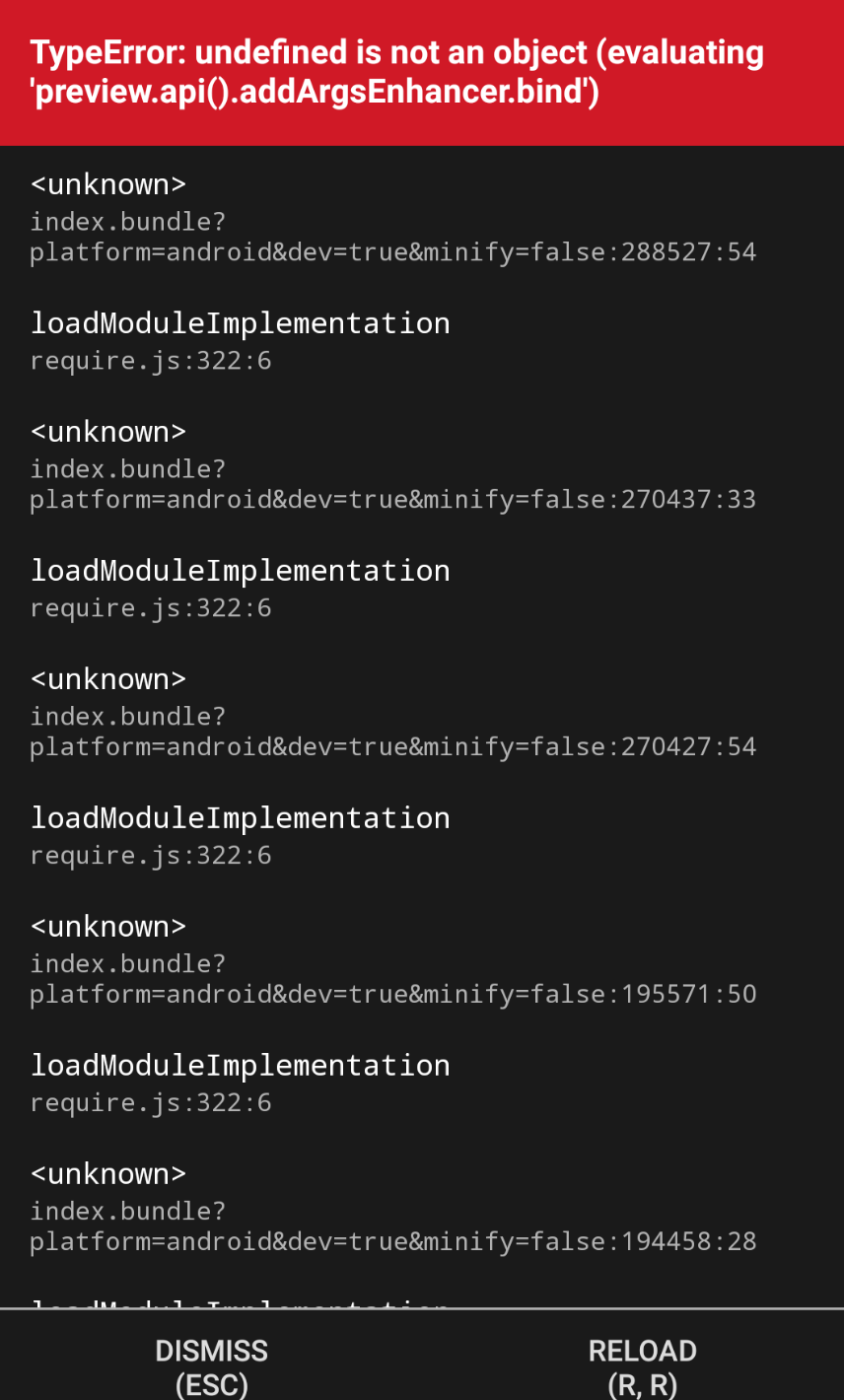
How to fix?
"@storybook/react-native": "^6.0.1-alpha.1", "@storybook/react-native-server": "^6.0.0-alpha.0",

@tsepen
How to fix?
"@storybook/react-native": "^6.0.1-alpha.1", "@storybook/react-native-server": "^6.0.0-alpha.0",
There is no @storybook/react-native-server implemented for 6.0 yet, this version you installed is a very old version before I even started work on v6.
Currently you can't use the server with this version of the alpha (6.0.1-alpha.1). I'm still deciding what to do with the server for v6.
Did you follow the guide for using 6.0? https://github.com/storybookjs/react-native/blob/next-6.0/v6README.md
I haven't worked on a migration guide yet though since this is a very early alpha build so a lot will probably change.
Hi guys, any update on this? Can we use React-Native-Web and the Storybook v6+?
I've found something in the Storybook v6.4 but I'm not sure if it's really work

@velidan with the react native v6 beta you can use react native storybook and react-native-web storybook together. You can try it out with the expo template I made expo init --template expo-template-storybook AwesomeStorybook
source for the template is here: https://github.com/dannyhw/expo-template-storybook
Note: react native storybook won't yet work with 6.4, for now stick to 6.3 until a fix is ready for 6.4
Hey @dannyhw, is there any update to 'react-native-server' for storybook/react-native v6 beta?

@Dhillon-Prabh unfortunately there is no update on that, I see it as something that can be re-introduced at a later time (after initial v6). The reason for that is that I don't really have the knowledge or time. The server is really legacy at this point and it's hard to know how to update it. The v6 release takes priority then it will be possible to investigate the server again.
Alternatively I would be open for someone from the community to take over maintenance of the server package.
I have published the latest v6.0.1-beta.6 package for storybook react native server at the following location.
https://gitlab.com/risserlabs/community/storybook-react-native/-/packages/7773741
You should be able to run the following commands to install it if you are using yarn.
echo \"@risserlabs:registry\" \"https://gitlab.com/api/v4/projects/37506841/packages/npm/\" >> .yarnrc
yarn add @risserlabs/storybook-react-native-server
or if you are using npm
echo @risserlabs:registry=https://gitlab.com/api/v4/projects/37506841/packages/npm/ >> .npmrc
npm i @risserlabs/storybook-react-native-server
I have published packages for the other modules in this project as well.
https://gitlab.com/risserlabs/community/storybook-react-native/-/packages/
Please note that once storybook react native is out of beta and publishes their packages to npm, I will not be maintaining this.

@clayrisser hey this is interesting, could you create a PR here on github instead?
@clayrisser im having trouble finding the changes which enable the server. Currently it wouldn't work because the websockets aren't opened on startup for the device and the server isnt updated for compatibility with v6+. Just publishing it wouldn't have any effect.
Can you explain more about what you've published?