
elements

elements copied to clipboard
 stoplightio
When using Try It or Send API Request, there is no formatting and indentation for response payload when it is big
Context
Also the Elements UI gets super slow when payload is big.
Current Behavior
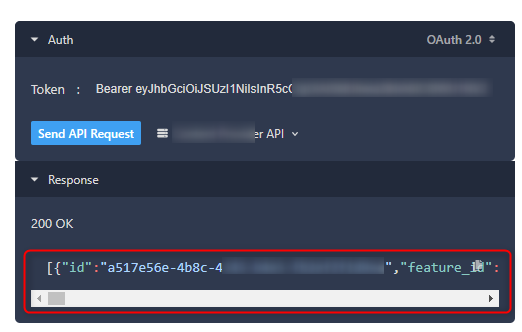
Expected Behavior
The response payload would be formatted and indented to make it more readable. And also that the performance would be better for big payloads.
Possible Workaround/Solution
Steps to Reproduce
- set the Bearer token or not if your API does not expect one
- click Send API Request
- check the big response payload which needs multiple lines to be shown, but is shown in a single line with a lot of horizontal scrolling
Environment
Using localhost in VS Code with "Live Server" extension: http://127.0.0.1:5500/reference/#/operations/list-features
<!doctype html>
<html lang="en">
  <head>
    <meta charset="utf-8">
    <meta name="viewport" content="width=device-width, initial-scale=1, shrink-to-fit=no">
    <title>Elements in HTML</title>

    <script src="https://unpkg.com/@stoplight/elements/web-components.min.js"></script>
    <link rel="stylesheet" href="https://unpkg.com/@stoplight/elements/styles.min.css">
  </head>
  <body>

    <elements-api
      apiDescriptionUrl="http://127.0.0.1:5500/my-api-full.v1.yaml"
      router="hash"
    />

  </body>
</html>
- Version used: https://unpkg.com/@stoplight/[email protected]/styles.min.css
- Environment name and version (e.g. Chrome 39, node.js 5.4): Chrome Version 101.0.4951.64 (Official Build) (64-bit)
- Operating System and version (desktop or mobile): Desktop Windows 10
- Link to your environment/workspace/project:
