

 stevearc
[Feature] Automatically toggle of Aerial windows when switching buffers
Let's imagine a layout with 4 buffers as follows:
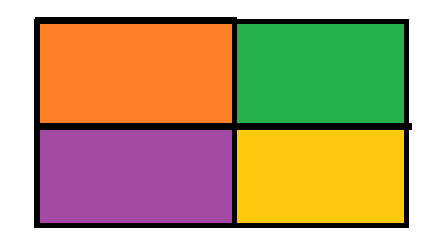
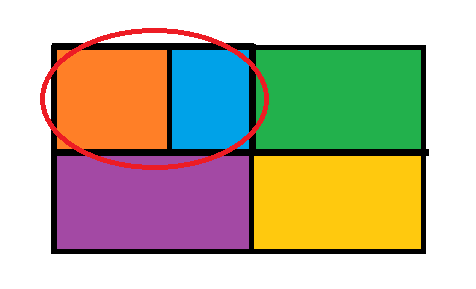
What I'm trying to achieve, is to automatically open an Aerial window when switching to one of those 4 buffers, in a way such that the aerial window is displayed just at the right (or left) of the selected buffer, without modifying the overall buffer layout.
So, when switching to the orange buffer, Aerial (blue) should be opened and displayed this way:
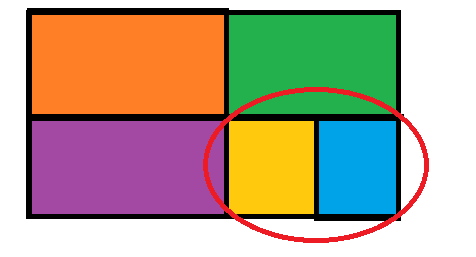
When selecting another buffer (yellow), the previous Aerial window should be closed and opened next to the newly selected buffer:
How could this behaviour be achieved?

There are already some pieces of this in place
require('aerial').setup({
  -- Open relative to window, not pinned to the far left/right
  placement_editor_edge = false,
  -- Automatically open aerial when you enter a buffer
  open_automatic = true,
})
The part that's missing is closing aerial when you leave the window. I'll look into this

The part that's missing is closing aerial when you leave the window. I'll look into this
Thank you 👍
And how should close_behavior be configured instead, to obtain the behaviour I described above?
There isn't a value that does what you want yet. I'm looking into adding support when I have time; I just have extremely limited free time for the next few weeks :(
Quick update: I'm going to be off the grid for about a week. This is been in the pending status for longer than I'd like, but it's still on my todo list and I'll come back to it as soon as I'm able.
Okay, this request led me down a rabbit hole of refactoring config options to make more sense and be more extensible. I've put up a PR that should provide you with the options that you want. Could you check it out and see if it's working as expected? The config options you'll want to set are:
require('aerial').setup({
    close_automatic_events = {
      "unfocus",
    },
    open_automatic = true,
})
Hello, how could I test your PR 'installing' it with packer? Currently, the latest commit from the main branch gets downloaded with the basic packer config:
    {
      'stevearc/aerial.nvim',
      config = function()
        require("mine.my-aerial-nvim").config()
      end,
      disable = not lvim.builtin.aerial.active,
    },
You can do this with the branch option:
    {
      'stevearc/aerial.nvim',
      branch = "stevearc-focus",
      config = function()
        require("mine.my-aerial-nvim").config()
      end,
      disable = not lvim.builtin.aerial.active,
    },
It seems to work ok 👍.
And what should the configuration be if I wanted to do the same as above, but without automatically closing the current buffer symbol panel when unfocusing it?
So that for example, given 4 identical buffers split into 4 window zones, every time I enter one of those zones then the corresponding symbol panel appears next to the buffer, leaving the other symbol panels open.
By doing that it works, but if two or more buffers are the same, then the panel is shown only next to the first buffer which gets the focus first.
It is good behaviour which could be useful in some cases, but would there be a way to enable an option to show a panel for each buffer when focused, even if a symbol panel already exists for it?
Needed to do some additional cleanup post-merging that PR. Should be working for you as expected now